PowerStore: System Health Check detects that the SDNAS snapshot limit has been exceeded
Summary: The PowerStore Pre-Upgrade Health Check detects that the SDNAS snapshot limit has been exceeded.
This article applies to
This article does not apply to
This article is not tied to any specific product.
Not all product versions are identified in this article.
Instructions
The PowerStore health check (PUHC) may fail the Checking SDNAS Snapshot Limit (off release check) validation, with the following error: "SDNAS snapshot limit reached. " with the event error code of (0XE10050060500). The health check is an off-release PUHC check that is contained in the Health Check thin package; see Additional Info section for information on the Health Check thin package.
This may be detected when running the PUHC.
Example screenshot for PUHC:
This may be detected when running the PUHC.
Example screenshot for PUHC:
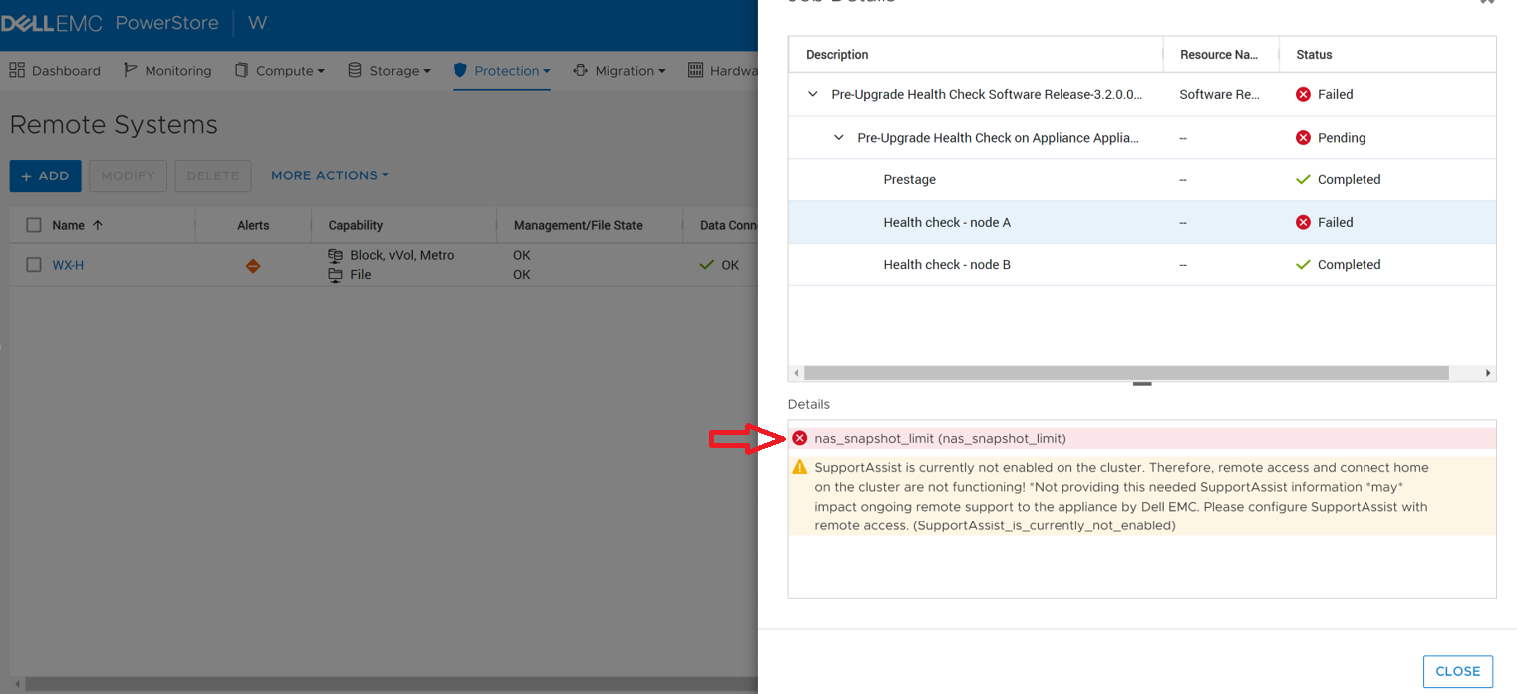
The failure message indicates that SDNAS snapshots exceed the system limit. This is the result of internal snapshots being created but not being removed.
If this issue is detected, NDU will fail. Do not perform NDU until the issue is resolved.
Contact Technical Support for assistance in resolving this issue. Reference KB # 000206131 for expedited attention and resolution.
Additional Information
For more information on System Health Checks see KB 000198084 PowerStore: How to use the System Check feature or KB 000192601 PowerStore: How to Check the Health of the Cluster Before Software Upgrade Using Pre-Upgrade Health Check and System Check.
Affected Products
PowerStoreArticle Properties
Article Number: 000206131
Article Type: How To
Last Modified: 13 Jun 2025
Version: 3
Find answers to your questions from other Dell users
Support Services
Check if your device is covered by Support Services.