Data Domain:在「NVRAM 驅動程式載入與初始化」時重新開機迴圈
Summary: PowerProtect Data Domain 系統回報其陷入重新開機迴圈。NVRAM 驅動程式無法成功載入或初始化,導致系統重新開機。
This article applies to
This article does not apply to
This article is not tied to any specific product.
Not all product versions are identified in this article.
Instructions
受影響的系統:
- PowerProtect DD6400 |DD6900 |DD9400 |DD9900
- 所有 DDOS 版本
症狀:
- 無法開機進入 DDOS
- 序列輸出 (虛擬主控台 - iDRAC) 顯示「NVRAM 驅動程式載入與初始化」後,開機程序重新開機
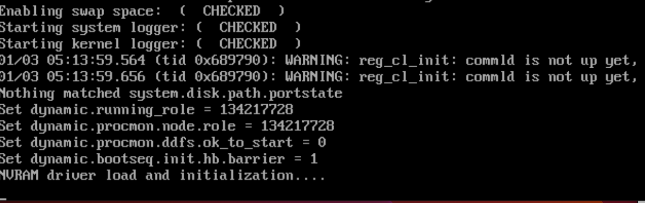
原因:
- 未正確安裝或未正確安裝 NVRAM 卡上的 DIMM。
- 或
- NVRAM 卡未正確安裝或故障。
必要動作:
關閉系統電源時:
- 檢查並重新安裝 NVRAM 卡上的 DIMM。
- 此圖顯示 NVRAM DIMM 未正確插入
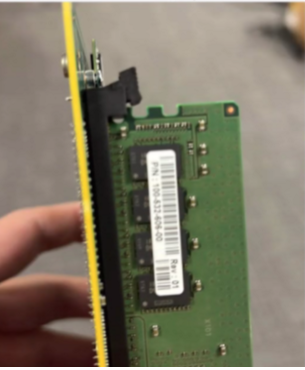
- 請確定 NVRAM 卡或 PCI 擴充板已穩固安裝。
- 開啟電源並重新嘗試啟動系統。
- 如果症狀持續存在,請更換 NVRAM (零件編號:DGK85)。
Affected Products
Data Domain, DD6400 ApplianceProducts
Data Domain, Data Domain Deduplication Storage Systems, DD6900 Appliance, DD9400 Appliance, DD9900 ApplianceArticle Properties
Article Number: 000208323
Article Type: How To
Last Modified: 16 May 2026
Version: 6
Find answers to your questions from other Dell users
Support Services
Check if your device is covered by Support Services.