Data Domain:“NVRAM 驱动程序加载和初始化”时的重新启动循环
Summary: PowerProtect Data Domain 系统报告卡在重新启动循环中。NVRAM 驱动程序加载或初始化失败,导致系统重新启动。
This article applies to
This article does not apply to
This article is not tied to any specific product.
Not all product versions are identified in this article.
Instructions
受影响的系统:
- PowerProtect DD6400 |DD6900 |DD9400 |DD9900型
- 所有 DDOS 版本
症状:
- 无法启动至 DDOS
- 串行输出(虚拟控制台 - iDRAC)显示在“NVRAM 驱动程序加载和初始化”后启动过程重新启动
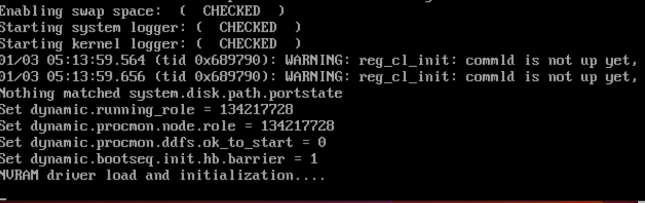
原因:
- NVRAM 卡上的 DIMM 未正确就位或安装。
- 或者
- NVRAM 卡未正确安装或出现故障。
所需作:
在系统关机的情况下:
- 检查并重新拔插 NVRAM 卡上的 DIMM。
- 此图显示 NVRAM DIMM 未正确夹入
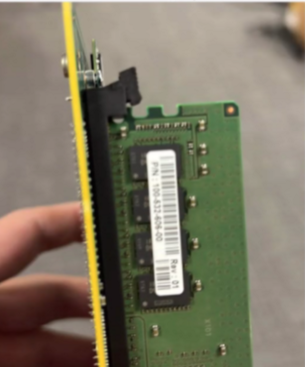
- 确保 NVRAM 卡或 PCI 转接卡牢固就位。
- 开机并重试引导系统。
- 如果症状仍然存在,请更换 NVRAM(部件号:DGK85)。
Affected Products
Data Domain, DD6400 ApplianceProducts
Data Domain, Data Domain Deduplication Storage Systems, DD6900 Appliance, DD9400 Appliance, DD9900 ApplianceArticle Properties
Article Number: 000208323
Article Type: How To
Last Modified: 16 May 2026
Version: 6
Find answers to your questions from other Dell users
Support Services
Check if your device is covered by Support Services.