PowerStore: Health Checks detect if a volume group with no members exists
Summary: These checks are designed to find any Volume Groups without members or if Volumes with internal attributes of concern are present. The PUHC check (empty_vg_no_members) shall stop the upgrade to PowerStoreOS 4.0.x if it finds this issue. The SHC check (invalid_vg_uuid_check) will fail and RxDefinitions alert (Volume groups with invalid internal IDs have been found) is raised, if this issue is found on a cluster running PowerStoreOS 4.0.x and 4.1.x. ...
Symptoms
PowerStore Pre-Upgrade Health Check (PUHC) and System Health Check (SHC) may detect this issue when run on the following PowerStoreOS releases:
- PowerStoreOS 3.x
- PowerStoreOS 4.x
| NOTICE |
|
The issue detected by these checks is resolved in PowerStoreOS version 4.0.1.2 (or later).
|
Scenario 1:
When running Pre-Upgrade Health Check (PUHC) the following message may be observed prior to an upgrade:
- Pre-Upgrade Health Check (PUHC) may return the following message:
Exists volume groups with no members. Please delete those volume groups and then add them back after NDU. KB # 000238653 (empty_vg_no_members).

- This PUHC check fails if a Volume Group exists and has zero (0) Member volumes
- Review the Resolution section of this knowledge base article for corrective actions.
- A Non-Disruptive Software Upgrade (NDU) will not be allowed to proceed
Scenario 2:
When running PowerStore System Health Check (SHC), the following message may be observed:
- System Health Check (SHC) may return the following message:
Found problematic attributes in volume groups. (KB#000238653).

- If the System Health Check (SHC) test is run from the Command-Line Interface (CLI), the following may be displayed:
[SVC:service@123456-A ~]$ svc_health_check run -rhc invalid_vg_uuid_check
Name                               Location  Status     Description
Invalid Volume Group UUID Check    node_a    Failed     Found problematic attributes in volume groups. (KB#000238653)


SUMMARY Status: Failed
   Passed:      0
   Failed:      1
   Total:       1
Note: Results may differ from the above depending on which nodes the test failed. - This SHC check fails if a Volume Group exists with an invalid UUID.
- Review the Resolution section of this knowledge base article for corrective actions.
Scenario 3:
Alert raised by RxDefinitions:
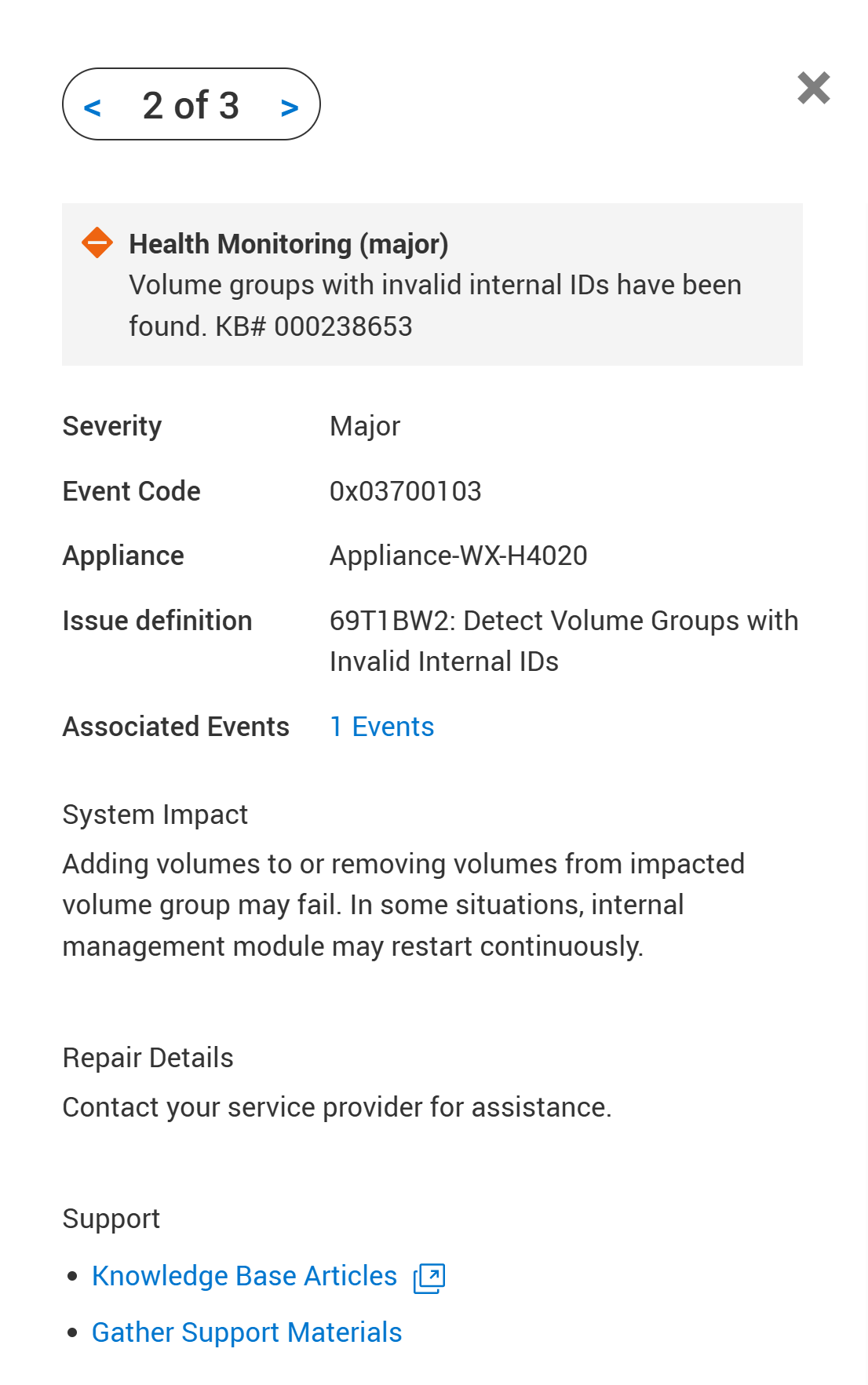
These health checks are off-release PUHC and SHC checks that are contained in the Health Check thin package. Similarly, this RxDefinitions check is contained in the RxDefinitions package. Both these packages can be downloaded from the Dell Drivers & Downloads site.
See the Additional Info section for information about the Health Check thin package and the RxDefinitions package.
Cause
Volume Groups are a new feature in System Manager (SYM). If there is a volume group without any members in Control Path (CP), it keeps an all-zero identifier. This invalid identifier can cause problems when adding or removing volume members later.
Resolution
Scenario 1:
If the Pre-Upgrade Health Check (PUHC) raises a message of Exists volume groups with no members on a PowerStoreOS 3.x or 4.x cluster:
- This message indicates that there are Volume Groups with zero (0) Member volumes present on the PowerStore cluster.
- Within PowerStore Manager, go to Storage > Volume Groups and locate any Volume Groups having zero (0) Member volumes.

- Select any Volume Groups with zero (0) Member volumes, click the More Actions dropdown menu and select Delete.

- Once all Volume Groups with zero (0) Member volumes have been deleted, proceed with Non-Disruptive Software Upgrade (NDU).
Scenario 2 and Scenario 3:
If System Health Check (SHC) raises a message of Found problematic attributes in volume groups. (KB#000238653), or if this RxDefinitions alert is raised, on a PowerStoreOS 4.0.x cluster:
- This message indicates a Volume Groups with zero (0) Member volumes was present on a PowerStoreOS 3.x cluster and later upgraded to PowerStoreOS 4.0.x.
- Following the software upgrade to PowerStoreOS 4.0.x, volumes were added to this Volume Group that previously had zero (0) Member volumes.
- This series of administrative actions may have introduced an invalid UUID to the PowerStore cluster of 00000000000000000000000000000000.
- To resolve this issue, contact technical support for assistance. Reference KB # 000238653 for expedited attention and resolution.
Additional Information
The health checks of this Article are implemented by thin packages that must be manually installed.
- For more information about System Health Checks, see Article 000198084 PowerStore: How to use the System Check feature or Article 000192601 PowerStore: How to Check the Health of the Cluster Before Software Upgrade Using Pre-Upgrade Health Check and System Check.
- For more information about RxDefinitions, see 000193518 PowerStore: Landing for Page RxDefinitions Issues for a complete list of RxDefinitions.