VxRail: Come reimpostare la password root di iDRAC
Summary: VxRail: Come reimpostare la password root di iDRAC.
This article applies to
This article does not apply to
This article is not tied to any specific product.
Not all product versions are identified in this article.
Instructions
Reimpostare PW root di iDRAC:
1. Connettersi con SSH al nodo
2. Controllare l'ID dell'utente root.
3. Reimpostare la nuova password con la root di iDRAC.
Ad esempio, impostare TestCalvin come nuovo PW
1. Connettersi con SSH al nodo
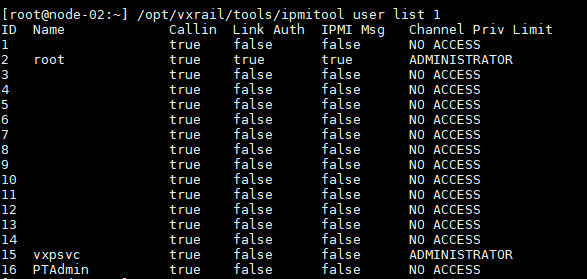
2. Controllare l'ID dell'utente root.
/opt/vxrail/tools/ipmitool user list 1
ID  Name             Callin  Link Auth  IPMI Msg   Channel Priv Limit
1                    true    false      false      NO ACCESS
2   root             true    true       true       ADMINISTRATOR
3                    true    false      false      NO ACCESS
4                    true    false      false      NO ACCESS
5                    true    false      false      NO ACCESS
6                    true    false      false      NO ACCESS
7                    true    false      false      NO ACCESS
8                    true    false      false      NO ACCESS
9                    true    false      false      NO ACCESS
10                   true    false      false      NO ACCESS
11                   true    false      false      NO ACCESS
12                   true    false      false      NO ACCESS
13                   true    false      false      NO ACCESS
14                   true    false      false      NO ACCESS
15  vxpsvc           true    false      false      ADMINISTRATOR
16  PTAdmin          true    false      false      NO ACCESS
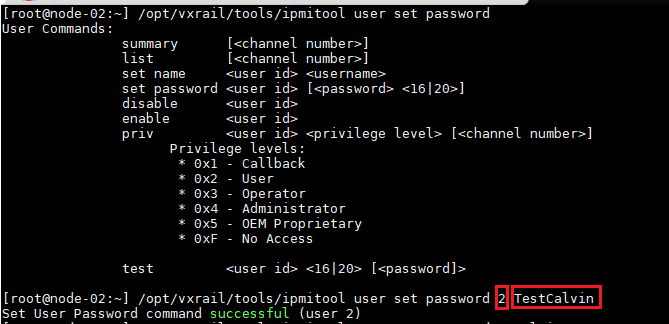
3. Reimpostare la nuova password con la root di iDRAC.
/opt/vxrail/tools/ipmitool user set password <Root user ID> <NEW PASSWORD>
Ad esempio, impostare TestCalvin come nuovo PW
[root@node-02:~] /opt/vxrail/tools/ipmitool user set password 2 TestCalvin
Set User Password command successful (user 2)
Affected Products
iDRAC9Products
VxRail SoftwareArticle Properties
Article Number: 000013629
Article Type: How To
Last Modified: 06 Dec 2024
Version: 7
Find answers to your questions from other Dell users
Support Services
Check if your device is covered by Support Services.