ECS: So finden Sie die richtige Position oder den richtigen Steckplatz der EX300-Festplatte, wenn die Ersatz-LED nicht leuchtet
Summary: Dieser Wissensdatenbank-Artikel zeigt die Steckplatznummerierung von EX300.
This article applies to
This article does not apply to
This article is not tied to any specific product.
Not all product versions are identified in this article.
Instructions
Jeder Austausch-Dispatch eines ausgefallenen Laufwerks enthält Details, z. B. Seriennummer und Steckplatzposition des jeweiligen ausgefallenen Laufwerks.
In der Regel weisen die ausgefallenen Laufwerke eine leuchtende LED als Hinweis auf, aber manchmal fällt diese Anzeige aus.
Verwenden Sie das folgende Bild als Referenz für den richtigen Steckplatz:
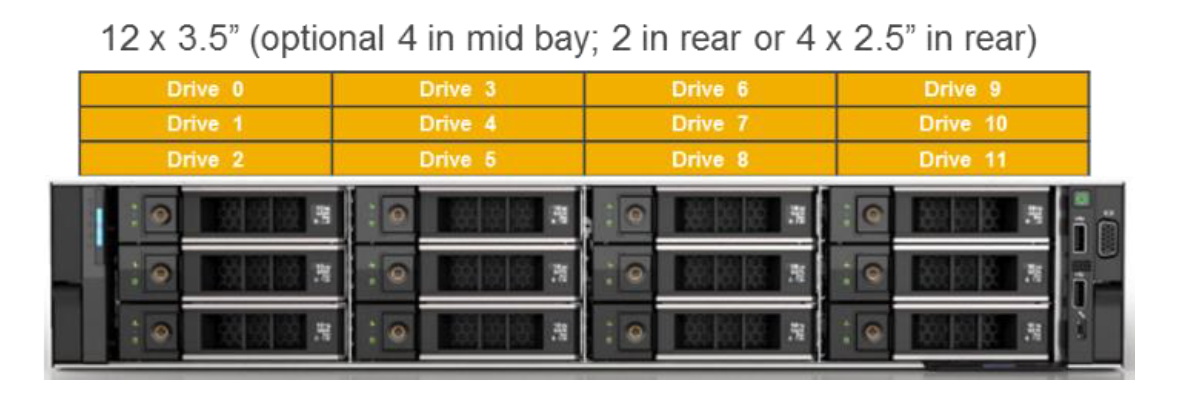
In der Regel weisen die ausgefallenen Laufwerke eine leuchtende LED als Hinweis auf, aber manchmal fällt diese Anzeige aus.
Verwenden Sie das folgende Bild als Referenz für den richtigen Steckplatz:
Affected Products
ECS Appliance Hardware Gen3 EX300Products
ECS, ECS Appliance, ECS Appliance Gen 3, Elastic Cloud StorageArticle Properties
Article Number: 000196815
Article Type: How To
Last Modified: 14 Dec 2022
Version: 5
Find answers to your questions from other Dell users
Support Services
Check if your device is covered by Support Services.