如何在 macOS 上允许 Dell Data Security 内核扩展
Summary: 了解如何允许 Dell Endpoint Security Suite Enterprise for Mac、Dell Threat Defense、Dell Encryption Enterprise for Mac、CrowdStrike Falcon Sensor 或 VMware Carbon Black Cloud Endpoint 的内核扩展。
Instructions
- 从 2021 年 2 月起,Dell Encryption Enterprise for Mac 停止维护。戴尔不再更新本产品及其文章。
- 从 2022 年 5 月起,Dell Endpoint Security Suite Enterprise 停止维护。戴尔不再更新本产品及其文章。
- 从 2022 年 5 月起,Dell Threat Defense 停止维护。戴尔不再更新本产品及其文章。
- 有关详细信息,请参阅 Dell Data Security 产品生命周期(结束支持和停售)政策。如果您对其他文章有任何疑问,请联系您的销售团队或联系 endpointsecurity@dell.com。
- 请参阅端点安全性,了解有关当前产品的其他信息。
在 macOS High Sierra (10.13) 中强化了系统完整性保护 (SIP),要求用户批准新的第三方内核扩展 (KEXT)。本文介绍如何针对 macOS High Sierra 及更高版本允许 Dell Data Security 内核扩展。
受影响的产品:
- Dell Endpoint Security Suite Enterprise for Mac
- Dell Threat Defense
- Dell Encryption Enterprise for Mac
- CrowdStrike Falcon Sensor
- VMware Carbon Black Cloud Endpoint
受影响的操作系统:
- macOS High Sierra (10.13) 及更高版本
对于以下情况,用户将遇到此安全功能提示:
- 执行以下项的新安装:
- Dell Threat Defense
- Dell Endpoint Security Suite Enterprise
- Dell Encryption Enterprise for Mac
- CrowdStrike Falcon Sensor
- VMware Carbon Black Cloud Endpoint
- SIP 已启用。
对于以下情况,用户将不会遇到此安全功能提示:
- 执行以下项的升级:
- Dell Threat Defense
- Dell Endpoint Security Suite Enterprise
- Dell Encryption Enterprise for Mac
- CrowdStrike Falcon Sensor
- VMware Carbon Black Cloud Endpoint
- SIP 处于禁用状态。
用户 体验 和 企业部署之间的允许内核扩展有所不同。选择相应的选项以了解更多信息。
用户体验
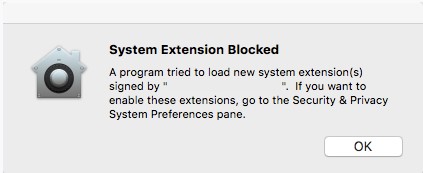
如果在 macOS High Sierra 或更高版本上启用 SIP,则在安装 Dell Endpoint Security Suite Enterprise、Dell Threat Defense、Dell Encryption Enterprise for Mac、CrowdStrike Falcon Sensor 或 VMware Carbon Black Cloud Endpoint 后,操作系统将遇到扩展拦截警报。这可能读作“System Extension Blocked - A program trying to load new system extension(s) signed by '[NAME]”。如果您想要启用这些扩展,请转至安全和隐私系统首选项窗格。
- Dell Inc,以前称为 Credant Technologies
- Credant Technologies
- Benjamin Fleischer(在启用了 Encryption External Media 策略的情况下)
批准扩展的方式会因安装的 macOS 版本而异。有关更多信息,请单击 v11。X(Big Sur)或 v10.13.X 至 10.15.X(High Sierra、Mojave 和 Catalina)。
v11.X (Big Sur)
随着 macOS Big Sur 中系统扩展的出现,新安装的应用程序在某些情况下可能无法正确加载内核扩展。升级到 macOS Big Sur 之前安装的应用程序应预导入内核扩展。
如果应用程序无法正确启动,则可能需要在操作系统之外手动输入应用程序的 TeamID。
- 在恢复模式下启动受影响的 Mac。
有关详细信息,请参阅“关于基于英特尔的 Mac 计算机上的 macOS 恢复”:https://support.apple.com/en-us/HT201314
。
- 单击 Utilities 菜单,然后选择 Terminal 。
- 在终端中,键入
/usr/sbin/spctl kext-consent add [TEAMID]然后按 Enter。注:[TEAMID][TEAMID] = 所安装产品的 Apple TeamID。- Apple TeamIDs:
- Dell Endpoint Security Suite Enterprise
6ENJ69K633 - Dell Threat Defense
6ENJ69K633 - Dell Encryption Enterprise
VR2659AZ37- Dell Encryption External Media:
3T5GSNBU6Wv10.1.0 及更低版本: - Dell Encryption External Media:
VR2659AZ37v10.5.0 及更高版本:
- Dell Encryption External Media:
- CrowdStrike Falcon Sensor
X9E956P446 - VMware Carbon Black Cloud Endpoint
7AGZNQ2S2T
- Dell Endpoint Security Suite Enterprise
- 例如,如果必须手动添加 VMware Carbon Black Cloud Endpoint,请键入 ,然后按 Enter 键。
/usr/sbin/spctl kext-consent add 7AGZNQ2S2T然后按 Enter。
- 关闭 Terminal 应用程序并重新启动进入 macOS。
v10.13.X 至 10.15.X(High Sierra、Mojave 和 Cataina)
- 登录到受影响的 Mac。
- 在 Apple Dock 中,单击 System Preferences。

- 双击 Security & Privacy。

- 在“General”选项卡下,单击 Allow 以加载 KEXT。
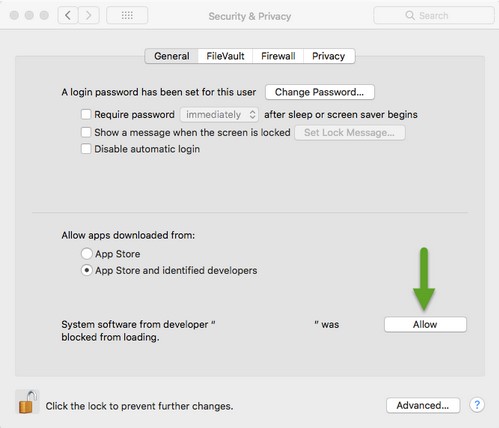 Allow 按钮仅在安装后 30 分钟内可用。在用户批准 KEXT 之前,未来的加载尝试将导致重新出现批准 UI,但不会触发其他的用户警报。
企业部署
Apple 管理解决方案(如 Workspace One、Jamf)可以使用 Apple TeamID 来禁止用户批准 KEXT。
- Apple TeamIDs:
- Dell Endpoint Security Suite Enterprise
6ENJ69K633 - Dell Threat Defense
6ENJ69K633 - Dell Encryption Enterprise
VR2659AZ37- Dell Encryption External Media:
3T5GSNBU6Wv10.1.0 及更低版本: - Dell Encryption External Media:
VR2659AZ37v10.5.0 及更高版本:
- Dell Encryption External Media:
- CrowdStrike Falcon Sensor
X9E956P446 - VMware Carbon Black Cloud Endpoint
7AGZNQ2S2T
- Dell Endpoint Security Suite Enterprise
要验证端点允许列出的 Apple TeamID,请执行以下操作:
- 在端点上,打开终端。
- 类型
sudo kextstat | grep -v com.apple然后按 Enter。 - 填写超级用户密码,然后按 Enter 键。