How Does SIEM Collect Dell Trusted Device Endpoint Security Data?
Summary: Dell Trusted Device data can be made available to Security information and event management (SIEM) solutions. Security administrators use this data to aggregate the data to better understand the state of their endpoint population. ...
Instructions
Affected Products:
- Dell Trusted Device
- Dell Trusted Device Event Repository
Affected Versions:
- v3.7 to 6.4
Affected Platforms:
- Latitude
- OptiPlex
- Precision Workstation
- XPS
Affected Operating Systems:
- Windows
Dell Trusted Device can collect data that is related to the security of a Dell endpoint:
- BIOS Verification
- BIOS Events and Indicators of Attack
- Image Capture
- Security Risk Protection Score
SIEM solutions aggregate data from multiple sources in your enterprise. SIEM enables administrators to identify trends and unusual behavior or to perform real-time analysis of alerts that get generated by applications and hardware. Data aggregated through SIEM can be transformed into charts and graphs on a dashboard to facilitate use. This helps administrators ensure that the enterprise maintains security compliance and protection against bad actors.
The high-level process that is shown below describes the data collection model for Dell Trusted Device.
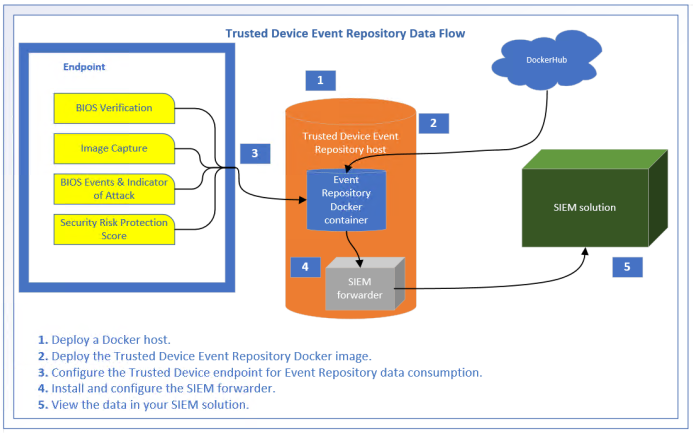
In the process shown above, the Dell Trusted Device endpoint collects the security data as normal (configuration is described in the Dell Trusted Device product documentation). Once the data is collected, the Dell Trusted Device endpoint pushes the data to the Dell Trusted Device Event Repository. Dell Trusted Device Event Repository is a docker container that processes the information and store it on the docker host file system. Once on the file system, a SIEM forwarder can be used to gather the data and push it to the SIEM solution for use by the Security Administrator.
To contact support, reference Dell Data Security International Support Phone Numbers.
Go to TechDirect to generate a technical support request online.
For additional insights and resources, join the Dell Security Community Forum.