IDPA : Failles de sécurité pour l’installation par défaut d’Apache Tomcat
Summary: Cet article fournit une solution de contournement pour les « Failles de sécurité pour l’installation par défaut d’Apache Tomcat et/ou la page d’accueil installées » détectées sur ACM.
Instructions
La faille de sécurité suivante peut être détectée sur la partie ACM d’IDPA pour le port 8543 :
| Titre de la faille de sécurité | divers | Port de service | Niveau de gravité de la vulnérabilité | Description de la faille de sécurité | À l’épreuve des failles de sécurité | Solution contre les failles de sécurité |
|---|---|---|---|---|---|---|
| Installation par défaut d’Apache Tomcat ou installation de la page d’accueil | ACM | 8543 | 5 | L’installation par défaut de Tomcat ou la page d’accueil est installée sur ce serveur. Cela indique généralement un serveur nouvellement installé qui n’a pas encore été configuré correctement et qui peut ne pas être connu. Souvent, Tomcat est installé avec d’autres applications et l’utilisateur peut ne pas savoir que le serveur Web est en cours d’exécution. Ces serveurs sont rarement mis à jour et rarement surveillés, ce qui fournit aux pirates une cible pratique qui n’est pas susceptible de déclencher des alarmes. |
Exécution du service HTTPS * Le produit Tomcat existe : Apache Tomcat 9.0.45. HTTP GET Demander à https://<ACM IP>:8543/Le code de réponse HTTP était attendu à 200. <h1>Apache Tomcat/9.0.45</h1> 27: </div> 28: <div id="upper" class="curved container"> 29: <div id="congrats" class="curved container"> 30: ... this, you have successfully installed Tomcat. Congratulations!</h2> |
Modifiez la page par défaut ou arrêtez et désactivez complètement le serveur Tomcat. Si ce serveur est nécessaire pour fournir les fonctionnalités nécessaires, la page par défaut doit être remplacée par du contenu approprié. Dans le cas contraire, ce serveur doit être supprimé du réseau, en suivant le principe de sécurité de complexité minimale. |
Pour contourner ce problème, procédez comme suit :
- Connectez-vous en tant qu’utilisateur root à l’ACM
- Remplacez le répertoire de travail par
/usr/local/dataprotection/apache-tomcat-9.0.*/webapps/ROOT.
acm:~ # cd /usr/local/dataprotection/apache-tomcat-9.0.*/webapps/ROOT
Dans cet exemple, le chemin d’accès Apache Tomcat est
/usr/local/dataprotection/apache-tomcat-9.0.45/webapps/ROOT
Cela peut être modifié en fonction de la version IDPA sur laquelle vous travaillez.
- Vérifiez que l’option
index.jspLe fichier existe dans le répertoire :
acm:/usr/local/dataprotection/apache-tomcat-9.0.45/webapps/ROOT # ls -la
total 188
drwxr-x--- 3 idpauser idpauser  4096 Nov 12 00:29 .
drwxr-x--- 6 idpauser idpauser  4096 Dec  6 17:00 ..
-rw-r----- 1 idpauser idpauser 12243 Feb  4  2022 1
-rw-r----- 1 idpauser idpauser  6898 Mar 30  2021 RELEASE-NOTES.txt
drwxr-x--- 2 idpauser idpauser  4096 May  7  2021 WEB-INF
-rw-r----- 1 idpauser idpauser 27235 Mar 30  2021 asf-logo-wide.svg
-rw-r----- 1 idpauser idpauser   713 Mar 30  2021 bg-button.png
-rw-r----- 1 idpauser idpauser  1918 Mar 30  2021 bg-middle.png
-rw-r----- 1 idpauser idpauser  1401 Mar 30  2021 bg-nav.png
-rw-r----- 1 idpauser idpauser  3103 Mar 30  2021 bg-upper.png
-rw-r----- 1 idpauser idpauser 21630 Mar 30  2021 favicon.ico
-rw-r----- 1 idpauser idpauser 12243 Feb  4  2022 index.jsp
-rw-r----- 1 idpauser idpauser  5542 Mar 30  2021 tomcat.css
-rw-r----- 1 idpauser idpauser 67795 Mar 30  2021 tomcat.svg
acm:/usr/local/dataprotection/apache-tomcat-9.0.45/webapps/ROOT #
- Effectuer une sauvegarde des données existantes
index.jspen le copiant dansindex.jsp.default:
acm:/usr/local/dataprotection/apache-tomcat-9.0.45/webapps/ROOT # cp -p index.jsp index.jsp.default
curl -kv https://localhost:8543. Vous devez utiliser cette sortie à l’étape 8 pour comparer la sortie après la solution de contournement.
- Créez un nouveau fichier appelé
index.jspet remplacez son contenu par ce qui suit :
<html>
<body>
<%
response.sendRedirect("../dataprotection/");
%>
</body>
</html>
Voici une procédure simple sur la façon de créer et de modifier le index.jsp fichier :
- Supprimer l’élément existant
index.jsp
rm index.jsp
- Créer un nouveau
index.jspà l’aide de l’éditeur VI.
vi index.jsp
- Appuyez sur
ipour passer en mode d’insertion. Cela permet l’édition au fichier. - Copiez le texte ci-dessus et collez-le dans l’éditeur vi.
- Pour quitter le mode d’insertion, appuyez sur
Esc - Enregistrez les modifications et quittez vi en saisissant
:wq!et en appuyant sur Entrée.
- Vérifiez le contenu du fichier
index.jspà l’aide des commandes suivantes :
acm:/usr/local/dataprotection/apache-tomcat-9.0.45/webapps/ROOT # ls -la
total 192
drwxr-x--- 3 idpauser idpauser  4096 Dec  6 17:05 .
drwxr-x--- 6 idpauser idpauser  4096 Dec  6 17:00 ..
-rw-r----- 1 idpauser idpauser 12243 Feb  4  2022 1
-rw-r----- 1 idpauser idpauser  6898 Mar 30  2021 RELEASE-NOTES.txt
drwxr-x--- 2 idpauser idpauser  4096 May  7  2021 WEB-INF
-rw-r----- 1 idpauser idpauser 27235 Mar 30  2021 asf-logo-wide.svg
-rw-r----- 1 idpauser idpauser   713 Mar 30  2021 bg-button.png
-rw-r----- 1 idpauser idpauser  1918 Mar 30  2021 bg-middle.png
-rw-r----- 1 idpauser idpauser  1401 Mar 30  2021 bg-nav.png
-rw-r----- 1 idpauser idpauser  3103 Mar 30  2021 bg-upper.png
-rw-r----- 1 idpauser idpauser 21630 Mar 30  2021 favicon.ico
-rw-r----- 1 idpauser idpauser    81 Feb 10 05:27 index.jsp
-rw-r----- 1 idpauser idpauser 12243 Feb  4  2022 index.jsp.default
-rw-r----- 1 idpauser idpauser  5542 Mar 30  2021 tomcat.css
-rw-r----- 1 idpauser idpauser 67795 Mar 30  2021 tomcat.svg

acm:/usr/local/dataprotection/apache-tomcat-9.0.45/webapps/ROOT # cat index.jsp
<html>
<body>
<%
response.sendRedirect("../dataprotection/");
%>
</body>
</html>
acm:/usr/local/dataprotection/apache-tomcat-9.0.45/webapps/ROOT #
- Ouvrez un navigateur Web et accédez à la page Web d’ACM, puis vérifiez si elle fonctionne correctement. Lors de l’ouverture de la page Web ACM :
https://<ACM IP Adddress>:8543/
https://<ACM IP Adddress>:8543/dataprotection/#/login
- Validez les modifications dans la ligne de commande ACM :
curl -kv https://localhost:8543 serait similaire à :
curl -kv https://<ACM IP address>:8543 renvoie le même résultat :
acm:/usr/local/dataprotection/apache-tomcat-9.0.45/webapps/ROOT # curl -kv https://localhost:8543
* Rebuilt URL to: https://localhost:8543/
*   Trying 12x.0.0.1...
* TCP_NODELAY set
* Connected to localhost (12x.0.0.1) port 8543 (#0)
* ALPN, offering h2
* ALPN, offering http/1.1
* Cipher selection: ALL:!EXPORT:!EXPORT40:!EXPORT56:!aNULL:!LOW:!RC4:@STRENGTH
* TLSv1.2 (OUT), TLS header, Certificate Status (22):
* TLSv1.2 (OUT), TLS handshake, Client hello (1):
* TLSv1.2 (IN), TLS handshake, Server hello (2):
* TLSv1.2 (IN), TLS handshake, Certificate (11):
* TLSv1.2 (IN), TLS handshake, Server key exchange (12):
* TLSv1.2 (IN), TLS handshake, Server finished (14):
* TLSv1.2 (OUT), TLS handshake, Client key exchange (16):
* TLSv1.2 (OUT), TLS change cipher, Client hello (1):
* TLSv1.2 (OUT), TLS handshake, Finished (20):
* TLSv1.2 (IN), TLS change cipher, Client hello (1):
* TLSv1.2 (IN), TLS handshake, Finished (20):
* SSL connection using TLSv1.2 / ECDHE-RSA-AES256-SHA384
* ALPN, server did not agree to a protocol
* Server certificate:
*  subject: C=US; ST=California; L=Irvine; O=EMC; OU=Avamar; CN=localhost.localdom
*  start date: Feb  4 12:27:16 2022 GMT
*  expire date: Feb  2 12:27:16 2032 GMT
*  issuer: C=US; ST=California; L=Irvine; O=EMC; OU=Avamar; CN=localhost.localdom
*  SSL certificate verify result: self signed certificate (18), continuing anyway.
> GET / HTTP/1.1
> Host: localhost:8543
> User-Agent: curl/7.60.0
> Accept: */*
>
< HTTP/1.1 200
< Content-Type: text/html;charset=UTF-8
< Transfer-Encoding: chunked
< Date: Fri, 10 Feb 2023 05:39:29 GMT
< Connection: close
< Server: DataDomain
<


<!DOCTYPE html>
<html lang="en">
    <head>
        <meta charset="UTF-8" />
        <title>Apache Tomcat/9.0.45</title>
        <link href="favicon.ico" rel="icon" type="image/x-icon" />
        <link href="tomcat.css" rel="stylesheet" type="text/css" />
     <script>window.location = window.location.origin + "/dataprotection/"; </script></head>

    <body>
        <div id="wrapper">
            <div id="navigation" class="curved container">
                <span id="nav-home"><a href="https://tomcat.apache.org/">Home</a></span>
                <span id="nav-hosts"><a href="/docs/">Documentation</a></span>
                <span id="nav-config"><a href="/docs/config/">Configuration</a></span>
                <span id="nav-examples"><a href="/examples/">Examples</a></span>
                <span id="nav-wiki"><a href="https://wiki.apache.org/tomcat/FrontPage">Wiki</a></span>
                <span id="nav-lists"><a href="https://tomcat.apache.org/lists.html">Mailing Lists</a></span>
                <span id="nav-help"><a href="https://tomcat.apache.org/findhelp.html">Find Help</a></span>
                <br class="separator" />
            </div>
            <div id="asf-box">
                <h1>Apache Tomcat/9.0.45</h1>
            </div>
            <div id="upper" class="curved container">
                <div id="congrats" class="curved container">
                    <h2>If you're seeing this, you've successfully installed Tomcat. Congratulations!</h2>
                </div>

... skipped

    </body>

</html>
Une fois la solution de contournement implémentée, le résultat doit devenir le suivant :
acm:/usr/local/dataprotection/apache-tomcat-9.0.45/webapps/ROOT # curl -kv https://localhost:8543
* Rebuilt URL to: https://localhost:8543/
*   Trying 12x.0.0.1...
* TCP_NODELAY set
* Connected to localhost (12x.0.0.1) port 8543 (#0)
* ALPN, offering h2
* ALPN, offering http/1.1
* Cipher selection: ALL:!EXPORT:!EXPORT40:!EXPORT56:!aNULL:!LOW:!RC4:@STRENGTH
* TLSv1.2 (OUT), TLS header, Certificate Status (22):
* TLSv1.2 (OUT), TLS handshake, Client hello (1):
* TLSv1.2 (IN), TLS handshake, Server hello (2):
* TLSv1.2 (IN), TLS handshake, Certificate (11):
* TLSv1.2 (IN), TLS handshake, Server key exchange (12):
* TLSv1.2 (IN), TLS handshake, Server finished (14):
* TLSv1.2 (OUT), TLS handshake, Client key exchange (16):
* TLSv1.2 (OUT), TLS change cipher, Client hello (1):
* TLSv1.2 (OUT), TLS handshake, Finished (20):
* TLSv1.2 (IN), TLS change cipher, Client hello (1):
* TLSv1.2 (IN), TLS handshake, Finished (20):
* SSL connection using TLSv1.2 / ECDHE-RSA-AES256-SHA384
* ALPN, server did not agree to a protocol
* Server certificate:
*  subject: C=US; ST=California; L=Irvine; O=EMC; OU=Avamar; CN=localhost.localdom
*  start date: Feb  4 12:27:16 2022 GMT
*  expire date: Feb  2 12:27:16 2032 GMT
*  issuer: C=US; ST=California; L=Irvine; O=EMC; OU=Avamar; CN=localhost.localdom
*  SSL certificate verify result: self signed certificate (18), continuing anyway.
> GET / HTTP/1.1
> Host: localhost:8543
> User-Agent: curl/7.60.0
> Accept: */*
>
< HTTP/1.1 302
< Set-Cookie: JSESSIONID=3396A12A1A458BBB4DDCB636A72B66EE; Path=/; Secure; HttpOnly
< Location: ../dataprotection/
< Content-Type: text/html;charset=ISO-8859-1
< Content-Length: 0
< Date: Fri, 10 Feb 2023 05:42:58 GMT
< Connection: close
< Server: DataDomain
<
* Closing connection 0
* TLSv1.2 (OUT), TLS alert, Client hello (1):
Additional Information
Si la page Web ACM affiche le message « HTTP Status 500 - Internal Server Error » après avoir suivi la procédure ci-dessus, par exemple :
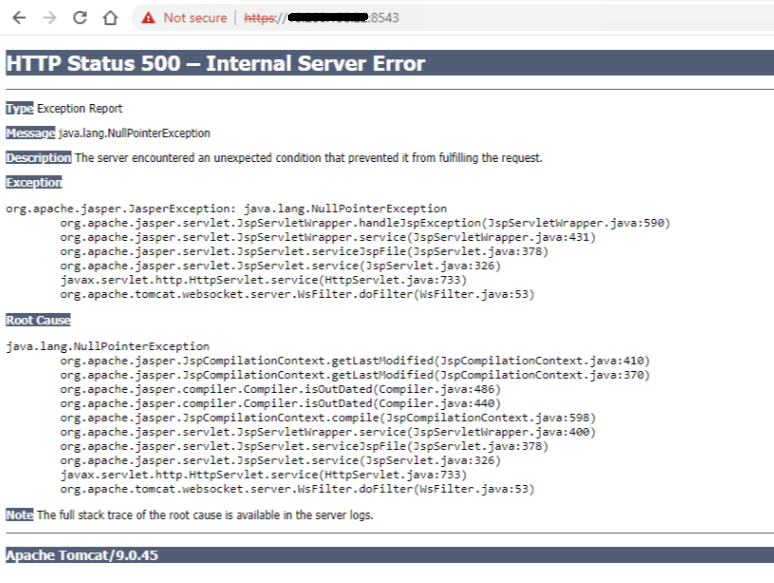
Connectez-vous à l’ACM à l’aide de SSH en tant qu’utilisateur root, puis redémarrez le service ACM avec les commandes suivantes :
service dataprotection_webapp stop
service dataprotection_webapp start
Rechargez ensuite la page Web ACM.
Contactez le support Dell pour obtenir de l’aide si nécessaire.