IDPA: Vulnerabilità di sicurezza per l'installazione predefinita di Apache Tomcat
Summary: L'articolo fornisce una soluzione alternativa per "Vulnerabilità di sicurezza per l'installazione predefinita e/o la pagina di benvenuto installata di Apache Tomcat" rilevate in ACM.
Instructions
È possibile che venga rilevata la seguente vulnerabilità nella parte ACM di IDPA per la porta 8543:
| Titolo vulnerabilità | Componenti | Porta di servizio | Livello di gravità della vulnerabilità | Descrizione della vulnerabilità | A prova di vulnerabilità | Soluzione per le vulnerabilità |
|---|---|---|---|---|---|---|
| Installazione predefinita o pagina di benvenuto installata di Apache Tomcat | ACM | 8543 | 5 | L'installazione predefinita di Tomcat o pagina "Welcome" è installata su questo server. Di solito indica un server appena installato che non è stato ancora configurato correttamente e di cui potrebbe non essere noto. Spesso Tomcat viene installato insieme ad altre applicazioni e l'utente potrebbe non sapere che il web server è in esecuzione. Questi server vengono raramente aggiornati e raramente monitorati, fornendo agli hacker un bersaglio conveniente che probabilmente non farà scattare alcun allarme. |
Esecuzione del servizio HTTPS * Prodotto Tomcat esistente -- Apache Tomcat 9.0.45. HTTP GET Richiesta di https://<ACM IP>:8543/Il codice di risposta HTTP era previsto 200. <h1>Apache Tomcat/9.0.45</h1> 27: </div> 28: <div id="upper" class="curved container"> 29: <div id="congrats" class="curved container"> 30: ... this, you have successfully installed Tomcat. Congratulations!</h2> |
Modificare la pagina predefinita o arrestare e disabilitare completamente il server Tomcat. Se questo server è necessario per fornire le funzionalità necessarie, la pagina predefinita deve essere sostituita con il contenuto pertinente. In caso contrario, questo server deve essere rimosso dalla rete, seguendo il principio di sicurezza della complessità minima. |
Procedura riportata di seguito per risolvere il problema:
- Accedere come root ad ACM
- Modificare la directory di lavoro in
/usr/local/dataprotection/apache-tomcat-9.0.*/webapps/ROOT.
acm:~ # cd /usr/local/dataprotection/apache-tomcat-9.0.*/webapps/ROOT
In questo esempio, il percorso di Apache Tomcat è
/usr/local/dataprotection/apache-tomcat-9.0.45/webapps/ROOT
Questa impostazione può variare a seconda della versione di IDPA su cui si sta lavorando.
- Verificare che l'opzione
index.jspIl file esiste nella directory:
acm:/usr/local/dataprotection/apache-tomcat-9.0.45/webapps/ROOT # ls -la
total 188
drwxr-x--- 3 idpauser idpauser  4096 Nov 12 00:29 .
drwxr-x--- 6 idpauser idpauser  4096 Dec  6 17:00 ..
-rw-r----- 1 idpauser idpauser 12243 Feb  4  2022 1
-rw-r----- 1 idpauser idpauser  6898 Mar 30  2021 RELEASE-NOTES.txt
drwxr-x--- 2 idpauser idpauser  4096 May  7  2021 WEB-INF
-rw-r----- 1 idpauser idpauser 27235 Mar 30  2021 asf-logo-wide.svg
-rw-r----- 1 idpauser idpauser   713 Mar 30  2021 bg-button.png
-rw-r----- 1 idpauser idpauser  1918 Mar 30  2021 bg-middle.png
-rw-r----- 1 idpauser idpauser  1401 Mar 30  2021 bg-nav.png
-rw-r----- 1 idpauser idpauser  3103 Mar 30  2021 bg-upper.png
-rw-r----- 1 idpauser idpauser 21630 Mar 30  2021 favicon.ico
-rw-r----- 1 idpauser idpauser 12243 Feb  4  2022 index.jsp
-rw-r----- 1 idpauser idpauser  5542 Mar 30  2021 tomcat.css
-rw-r----- 1 idpauser idpauser 67795 Mar 30  2021 tomcat.svg
acm:/usr/local/dataprotection/apache-tomcat-9.0.45/webapps/ROOT #
- Eseguire un backup del file esistente
index.jspcopiandolo inindex.jsp.default:
acm:/usr/local/dataprotection/apache-tomcat-9.0.45/webapps/ROOT # cp -p index.jsp index.jsp.default
curl -kv https://localhost:8543. Questo output deve essere utilizzato nel passaggio 8 per confrontare l'output dopo la soluzione alternativa.
- Creare un nuovo file denominato
index.jspe sostituisci il suo contenuto con il seguente:
<html>
<body>
<%
response.sendRedirect("../dataprotection/");
%>
</body>
</html>
Di seguito è riportata una semplice procedura su come creare e modificare il file index.jsp file:
- Rimuovere il file esistente
index.jsp
rm index.jsp
- Creare un nuovo
index.jsputilizzando l'editor VI.
vi index.jsp
- Premere
iper accedere alla modalità di inserimento. In questo modo è possibile modificare il file. - Copia il testo qui sopra e incollalo nell'editor vi.
- Uscire dalla modalità di inserimento premendo
Esc - Salvare le modifiche e uscire da vi digitando
:wq!e premendo Invio.
- Verificare il contenuto del
index.jsputilizzando i seguenti comandi:
acm:/usr/local/dataprotection/apache-tomcat-9.0.45/webapps/ROOT # ls -la
total 192
drwxr-x--- 3 idpauser idpauser  4096 Dec  6 17:05 .
drwxr-x--- 6 idpauser idpauser  4096 Dec  6 17:00 ..
-rw-r----- 1 idpauser idpauser 12243 Feb  4  2022 1
-rw-r----- 1 idpauser idpauser  6898 Mar 30  2021 RELEASE-NOTES.txt
drwxr-x--- 2 idpauser idpauser  4096 May  7  2021 WEB-INF
-rw-r----- 1 idpauser idpauser 27235 Mar 30  2021 asf-logo-wide.svg
-rw-r----- 1 idpauser idpauser   713 Mar 30  2021 bg-button.png
-rw-r----- 1 idpauser idpauser  1918 Mar 30  2021 bg-middle.png
-rw-r----- 1 idpauser idpauser  1401 Mar 30  2021 bg-nav.png
-rw-r----- 1 idpauser idpauser  3103 Mar 30  2021 bg-upper.png
-rw-r----- 1 idpauser idpauser 21630 Mar 30  2021 favicon.ico
-rw-r----- 1 idpauser idpauser    81 Feb 10 05:27 index.jsp
-rw-r----- 1 idpauser idpauser 12243 Feb  4  2022 index.jsp.default
-rw-r----- 1 idpauser idpauser  5542 Mar 30  2021 tomcat.css
-rw-r----- 1 idpauser idpauser 67795 Mar 30  2021 tomcat.svg

acm:/usr/local/dataprotection/apache-tomcat-9.0.45/webapps/ROOT # cat index.jsp
<html>
<body>
<%
response.sendRedirect("../dataprotection/");
%>
</body>
</html>
acm:/usr/local/dataprotection/apache-tomcat-9.0.45/webapps/ROOT #
- Aprire un web browser e accedere alla pagina web di ACM, quindi verificare che funzioni correttamente. Quando si apre la pagina web ACM:
https://<ACM IP Adddress>:8543/
https://<ACM IP Adddress>:8543/dataprotection/#/login
- Verificare le modifiche nella riga di comando di ACM:
curl -kv https://localhost:8543 sarebbe simile a:
curl -kv https://<ACM IP address>:8543 Restituisce lo stesso risultato:
acm:/usr/local/dataprotection/apache-tomcat-9.0.45/webapps/ROOT # curl -kv https://localhost:8543
* Rebuilt URL to: https://localhost:8543/
*   Trying 12x.0.0.1...
* TCP_NODELAY set
* Connected to localhost (12x.0.0.1) port 8543 (#0)
* ALPN, offering h2
* ALPN, offering http/1.1
* Cipher selection: ALL:!EXPORT:!EXPORT40:!EXPORT56:!aNULL:!LOW:!RC4:@STRENGTH
* TLSv1.2 (OUT), TLS header, Certificate Status (22):
* TLSv1.2 (OUT), TLS handshake, Client hello (1):
* TLSv1.2 (IN), TLS handshake, Server hello (2):
* TLSv1.2 (IN), TLS handshake, Certificate (11):
* TLSv1.2 (IN), TLS handshake, Server key exchange (12):
* TLSv1.2 (IN), TLS handshake, Server finished (14):
* TLSv1.2 (OUT), TLS handshake, Client key exchange (16):
* TLSv1.2 (OUT), TLS change cipher, Client hello (1):
* TLSv1.2 (OUT), TLS handshake, Finished (20):
* TLSv1.2 (IN), TLS change cipher, Client hello (1):
* TLSv1.2 (IN), TLS handshake, Finished (20):
* SSL connection using TLSv1.2 / ECDHE-RSA-AES256-SHA384
* ALPN, server did not agree to a protocol
* Server certificate:
*  subject: C=US; ST=California; L=Irvine; O=EMC; OU=Avamar; CN=localhost.localdom
*  start date: Feb  4 12:27:16 2022 GMT
*  expire date: Feb  2 12:27:16 2032 GMT
*  issuer: C=US; ST=California; L=Irvine; O=EMC; OU=Avamar; CN=localhost.localdom
*  SSL certificate verify result: self signed certificate (18), continuing anyway.
> GET / HTTP/1.1
> Host: localhost:8543
> User-Agent: curl/7.60.0
> Accept: */*
>
< HTTP/1.1 200
< Content-Type: text/html;charset=UTF-8
< Transfer-Encoding: chunked
< Date: Fri, 10 Feb 2023 05:39:29 GMT
< Connection: close
< Server: DataDomain
<


<!DOCTYPE html>
<html lang="en">
    <head>
        <meta charset="UTF-8" />
        <title>Apache Tomcat/9.0.45</title>
        <link href="favicon.ico" rel="icon" type="image/x-icon" />
        <link href="tomcat.css" rel="stylesheet" type="text/css" />
     <script>window.location = window.location.origin + "/dataprotection/"; </script></head>

    <body>
        <div id="wrapper">
            <div id="navigation" class="curved container">
                <span id="nav-home"><a href="https://tomcat.apache.org/">Home</a></span>
                <span id="nav-hosts"><a href="/docs/">Documentation</a></span>
                <span id="nav-config"><a href="/docs/config/">Configuration</a></span>
                <span id="nav-examples"><a href="/examples/">Examples</a></span>
                <span id="nav-wiki"><a href="https://wiki.apache.org/tomcat/FrontPage">Wiki</a></span>
                <span id="nav-lists"><a href="https://tomcat.apache.org/lists.html">Mailing Lists</a></span>
                <span id="nav-help"><a href="https://tomcat.apache.org/findhelp.html">Find Help</a></span>
                <br class="separator" />
            </div>
            <div id="asf-box">
                <h1>Apache Tomcat/9.0.45</h1>
            </div>
            <div id="upper" class="curved container">
                <div id="congrats" class="curved container">
                    <h2>If you're seeing this, you've successfully installed Tomcat. Congratulations!</h2>
                </div>

... skipped

    </body>

</html>
Una volta implementata la soluzione alternativa, l'output dovrebbe diventare:
acm:/usr/local/dataprotection/apache-tomcat-9.0.45/webapps/ROOT # curl -kv https://localhost:8543
* Rebuilt URL to: https://localhost:8543/
*   Trying 12x.0.0.1...
* TCP_NODELAY set
* Connected to localhost (12x.0.0.1) port 8543 (#0)
* ALPN, offering h2
* ALPN, offering http/1.1
* Cipher selection: ALL:!EXPORT:!EXPORT40:!EXPORT56:!aNULL:!LOW:!RC4:@STRENGTH
* TLSv1.2 (OUT), TLS header, Certificate Status (22):
* TLSv1.2 (OUT), TLS handshake, Client hello (1):
* TLSv1.2 (IN), TLS handshake, Server hello (2):
* TLSv1.2 (IN), TLS handshake, Certificate (11):
* TLSv1.2 (IN), TLS handshake, Server key exchange (12):
* TLSv1.2 (IN), TLS handshake, Server finished (14):
* TLSv1.2 (OUT), TLS handshake, Client key exchange (16):
* TLSv1.2 (OUT), TLS change cipher, Client hello (1):
* TLSv1.2 (OUT), TLS handshake, Finished (20):
* TLSv1.2 (IN), TLS change cipher, Client hello (1):
* TLSv1.2 (IN), TLS handshake, Finished (20):
* SSL connection using TLSv1.2 / ECDHE-RSA-AES256-SHA384
* ALPN, server did not agree to a protocol
* Server certificate:
*  subject: C=US; ST=California; L=Irvine; O=EMC; OU=Avamar; CN=localhost.localdom
*  start date: Feb  4 12:27:16 2022 GMT
*  expire date: Feb  2 12:27:16 2032 GMT
*  issuer: C=US; ST=California; L=Irvine; O=EMC; OU=Avamar; CN=localhost.localdom
*  SSL certificate verify result: self signed certificate (18), continuing anyway.
> GET / HTTP/1.1
> Host: localhost:8543
> User-Agent: curl/7.60.0
> Accept: */*
>
< HTTP/1.1 302
< Set-Cookie: JSESSIONID=3396A12A1A458BBB4DDCB636A72B66EE; Path=/; Secure; HttpOnly
< Location: ../dataprotection/
< Content-Type: text/html;charset=ISO-8859-1
< Content-Length: 0
< Date: Fri, 10 Feb 2023 05:42:58 GMT
< Connection: close
< Server: DataDomain
<
* Closing connection 0
* TLSv1.2 (OUT), TLS alert, Client hello (1):
Additional Information
Se la pagina web ACM visualizza il messaggio "HTTP Status 500 - Internal Server Error" dopo aver seguito la procedura descritta sopra, ad esempio:
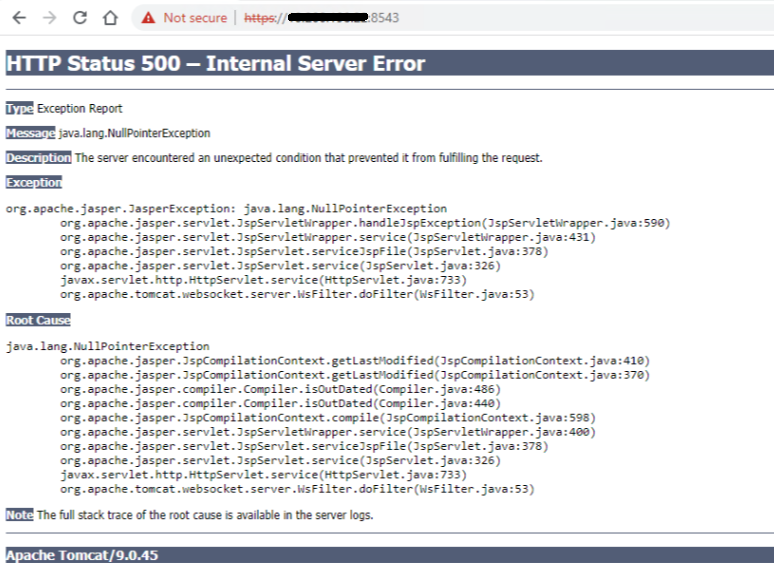
Accedere ad ACM utilizzando SSH come utente root, quindi riavviare il servizio ACM con i seguenti comandi:
service dataprotection_webapp stop
service dataprotection_webapp start
Quindi ricaricare nuovamente la pagina web ACM.
Se necessario, contattare il supporto Dell per ulteriore assistenza.