IDPA: Apache Tomcat 기본 설치의 보안 취약성
Summary: 이 문서에서는 ACM에서 탐지된 "Apache Tomcat 기본 설치 및/또는 시작 페이지 설치의 보안 취약성"에 대한 해결 방법을 제공합니다.
This article applies to
This article does not apply to
This article is not tied to any specific product.
Not all product versions are identified in this article.
Instructions
포트 8543에 대한 IDPA의 ACM 부분에서 다음 취약성이 감지될 수 있습니다.
| 취약성 제목 | 구성 요소 | 서비스 포트 | 취약성 심각도 수준 | 취약성 설명 | 취약성 증명 | 취약성 솔루션 |
|---|---|---|---|---|---|---|
| Apache Tomcat 기본 설치 또는 시작 페이지 설치 | ACM | 8543 | 5 | Tomcat 기본 설치 또는 "시작" 페이지가 이 서버에 설치됩니다. 이는 일반적으로 새로 설치된 서버가 아직 제대로 구성되지 않았으며 알려지지 않았을 수 있음을 나타냅니다. Tomcat은 다른 애플리케이션과 함께 설치되는 경우가 많으며 사용자는 웹 서버가 실행 중인지 모를 수 있습니다. 이러한 서버는 거의 업데이트되지 않고 거의 모니터링되지 않으므로 해커에게 경보를 울리지 않는 편리한 표적을 제공합니다. |
HTTPS 서비스 실행 중 * 제품 Tomcat이 있음 -- Apache Tomcat 9.0.45. HTTP GET 요청 대상 https://<ACM IP>:8543/HTTP 응답 코드는 200이어야 합니다. <h1>Apache Tomcat/9.0.45</h1> 27: </div> 28: <div id="upper" class="curved container"> 29: <div id="congrats" class="curved container"> 30: ... this, you have successfully installed Tomcat. Congratulations!</h2> |
기본 페이지를 변경하거나 Tomcat 서버를 완전히 중지하고 비활성화합니다. 이 서버가 필요한 기능을 제공해야 하는 경우 기본 페이지를 관련 콘텐츠로 대체해야 합니다. 그렇지 않으면 최소 복잡성의 보안 원칙에 따라 이 서버를 네트워크에서 제거해야 합니다. |
다음 단계에 따라 문제를 해결하십시오.
- ACM에 루트로 로그인합니다.
- 작업 디렉토리를 다음으로 변경합니다.
/usr/local/dataprotection/apache-tomcat-9.0.*/webapps/ROOT.
acm:~ # cd /usr/local/dataprotection/apache-tomcat-9.0.*/webapps/ROOT
이 예에서 Apache Tomcat 경로는 다음과 같습니다.
/usr/local/dataprotection/apache-tomcat-9.0.45/webapps/ROOT
이는 작업 중인 IDPA 버전에 따라 변경될 수 있습니다.
- 다음 사항을 확인합니다.
index.jsp파일이 디렉토리에 있습니다.
acm:/usr/local/dataprotection/apache-tomcat-9.0.45/webapps/ROOT # ls -la
total 188
drwxr-x--- 3 idpauser idpauser  4096 Nov 12 00:29 .
drwxr-x--- 6 idpauser idpauser  4096 Dec  6 17:00 ..
-rw-r----- 1 idpauser idpauser 12243 Feb  4  2022 1
-rw-r----- 1 idpauser idpauser  6898 Mar 30  2021 RELEASE-NOTES.txt
drwxr-x--- 2 idpauser idpauser  4096 May  7  2021 WEB-INF
-rw-r----- 1 idpauser idpauser 27235 Mar 30  2021 asf-logo-wide.svg
-rw-r----- 1 idpauser idpauser   713 Mar 30  2021 bg-button.png
-rw-r----- 1 idpauser idpauser  1918 Mar 30  2021 bg-middle.png
-rw-r----- 1 idpauser idpauser  1401 Mar 30  2021 bg-nav.png
-rw-r----- 1 idpauser idpauser  3103 Mar 30  2021 bg-upper.png
-rw-r----- 1 idpauser idpauser 21630 Mar 30  2021 favicon.ico
-rw-r----- 1 idpauser idpauser 12243 Feb  4  2022 index.jsp
-rw-r----- 1 idpauser idpauser  5542 Mar 30  2021 tomcat.css
-rw-r----- 1 idpauser idpauser 67795 Mar 30  2021 tomcat.svg
acm:/usr/local/dataprotection/apache-tomcat-9.0.45/webapps/ROOT #
- 기존 백업 만들기
index.jsp복사하여index.jsp.default을 설정합니다.
acm:/usr/local/dataprotection/apache-tomcat-9.0.45/webapps/ROOT # cp -p index.jsp index.jsp.default
참고: 참조로 해결 방법을 구현하기 전에
curl -kv https://localhost:8543에 관한 자세한 내용을 참조하십시오. 이 출력은 해결 방법 이후의 출력을 비교하기 위해 8단계에서 사용해야 합니다.
- 라는 새 파일을 만듭니다.
index.jsp을 클릭하고 내용을 다음과 같이 바꿉니다.
<html>
<body>
<%
response.sendRedirect("../dataprotection/");
%>
</body>
</html>
다음은 생성 및 편집 방법에 대한 간단한 절차입니다. index.jsp 파일에서 내보낸 고유한 SSL 라이브러리를 제공합니다.
- 기존 제거
index.jsp
rm index.jsp
- 새로 만들기
index.jspvi 편집기를 사용하여 파일.
vi index.jsp
- 다음으로
i삽입 모드로 들어갑니다. 이렇게 하면 파일에 대한 편집이 허용됩니다. - 위의 텍스트를 복사하여 vi 편집기에 붙여넣습니다.
- 키를 눌러 삽입 모드를 종료합니다.
Esc - 변경 사항을 저장하고 다음을 입력하여 vi를 종료하십시오.
:wq!Enter 키를 누릅니다.
- 의 내용물을 확인합니다.
index.jsp다음 명령을 사용하여 파일:
acm:/usr/local/dataprotection/apache-tomcat-9.0.45/webapps/ROOT # ls -la
total 192
drwxr-x--- 3 idpauser idpauser  4096 Dec  6 17:05 .
drwxr-x--- 6 idpauser idpauser  4096 Dec  6 17:00 ..
-rw-r----- 1 idpauser idpauser 12243 Feb  4  2022 1
-rw-r----- 1 idpauser idpauser  6898 Mar 30  2021 RELEASE-NOTES.txt
drwxr-x--- 2 idpauser idpauser  4096 May  7  2021 WEB-INF
-rw-r----- 1 idpauser idpauser 27235 Mar 30  2021 asf-logo-wide.svg
-rw-r----- 1 idpauser idpauser   713 Mar 30  2021 bg-button.png
-rw-r----- 1 idpauser idpauser  1918 Mar 30  2021 bg-middle.png
-rw-r----- 1 idpauser idpauser  1401 Mar 30  2021 bg-nav.png
-rw-r----- 1 idpauser idpauser  3103 Mar 30  2021 bg-upper.png
-rw-r----- 1 idpauser idpauser 21630 Mar 30  2021 favicon.ico
-rw-r----- 1 idpauser idpauser    81 Feb 10 05:27 index.jsp
-rw-r----- 1 idpauser idpauser 12243 Feb  4  2022 index.jsp.default
-rw-r----- 1 idpauser idpauser  5542 Mar 30  2021 tomcat.css
-rw-r----- 1 idpauser idpauser 67795 Mar 30  2021 tomcat.svg

acm:/usr/local/dataprotection/apache-tomcat-9.0.45/webapps/ROOT # cat index.jsp
<html>
<body>
<%
response.sendRedirect("../dataprotection/");
%>
</body>
</html>
acm:/usr/local/dataprotection/apache-tomcat-9.0.45/webapps/ROOT #
- 웹 브라우저를 열고 ACM 웹 페이지에 액세스하여 올바르게 작동하는지 확인합니다. ACM 웹 페이지를 여는 경우:
https://<ACM IP Adddress>:8543/
자동으로 리디렉션되어야 합니다.
https://<ACM IP Adddress>:8543/dataprotection/#/login
- ACM 명령줄에서 변경 사항을 확인합니다.
해결 방법을 구현하기 전에
curl -kv https://localhost:8543 다음과 유사합니다.
참고: 이
curl -kv https://<ACM IP address>:8543 동일한 결과를 반환합니다.
acm:/usr/local/dataprotection/apache-tomcat-9.0.45/webapps/ROOT # curl -kv https://localhost:8543
* Rebuilt URL to: https://localhost:8543/
*   Trying 12x.0.0.1...
* TCP_NODELAY set
* Connected to localhost (12x.0.0.1) port 8543 (#0)
* ALPN, offering h2
* ALPN, offering http/1.1
* Cipher selection: ALL:!EXPORT:!EXPORT40:!EXPORT56:!aNULL:!LOW:!RC4:@STRENGTH
* TLSv1.2 (OUT), TLS header, Certificate Status (22):
* TLSv1.2 (OUT), TLS handshake, Client hello (1):
* TLSv1.2 (IN), TLS handshake, Server hello (2):
* TLSv1.2 (IN), TLS handshake, Certificate (11):
* TLSv1.2 (IN), TLS handshake, Server key exchange (12):
* TLSv1.2 (IN), TLS handshake, Server finished (14):
* TLSv1.2 (OUT), TLS handshake, Client key exchange (16):
* TLSv1.2 (OUT), TLS change cipher, Client hello (1):
* TLSv1.2 (OUT), TLS handshake, Finished (20):
* TLSv1.2 (IN), TLS change cipher, Client hello (1):
* TLSv1.2 (IN), TLS handshake, Finished (20):
* SSL connection using TLSv1.2 / ECDHE-RSA-AES256-SHA384
* ALPN, server did not agree to a protocol
* Server certificate:
*  subject: C=US; ST=California; L=Irvine; O=EMC; OU=Avamar; CN=localhost.localdom
*  start date: Feb  4 12:27:16 2022 GMT
*  expire date: Feb  2 12:27:16 2032 GMT
*  issuer: C=US; ST=California; L=Irvine; O=EMC; OU=Avamar; CN=localhost.localdom
*  SSL certificate verify result: self signed certificate (18), continuing anyway.
> GET / HTTP/1.1
> Host: localhost:8543
> User-Agent: curl/7.60.0
> Accept: */*
>
< HTTP/1.1 200
< Content-Type: text/html;charset=UTF-8
< Transfer-Encoding: chunked
< Date: Fri, 10 Feb 2023 05:39:29 GMT
< Connection: close
< Server: DataDomain
<


<!DOCTYPE html>
<html lang="en">
    <head>
        <meta charset="UTF-8" />
        <title>Apache Tomcat/9.0.45</title>
        <link href="favicon.ico" rel="icon" type="image/x-icon" />
        <link href="tomcat.css" rel="stylesheet" type="text/css" />
     <script>window.location = window.location.origin + "/dataprotection/"; </script></head>

    <body>
        <div id="wrapper">
            <div id="navigation" class="curved container">
                <span id="nav-home"><a href="https://tomcat.apache.org/">Home</a></span>
                <span id="nav-hosts"><a href="/docs/">Documentation</a></span>
                <span id="nav-config"><a href="/docs/config/">Configuration</a></span>
                <span id="nav-examples"><a href="/examples/">Examples</a></span>
                <span id="nav-wiki"><a href="https://wiki.apache.org/tomcat/FrontPage">Wiki</a></span>
                <span id="nav-lists"><a href="https://tomcat.apache.org/lists.html">Mailing Lists</a></span>
                <span id="nav-help"><a href="https://tomcat.apache.org/findhelp.html">Find Help</a></span>
                <br class="separator" />
            </div>
            <div id="asf-box">
                <h1>Apache Tomcat/9.0.45</h1>
            </div>
            <div id="upper" class="curved container">
                <div id="congrats" class="curved container">
                    <h2>If you're seeing this, you've successfully installed Tomcat. Congratulations!</h2>
                </div>

... skipped

    </body>

</html>
해결 방법이 구현되면 출력은 다음과 같아야 합니다.
acm:/usr/local/dataprotection/apache-tomcat-9.0.45/webapps/ROOT # curl -kv https://localhost:8543
* Rebuilt URL to: https://localhost:8543/
*   Trying 12x.0.0.1...
* TCP_NODELAY set
* Connected to localhost (12x.0.0.1) port 8543 (#0)
* ALPN, offering h2
* ALPN, offering http/1.1
* Cipher selection: ALL:!EXPORT:!EXPORT40:!EXPORT56:!aNULL:!LOW:!RC4:@STRENGTH
* TLSv1.2 (OUT), TLS header, Certificate Status (22):
* TLSv1.2 (OUT), TLS handshake, Client hello (1):
* TLSv1.2 (IN), TLS handshake, Server hello (2):
* TLSv1.2 (IN), TLS handshake, Certificate (11):
* TLSv1.2 (IN), TLS handshake, Server key exchange (12):
* TLSv1.2 (IN), TLS handshake, Server finished (14):
* TLSv1.2 (OUT), TLS handshake, Client key exchange (16):
* TLSv1.2 (OUT), TLS change cipher, Client hello (1):
* TLSv1.2 (OUT), TLS handshake, Finished (20):
* TLSv1.2 (IN), TLS change cipher, Client hello (1):
* TLSv1.2 (IN), TLS handshake, Finished (20):
* SSL connection using TLSv1.2 / ECDHE-RSA-AES256-SHA384
* ALPN, server did not agree to a protocol
* Server certificate:
*  subject: C=US; ST=California; L=Irvine; O=EMC; OU=Avamar; CN=localhost.localdom
*  start date: Feb  4 12:27:16 2022 GMT
*  expire date: Feb  2 12:27:16 2032 GMT
*  issuer: C=US; ST=California; L=Irvine; O=EMC; OU=Avamar; CN=localhost.localdom
*  SSL certificate verify result: self signed certificate (18), continuing anyway.
> GET / HTTP/1.1
> Host: localhost:8543
> User-Agent: curl/7.60.0
> Accept: */*
>
< HTTP/1.1 302
< Set-Cookie: JSESSIONID=3396A12A1A458BBB4DDCB636A72B66EE; Path=/; Secure; HttpOnly
< Location: ../dataprotection/
< Content-Type: text/html;charset=ISO-8859-1
< Content-Length: 0
< Date: Fri, 10 Feb 2023 05:42:58 GMT
< Connection: close
< Server: DataDomain
<
* Closing connection 0
* TLSv1.2 (OUT), TLS alert, Client hello (1):
Additional Information
위의 절차를 수행한 후 ACM 웹 페이지에 "HTTP Status 500 - Internal Server Error"가 표시되는 경우, 예:
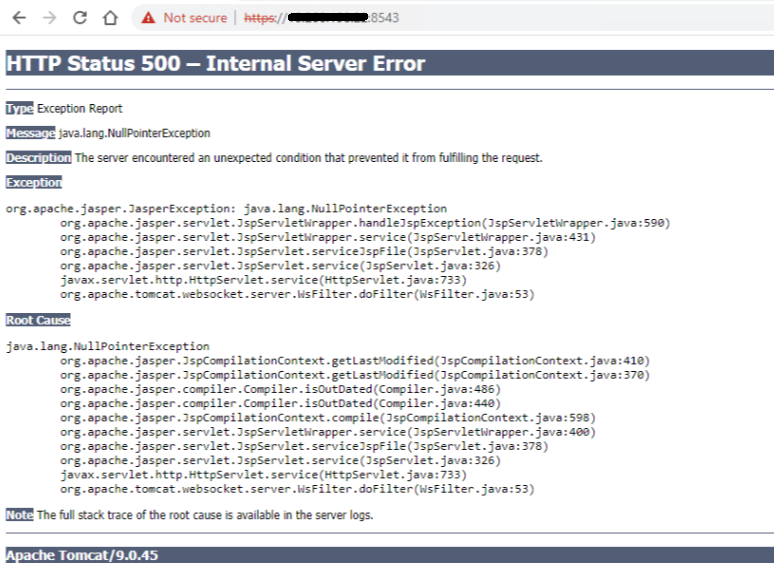
루트 사용자로 SSH를 사용하여 ACM에 로그인한 후 다음 명령을 사용하여 ACM 서비스를 재시작합니다.
service dataprotection_webapp stop
service dataprotection_webapp start
그런 다음 ACM 웹 페이지를 다시 로드합니다.
필요한 경우 Dell 지원 팀에 문의하여 추가 지원을 받으십시오.
Affected Products
PowerProtect DP4400, PowerProtect DP5300, PowerProtect DP5800, PowerProtect DP8300, PowerProtect DP8800, PowerProtect Data Protection Software, Integrated Data Protection Appliance Family, Integrated Data Protection Appliance Software
, PowerProtect DP5900, PowerProtect DP8400, PowerProtect DP8900
...
Article Properties
Article Number: 000206114
Article Type: How To
Last Modified: 25 Aug 2025
Version: 11
Find answers to your questions from other Dell users
Support Services
Check if your device is covered by Support Services.