IDPA: Apache Tomcat Varsayılan Kurulumu için Güvenlik Açıkları
Summary: Bu makalede, ACM'de algılanan "Apache Tomcat varsayılan yüklemesi ve/veya karşılama sayfası yüklemesi için Güvenlik Açıkları" için bir geçici çözüm sağlanır.
Instructions
Bağlantı noktası 8543 için IDPA'nın ACM bölümünde aşağıdaki güvenlik açığı algılanabilir:
| Güvenlik Açığı Başlığı | Bileşen | Servis Bağlantı Noktası | Güvenlik Açığı Önem Derecesi Düzeyi | Güvenlik Açığı Açıklaması | Güvenlik Açığı Kanıtı | Güvenlik Açığı Çözümü |
|---|---|---|---|---|---|---|
| Apache Tomcat varsayılan yüklemesi veya karşılama sayfası yüklü | ACM | 8543 | 5 | Tomcat varsayılan kurulumu veya "Hoş Geldiniz" sayfası bu sunucuya yüklenir. Bu genellikle, henüz düzgün bir şekilde yapılandırılmamış ve hakkında bilgi verilemeyen, yeni yüklenmiş bir sunucuyu gösterir. Tomcat genellikle diğer uygulamalarla birlikte yüklenir ve kullanıcı web sunucusunun çalıştığını bilmeyebilir. Bu sunucular nadiren güncellenir ve nadiren izlenir, bu da bilgisayar korsanlarına herhangi bir alarmı tetiklemesi muhtemel olmayan uygun bir hedef sağlar. |
HTTPS hizmeti çalıştırılıyor * Ürün Tomcat mevcut -- Apache Tomcat 9.0.45. HTTP GET İstek https://<ACM IP>:8543/HTTP yanıt kodu beklenen 200 dür. <h1>Apache Tomcat/9.0.45</h1> 27: </div> 28: <div id="upper" class="curved container"> 29: <div id="congrats" class="curved container"> 30: ... this, you have successfully installed Tomcat. Congratulations!</h2> |
Varsayılan sayfayı değiştirin veya Tomcat sunucusunu durdurun ve tamamen devre dışı bırakın. Bu sunucunun gerekli işlevselliği sağlaması gerekiyorsa, varsayılan sayfa ilgili içerikle değiştirilmelidir. Aksi takdirde, bu sunucu minimum karmaşıklık güvenlik ilkesi izlenerek ağdan kaldırılmalıdır. |
Soruna geçici bir çözüm bulmak için şu adımları izleyin:
- ACM de kök kullanıcı olarak oturum açın
- Çalışma dizinini
/usr/local/dataprotection/apache-tomcat-9.0.*/webapps/ROOT.
acm:~ # cd /usr/local/dataprotection/apache-tomcat-9.0.*/webapps/ROOT
Bu örnekte Apache Tomcat yolu şu şekildedir:
/usr/local/dataprotection/apache-tomcat-9.0.45/webapps/ROOT
Bu, üzerinde çalışılan IDPA sürümüne bağlı olarak değiştirilebilir.
- Şunu onaylayın :
index.jspDosya şu dizinde mevcut:
acm:/usr/local/dataprotection/apache-tomcat-9.0.45/webapps/ROOT # ls -la
total 188
drwxr-x--- 3 idpauser idpauser  4096 Nov 12 00:29 .
drwxr-x--- 6 idpauser idpauser  4096 Dec  6 17:00 ..
-rw-r----- 1 idpauser idpauser 12243 Feb  4  2022 1
-rw-r----- 1 idpauser idpauser  6898 Mar 30  2021 RELEASE-NOTES.txt
drwxr-x--- 2 idpauser idpauser  4096 May  7  2021 WEB-INF
-rw-r----- 1 idpauser idpauser 27235 Mar 30  2021 asf-logo-wide.svg
-rw-r----- 1 idpauser idpauser   713 Mar 30  2021 bg-button.png
-rw-r----- 1 idpauser idpauser  1918 Mar 30  2021 bg-middle.png
-rw-r----- 1 idpauser idpauser  1401 Mar 30  2021 bg-nav.png
-rw-r----- 1 idpauser idpauser  3103 Mar 30  2021 bg-upper.png
-rw-r----- 1 idpauser idpauser 21630 Mar 30  2021 favicon.ico
-rw-r----- 1 idpauser idpauser 12243 Feb  4  2022 index.jsp
-rw-r----- 1 idpauser idpauser  5542 Mar 30  2021 tomcat.css
-rw-r----- 1 idpauser idpauser 67795 Mar 30  2021 tomcat.svg
acm:/usr/local/dataprotection/apache-tomcat-9.0.45/webapps/ROOT #
- Mevcut bir yedeklemenin
index.jspkopyalayarakindex.jsp.default:
acm:/usr/local/dataprotection/apache-tomcat-9.0.45/webapps/ROOT # cp -p index.jsp index.jsp.default
curl -kv https://localhost:8543. Bu çıktı, geçici çözümden sonra çıktıyı karşılaştırmak için 8. Adımda kullanılmalıdır.
- adlı yeni bir dosya oluşturun
index.jspve içeriğini aşağıdakilerle değiştirin:
<html>
<body>
<%
response.sendRedirect("../dataprotection/");
%>
</body>
</html>
Aşağıda, oluşturulacak ve düzenlenecek basit bir prosedür verilmiştir. index.jsp :
- Mevcut olanı
index.jsp
rm index.jsp
- Yeni oluşturun
index.jspVI düzenleyicisini kullanarak dosyalayın.
vi index.jsp
- Kaydetmek ve Çıkmak için
iEkleme moduna girmek için Bu, dosyanın sürümüne izin verir. - Yukarıdaki metni kopyalayın ve vi düzenleyicisine yapıştırın.
- tuşuna basarak ekleme modundan çıkın
Esc - Değişiklikleri kaydedin ve şunu yazarak vi'den çıkın:
:wq!ve Enter tuşuna basın.
- Şu öğenin içeriklerini doğrulayın:
index.jspAşağıdaki komutları kullanarak dosyalayın:
acm:/usr/local/dataprotection/apache-tomcat-9.0.45/webapps/ROOT # ls -la
total 192
drwxr-x--- 3 idpauser idpauser  4096 Dec  6 17:05 .
drwxr-x--- 6 idpauser idpauser  4096 Dec  6 17:00 ..
-rw-r----- 1 idpauser idpauser 12243 Feb  4  2022 1
-rw-r----- 1 idpauser idpauser  6898 Mar 30  2021 RELEASE-NOTES.txt
drwxr-x--- 2 idpauser idpauser  4096 May  7  2021 WEB-INF
-rw-r----- 1 idpauser idpauser 27235 Mar 30  2021 asf-logo-wide.svg
-rw-r----- 1 idpauser idpauser   713 Mar 30  2021 bg-button.png
-rw-r----- 1 idpauser idpauser  1918 Mar 30  2021 bg-middle.png
-rw-r----- 1 idpauser idpauser  1401 Mar 30  2021 bg-nav.png
-rw-r----- 1 idpauser idpauser  3103 Mar 30  2021 bg-upper.png
-rw-r----- 1 idpauser idpauser 21630 Mar 30  2021 favicon.ico
-rw-r----- 1 idpauser idpauser    81 Feb 10 05:27 index.jsp
-rw-r----- 1 idpauser idpauser 12243 Feb  4  2022 index.jsp.default
-rw-r----- 1 idpauser idpauser  5542 Mar 30  2021 tomcat.css
-rw-r----- 1 idpauser idpauser 67795 Mar 30  2021 tomcat.svg

acm:/usr/local/dataprotection/apache-tomcat-9.0.45/webapps/ROOT # cat index.jsp
<html>
<body>
<%
response.sendRedirect("../dataprotection/");
%>
</body>
</html>
acm:/usr/local/dataprotection/apache-tomcat-9.0.45/webapps/ROOT #
- Bir web tarayıcısı açarak ACM web sayfasına erişin ve düzgün çalışıp çalışmadığını kontrol edin. ACM web sayfasını açarken:
https://<ACM IP Adddress>:8543/
https://<ACM IP Adddress>:8543/dataprotection/#/login
- ACM komut satırındaki değişiklikleri doğrulayın:
curl -kv https://localhost:8543 şuna benzer olacaktır:
curl -kv https://<ACM IP address>:8543 Aynı sonucu verir:
acm:/usr/local/dataprotection/apache-tomcat-9.0.45/webapps/ROOT # curl -kv https://localhost:8543
* Rebuilt URL to: https://localhost:8543/
*   Trying 12x.0.0.1...
* TCP_NODELAY set
* Connected to localhost (12x.0.0.1) port 8543 (#0)
* ALPN, offering h2
* ALPN, offering http/1.1
* Cipher selection: ALL:!EXPORT:!EXPORT40:!EXPORT56:!aNULL:!LOW:!RC4:@STRENGTH
* TLSv1.2 (OUT), TLS header, Certificate Status (22):
* TLSv1.2 (OUT), TLS handshake, Client hello (1):
* TLSv1.2 (IN), TLS handshake, Server hello (2):
* TLSv1.2 (IN), TLS handshake, Certificate (11):
* TLSv1.2 (IN), TLS handshake, Server key exchange (12):
* TLSv1.2 (IN), TLS handshake, Server finished (14):
* TLSv1.2 (OUT), TLS handshake, Client key exchange (16):
* TLSv1.2 (OUT), TLS change cipher, Client hello (1):
* TLSv1.2 (OUT), TLS handshake, Finished (20):
* TLSv1.2 (IN), TLS change cipher, Client hello (1):
* TLSv1.2 (IN), TLS handshake, Finished (20):
* SSL connection using TLSv1.2 / ECDHE-RSA-AES256-SHA384
* ALPN, server did not agree to a protocol
* Server certificate:
*  subject: C=US; ST=California; L=Irvine; O=EMC; OU=Avamar; CN=localhost.localdom
*  start date: Feb  4 12:27:16 2022 GMT
*  expire date: Feb  2 12:27:16 2032 GMT
*  issuer: C=US; ST=California; L=Irvine; O=EMC; OU=Avamar; CN=localhost.localdom
*  SSL certificate verify result: self signed certificate (18), continuing anyway.
> GET / HTTP/1.1
> Host: localhost:8543
> User-Agent: curl/7.60.0
> Accept: */*
>
< HTTP/1.1 200
< Content-Type: text/html;charset=UTF-8
< Transfer-Encoding: chunked
< Date: Fri, 10 Feb 2023 05:39:29 GMT
< Connection: close
< Server: DataDomain
<


<!DOCTYPE html>
<html lang="en">
    <head>
        <meta charset="UTF-8" />
        <title>Apache Tomcat/9.0.45</title>
        <link href="favicon.ico" rel="icon" type="image/x-icon" />
        <link href="tomcat.css" rel="stylesheet" type="text/css" />
     <script>window.location = window.location.origin + "/dataprotection/"; </script></head>

    <body>
        <div id="wrapper">
            <div id="navigation" class="curved container">
                <span id="nav-home"><a href="https://tomcat.apache.org/">Home</a></span>
                <span id="nav-hosts"><a href="/docs/">Documentation</a></span>
                <span id="nav-config"><a href="/docs/config/">Configuration</a></span>
                <span id="nav-examples"><a href="/examples/">Examples</a></span>
                <span id="nav-wiki"><a href="https://wiki.apache.org/tomcat/FrontPage">Wiki</a></span>
                <span id="nav-lists"><a href="https://tomcat.apache.org/lists.html">Mailing Lists</a></span>
                <span id="nav-help"><a href="https://tomcat.apache.org/findhelp.html">Find Help</a></span>
                <br class="separator" />
            </div>
            <div id="asf-box">
                <h1>Apache Tomcat/9.0.45</h1>
            </div>
            <div id="upper" class="curved container">
                <div id="congrats" class="curved container">
                    <h2>If you're seeing this, you've successfully installed Tomcat. Congratulations!</h2>
                </div>

... skipped

    </body>

</html>
Geçici çözüm uygulandıktan sonra çıktı şu şekilde olmalıdır:
acm:/usr/local/dataprotection/apache-tomcat-9.0.45/webapps/ROOT # curl -kv https://localhost:8543
* Rebuilt URL to: https://localhost:8543/
*   Trying 12x.0.0.1...
* TCP_NODELAY set
* Connected to localhost (12x.0.0.1) port 8543 (#0)
* ALPN, offering h2
* ALPN, offering http/1.1
* Cipher selection: ALL:!EXPORT:!EXPORT40:!EXPORT56:!aNULL:!LOW:!RC4:@STRENGTH
* TLSv1.2 (OUT), TLS header, Certificate Status (22):
* TLSv1.2 (OUT), TLS handshake, Client hello (1):
* TLSv1.2 (IN), TLS handshake, Server hello (2):
* TLSv1.2 (IN), TLS handshake, Certificate (11):
* TLSv1.2 (IN), TLS handshake, Server key exchange (12):
* TLSv1.2 (IN), TLS handshake, Server finished (14):
* TLSv1.2 (OUT), TLS handshake, Client key exchange (16):
* TLSv1.2 (OUT), TLS change cipher, Client hello (1):
* TLSv1.2 (OUT), TLS handshake, Finished (20):
* TLSv1.2 (IN), TLS change cipher, Client hello (1):
* TLSv1.2 (IN), TLS handshake, Finished (20):
* SSL connection using TLSv1.2 / ECDHE-RSA-AES256-SHA384
* ALPN, server did not agree to a protocol
* Server certificate:
*  subject: C=US; ST=California; L=Irvine; O=EMC; OU=Avamar; CN=localhost.localdom
*  start date: Feb  4 12:27:16 2022 GMT
*  expire date: Feb  2 12:27:16 2032 GMT
*  issuer: C=US; ST=California; L=Irvine; O=EMC; OU=Avamar; CN=localhost.localdom
*  SSL certificate verify result: self signed certificate (18), continuing anyway.
> GET / HTTP/1.1
> Host: localhost:8543
> User-Agent: curl/7.60.0
> Accept: */*
>
< HTTP/1.1 302
< Set-Cookie: JSESSIONID=3396A12A1A458BBB4DDCB636A72B66EE; Path=/; Secure; HttpOnly
< Location: ../dataprotection/
< Content-Type: text/html;charset=ISO-8859-1
< Content-Length: 0
< Date: Fri, 10 Feb 2023 05:42:58 GMT
< Connection: close
< Server: DataDomain
<
* Closing connection 0
* TLSv1.2 (OUT), TLS alert, Client hello (1):
Additional Information
Yukarıdaki prosedürü uyguladıktan sonra ACM web sayfasında "HTTP Status 500 - Internal Server Error" hatası görünüyorsa örneğin:
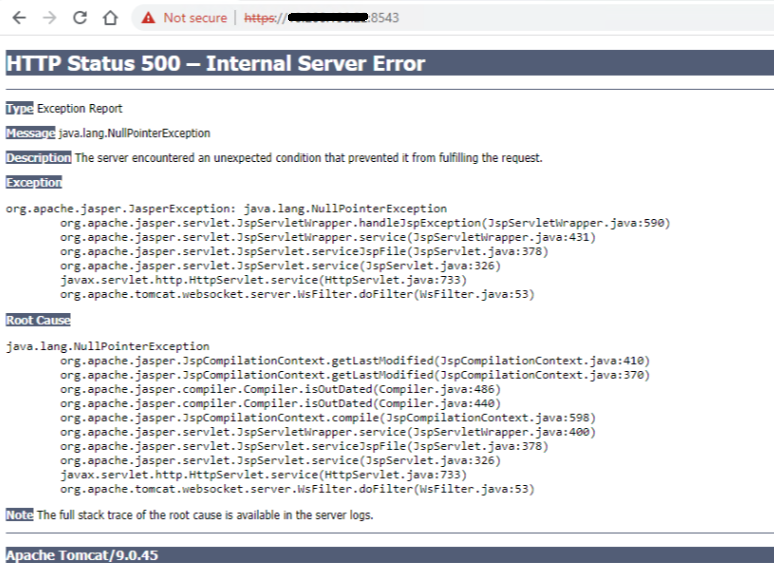
Kök kullanıcı olarak SSH aracılığıyla ACM'de oturum açın, ardından aşağıdaki komutlarla ACM hizmetini yeniden başlatın:
service dataprotection_webapp stop
service dataprotection_webapp start
Ardından ACM web sayfasını yeniden yükleyin.
Gerekirse daha fazla yardım için Dell Destek ekibiyle iletişime geçin.