IDPA:Apache Tomcat 默认安装的安全漏洞
Summary: 本文提供了在 ACM 上检测到的“Apache Tomcat 默认安装和/或欢迎页面安装的安全漏洞”的解决方法。
This article applies to
This article does not apply to
This article is not tied to any specific product.
Not all product versions are identified in this article.
Instructions
在端口 8543 的 IDPA 的 ACM 部分上可能会检测到以下漏洞:
| 漏洞标题 | 组件 | 服务端口 | 漏洞严重性级别 | 漏洞描述 | 漏洞证明 | 漏洞解决方案 |
|---|---|---|---|---|---|---|
| Apache Tomcat 默认安装或欢迎页面已安装 | ACM | 8543 | 5 | Tomcat 默认安装或“欢迎”页面安装在此服务器上。这通常表示新安装的服务器尚未正确配置,并且可能不知道。 通常,Tomcat 与其他应用程序一起安装,用户可能不知道 Web 服务器正在运行。这些服务器很少更新,也很少受到监控,为黑客提供了一个方便的目标,不太可能触发任何警报。 |
正在运行 HTTPS 服务 * 产品 Tomcat 存在 — Apache Tomcat 9.0.45。 HTTP GET 请求 https://<ACM IP>:8543/HTTP 响应代码预期为 200。 <h1>Apache Tomcat/9.0.45</h1> 27: </div> 28: <div id="upper" class="curved container"> 29: <div id="congrats" class="curved container"> 30: ... this, you have successfully installed Tomcat. Congratulations!</h2> |
更改默认页面,或完全停止并禁用 Tomcat 服务器。 如果需要此服务器来提供必要的功能,则默认页面应替换为相关内容。否则,应遵循“最低复杂性”的安全原则,将此服务器从网络中删除。 |
请按照下列步骤解决此问题:
- 以 root 用户身份登录到 ACM
- 将 工作目录切换到
/usr/local/dataprotection/apache-tomcat-9.0.*/webapps/ROOT.
acm:~ # cd /usr/local/dataprotection/apache-tomcat-9.0.*/webapps/ROOT
在此示例中,Apache Tomcat 路径为
/usr/local/dataprotection/apache-tomcat-9.0.45/webapps/ROOT
这可能会根据正在处理的 IDPA 版本进行更改。
- 确认
index.jsp文件存在于目录中:
acm:/usr/local/dataprotection/apache-tomcat-9.0.45/webapps/ROOT # ls -la
total 188
drwxr-x--- 3 idpauser idpauser  4096 Nov 12 00:29 .
drwxr-x--- 6 idpauser idpauser  4096 Dec  6 17:00 ..
-rw-r----- 1 idpauser idpauser 12243 Feb  4  2022 1
-rw-r----- 1 idpauser idpauser  6898 Mar 30  2021 RELEASE-NOTES.txt
drwxr-x--- 2 idpauser idpauser  4096 May  7  2021 WEB-INF
-rw-r----- 1 idpauser idpauser 27235 Mar 30  2021 asf-logo-wide.svg
-rw-r----- 1 idpauser idpauser   713 Mar 30  2021 bg-button.png
-rw-r----- 1 idpauser idpauser  1918 Mar 30  2021 bg-middle.png
-rw-r----- 1 idpauser idpauser  1401 Mar 30  2021 bg-nav.png
-rw-r----- 1 idpauser idpauser  3103 Mar 30  2021 bg-upper.png
-rw-r----- 1 idpauser idpauser 21630 Mar 30  2021 favicon.ico
-rw-r----- 1 idpauser idpauser 12243 Feb  4  2022 index.jsp
-rw-r----- 1 idpauser idpauser  5542 Mar 30  2021 tomcat.css
-rw-r----- 1 idpauser idpauser 67795 Mar 30  2021 tomcat.svg
acm:/usr/local/dataprotection/apache-tomcat-9.0.45/webapps/ROOT #
- 备份现有的
index.jsp方法是将其复制到index.jsp.default:
acm:/usr/local/dataprotection/apache-tomcat-9.0.45/webapps/ROOT # cp -p index.jsp index.jsp.default
提醒:作为参考,在实施解决方法之前,请运行以下命令以供参考
curl -kv https://localhost:8543。应在步骤 8 中使用此输出来比较解决方法后的输出。
- 创建 一个名为
index.jsp并将其内容替换为以下内容:
<html>
<body>
<%
response.sendRedirect("../dataprotection/");
%>
</body>
</html>
下面是有关如何创建和编辑 index.jsp 文件中:
- 删除 现有的
index.jsp
rm index.jsp
- 新建 一个
index.jsp文件。
vi index.jsp
- 按
i进入插入模式。这允许对文件进行编辑。 - 复制 上面的文本并将其粘贴到 vi 编辑器中。
- 按
Esc - 保存 更改并退出 vi,方法是键入
:wq!并按 Enter 键。
- 验证
index.jsp文件(文件):
acm:/usr/local/dataprotection/apache-tomcat-9.0.45/webapps/ROOT # ls -la
total 192
drwxr-x--- 3 idpauser idpauser  4096 Dec  6 17:05 .
drwxr-x--- 6 idpauser idpauser  4096 Dec  6 17:00 ..
-rw-r----- 1 idpauser idpauser 12243 Feb  4  2022 1
-rw-r----- 1 idpauser idpauser  6898 Mar 30  2021 RELEASE-NOTES.txt
drwxr-x--- 2 idpauser idpauser  4096 May  7  2021 WEB-INF
-rw-r----- 1 idpauser idpauser 27235 Mar 30  2021 asf-logo-wide.svg
-rw-r----- 1 idpauser idpauser   713 Mar 30  2021 bg-button.png
-rw-r----- 1 idpauser idpauser  1918 Mar 30  2021 bg-middle.png
-rw-r----- 1 idpauser idpauser  1401 Mar 30  2021 bg-nav.png
-rw-r----- 1 idpauser idpauser  3103 Mar 30  2021 bg-upper.png
-rw-r----- 1 idpauser idpauser 21630 Mar 30  2021 favicon.ico
-rw-r----- 1 idpauser idpauser    81 Feb 10 05:27 index.jsp
-rw-r----- 1 idpauser idpauser 12243 Feb  4  2022 index.jsp.default
-rw-r----- 1 idpauser idpauser  5542 Mar 30  2021 tomcat.css
-rw-r----- 1 idpauser idpauser 67795 Mar 30  2021 tomcat.svg

acm:/usr/local/dataprotection/apache-tomcat-9.0.45/webapps/ROOT # cat index.jsp
<html>
<body>
<%
response.sendRedirect("../dataprotection/");
%>
</body>
</html>
acm:/usr/local/dataprotection/apache-tomcat-9.0.45/webapps/ROOT #
- 打开 Web 浏览器 并访问 ACM 网页,并检查其是否正常工作。打开 ACM 网页时:
https://<ACM IP Adddress>:8543/
它应自动重定向:
https://<ACM IP Adddress>:8543/dataprotection/#/login
- 在 ACM 命令行中验证更改:
在实施解决方法之前,请
curl -kv https://localhost:8543 类似于:
提醒:而
curl -kv https://<ACM IP address>:8543 返回相同的结果:
acm:/usr/local/dataprotection/apache-tomcat-9.0.45/webapps/ROOT # curl -kv https://localhost:8543
* Rebuilt URL to: https://localhost:8543/
*   Trying 12x.0.0.1...
* TCP_NODELAY set
* Connected to localhost (12x.0.0.1) port 8543 (#0)
* ALPN, offering h2
* ALPN, offering http/1.1
* Cipher selection: ALL:!EXPORT:!EXPORT40:!EXPORT56:!aNULL:!LOW:!RC4:@STRENGTH
* TLSv1.2 (OUT), TLS header, Certificate Status (22):
* TLSv1.2 (OUT), TLS handshake, Client hello (1):
* TLSv1.2 (IN), TLS handshake, Server hello (2):
* TLSv1.2 (IN), TLS handshake, Certificate (11):
* TLSv1.2 (IN), TLS handshake, Server key exchange (12):
* TLSv1.2 (IN), TLS handshake, Server finished (14):
* TLSv1.2 (OUT), TLS handshake, Client key exchange (16):
* TLSv1.2 (OUT), TLS change cipher, Client hello (1):
* TLSv1.2 (OUT), TLS handshake, Finished (20):
* TLSv1.2 (IN), TLS change cipher, Client hello (1):
* TLSv1.2 (IN), TLS handshake, Finished (20):
* SSL connection using TLSv1.2 / ECDHE-RSA-AES256-SHA384
* ALPN, server did not agree to a protocol
* Server certificate:
*  subject: C=US; ST=California; L=Irvine; O=EMC; OU=Avamar; CN=localhost.localdom
*  start date: Feb  4 12:27:16 2022 GMT
*  expire date: Feb  2 12:27:16 2032 GMT
*  issuer: C=US; ST=California; L=Irvine; O=EMC; OU=Avamar; CN=localhost.localdom
*  SSL certificate verify result: self signed certificate (18), continuing anyway.
> GET / HTTP/1.1
> Host: localhost:8543
> User-Agent: curl/7.60.0
> Accept: */*
>
< HTTP/1.1 200
< Content-Type: text/html;charset=UTF-8
< Transfer-Encoding: chunked
< Date: Fri, 10 Feb 2023 05:39:29 GMT
< Connection: close
< Server: DataDomain
<


<!DOCTYPE html>
<html lang="en">
    <head>
        <meta charset="UTF-8" />
        <title>Apache Tomcat/9.0.45</title>
        <link href="favicon.ico" rel="icon" type="image/x-icon" />
        <link href="tomcat.css" rel="stylesheet" type="text/css" />
     <script>window.location = window.location.origin + "/dataprotection/"; </script></head>

    <body>
        <div id="wrapper">
            <div id="navigation" class="curved container">
                <span id="nav-home"><a href="https://tomcat.apache.org/">Home</a></span>
                <span id="nav-hosts"><a href="/docs/">Documentation</a></span>
                <span id="nav-config"><a href="/docs/config/">Configuration</a></span>
                <span id="nav-examples"><a href="/examples/">Examples</a></span>
                <span id="nav-wiki"><a href="https://wiki.apache.org/tomcat/FrontPage">Wiki</a></span>
                <span id="nav-lists"><a href="https://tomcat.apache.org/lists.html">Mailing Lists</a></span>
                <span id="nav-help"><a href="https://tomcat.apache.org/findhelp.html">Find Help</a></span>
                <br class="separator" />
            </div>
            <div id="asf-box">
                <h1>Apache Tomcat/9.0.45</h1>
            </div>
            <div id="upper" class="curved container">
                <div id="congrats" class="curved container">
                    <h2>If you're seeing this, you've successfully installed Tomcat. Congratulations!</h2>
                </div>

... skipped

    </body>

</html>
实施解决方法后,输出应变为:
acm:/usr/local/dataprotection/apache-tomcat-9.0.45/webapps/ROOT # curl -kv https://localhost:8543
* Rebuilt URL to: https://localhost:8543/
*   Trying 12x.0.0.1...
* TCP_NODELAY set
* Connected to localhost (12x.0.0.1) port 8543 (#0)
* ALPN, offering h2
* ALPN, offering http/1.1
* Cipher selection: ALL:!EXPORT:!EXPORT40:!EXPORT56:!aNULL:!LOW:!RC4:@STRENGTH
* TLSv1.2 (OUT), TLS header, Certificate Status (22):
* TLSv1.2 (OUT), TLS handshake, Client hello (1):
* TLSv1.2 (IN), TLS handshake, Server hello (2):
* TLSv1.2 (IN), TLS handshake, Certificate (11):
* TLSv1.2 (IN), TLS handshake, Server key exchange (12):
* TLSv1.2 (IN), TLS handshake, Server finished (14):
* TLSv1.2 (OUT), TLS handshake, Client key exchange (16):
* TLSv1.2 (OUT), TLS change cipher, Client hello (1):
* TLSv1.2 (OUT), TLS handshake, Finished (20):
* TLSv1.2 (IN), TLS change cipher, Client hello (1):
* TLSv1.2 (IN), TLS handshake, Finished (20):
* SSL connection using TLSv1.2 / ECDHE-RSA-AES256-SHA384
* ALPN, server did not agree to a protocol
* Server certificate:
*  subject: C=US; ST=California; L=Irvine; O=EMC; OU=Avamar; CN=localhost.localdom
*  start date: Feb  4 12:27:16 2022 GMT
*  expire date: Feb  2 12:27:16 2032 GMT
*  issuer: C=US; ST=California; L=Irvine; O=EMC; OU=Avamar; CN=localhost.localdom
*  SSL certificate verify result: self signed certificate (18), continuing anyway.
> GET / HTTP/1.1
> Host: localhost:8543
> User-Agent: curl/7.60.0
> Accept: */*
>
< HTTP/1.1 302
< Set-Cookie: JSESSIONID=3396A12A1A458BBB4DDCB636A72B66EE; Path=/; Secure; HttpOnly
< Location: ../dataprotection/
< Content-Type: text/html;charset=ISO-8859-1
< Content-Length: 0
< Date: Fri, 10 Feb 2023 05:42:58 GMT
< Connection: close
< Server: DataDomain
<
* Closing connection 0
* TLSv1.2 (OUT), TLS alert, Client hello (1):
Additional Information
如果在执行上述过程后 ACM 网页显示“HTTP Status 500 - Internal Server Error”(HTTP 状态 500 — 内部服务器错误),例如:
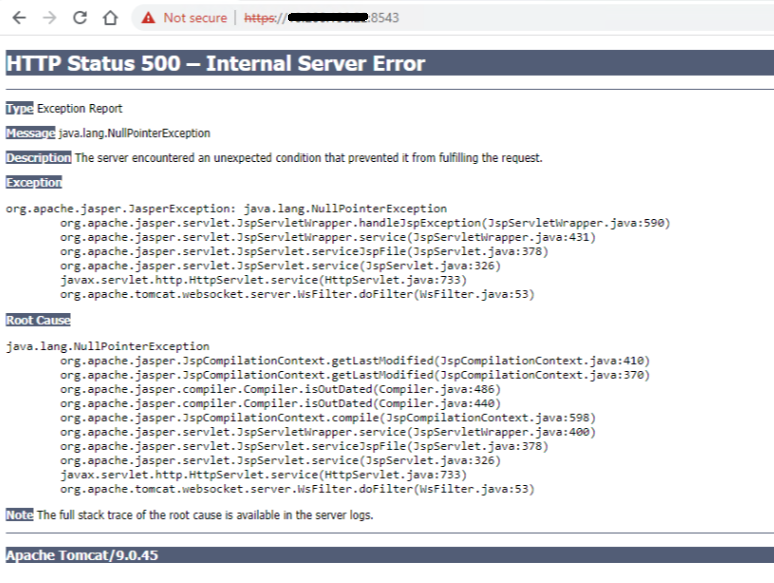
以 root 用户身份使用 SSH 登录 ACM,然后使用以下命令重新启动 ACM 服务:
service dataprotection_webapp stop
service dataprotection_webapp start
然后再次重新加载 ACM 网页。
如果需要,请联系 戴尔支持 以获得进一步的帮助。
Affected Products
PowerProtect DP4400, PowerProtect DP5300, PowerProtect DP5800, PowerProtect DP8300, PowerProtect DP8800, PowerProtect Data Protection Software, Integrated Data Protection Appliance Family, Integrated Data Protection Appliance Software
, PowerProtect DP5900, PowerProtect DP8400, PowerProtect DP8900
...
Article Properties
Article Number: 000206114
Article Type: How To
Last Modified: 25 Aug 2025
Version: 11
Find answers to your questions from other Dell users
Support Services
Check if your device is covered by Support Services.