DPA:エラー メッセージ「Error 401: Unauthorized Action」がUIに表示される
Summary: ユーザーが何時間もログインしたままになると、Data Protection Advisor (DPA) UIに「401 Unauthorized Action」エラーが表示されます。これは、非アクティブなためにセッションが自動的に閉じられたことが原因で発生します。
This article applies to
This article does not apply to
This article is not tied to any specific product.
Not all product versions are identified in this article.
Symptoms
ユーザーにDPA UIにエラー メッセージが表示され、再度ログインする必要があります。
Error 401: Unauthorized Action Cause
このエラーは、ユーザーが一度に1時間にわたってDPA UIにログインしており、非アクティブ状態のために開いているセッションが閉じられているか、その他の環境要因によってセッションが閉じられた場合に発生します。
Resolution
このエラーはDPA機能に影響しないため無視してかまいません
ユーザーはDPAに再度ログインして、通常どおりに続行できます。
UIでは、特定の期間が経過した後にクリーンなログオフを強制するために、次の設定を構成できます。
Administration > User & Security > Security Settings
Session Expirationパラメータは、exampleに6時間設定できます(デフォルトはoff)。
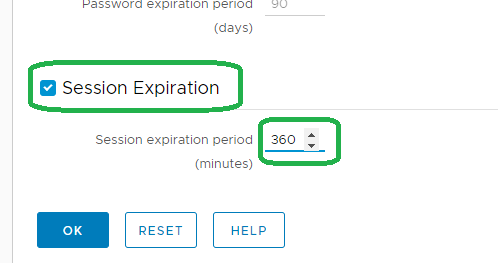
注:上記の機能は18.2.
で導入されました詳細については、サポートにお問い合わせください。
で導入されました詳細については、サポートにお問い合わせください。
Affected Products
Data Protection AdvisorProducts
Data Protection AdvisorArticle Properties
Article Number: 000173588
Article Type: Solution
Last Modified: 10 Jun 2026
Version: 5
Find answers to your questions from other Dell users
Support Services
Check if your device is covered by Support Services.