Dell Management Server Virtual Core Server 存在しないという通知
Summary: Dell Management Server Virtual を導入またはv11.4 にアップグレードし、電子メール通知を有効にすると、電子メール通知の受信者にエラー通知が毎時送信されます。
This article applies to
This article does not apply to
This article is not tied to any specific product.
Not all product versions are identified in this article.
Symptoms
対象製品:
- Dell Management Server Virtual
影響を受けるバージョン :
- v11.4
対象オペレーティング システム:
- Linux
受信したEメールの例:
Automatically generated alert from Dell Security Management Server Virtual – Service: Dell Core Server - HTTP / Event: Does not exist
Action: restart
Host: Server Hostname
Description: process is not running
Service: Dell Core Server - HTTP
Event: Does not exist
Cause
Dell Management Server Virtual コンポーネントのステータスをチェックするサービスは、コアサーバをリスンしていると検出できません。 netstatnet-toolsパッケージの一部であり、インストールされていません。
Resolution
- Dell Management Server Virtual管理コンソールにログインします。
注:
- Dell Security Management Server Virtualのデフォルト認証情報は次のとおりです。
- ユーザー名:
delluser - パスワード:
delluser
- ユーザー名:
- 管理者は、製品の[Virtual Appliance Menu]内でデフォルトのパスワードを変更できます。
- [Main Menu]から、[ Launch Shell ]を選択し、 Enterを押します。
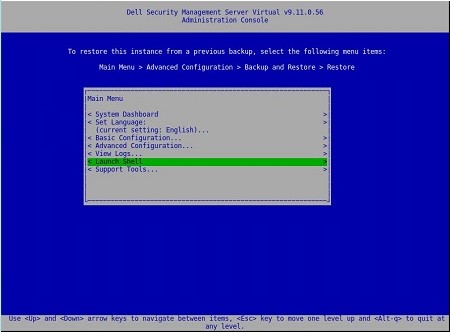
- ユーザーを
dellsupportコマンドでsu dellsupport
 注:
注:- Dell Security Management Server Virtualのデフォルト認証情報は次のとおりです。
- ユーザー名:
dellsupport - パスワード:
dellsupport
- ユーザー名:
- 管理者は、製品の[Virtual Appliance Menu]内でデフォルトのパスワードを変更できます。
- Dell Security Management Server Virtualのデフォルト認証情報は次のとおりです。
- のパスワードを確認します
dellsupportユーザーとしてログインします。

- のステータスを確認する
netstatコマンドでnetstat --version。 - プロファイルエディタで
netstatがインストールされていない場合は、次のエラーが表示されます。

- コマンドを実行します。
sudo apt install net-toolsをクリックして、Net Tools をインストールします。 - 実行
netstat --versionもう一度確認しますnetstatがインストールされました。

- タイプ
exitEnterを押してログアウトしますdellsupport。

- タイプ
exitEnterを押してシェルからログアウトし、メインメニューに戻ります。

Affected Products
Dell EncryptionArticle Properties
Article Number: 000202891
Article Type: Solution
Last Modified: 14 Sept 2026
Version: 3
Find answers to your questions from other Dell users
Support Services
Check if your device is covered by Support Services.