Dell Management Server Virtual Core Server Does Not Exist Notifications
Summary: 在将 Dell Management Server Virtual 部署或升级到 v11.4 并启用电子邮件通知时,电子邮件通知的收件人每小时都会收到错误通知。
This article applies to
This article does not apply to
This article is not tied to any specific product.
Not all product versions are identified in this article.
Symptoms
受影响的产品:
- Dell Management Server Virtual
受影响的版本:
- v11.4
受影响的操作系统:
- Linux
收到的电子邮件示例:
Automatically generated alert from Dell Security Management Server Virtual – Service: Dell Core Server - HTTP / Event: Does not exist
Action: restart
Host: Server Hostname
Description: process is not running
Service: Dell Core Server - HTTP
Event: Does not exist
Cause
检查 Dell Management Server Virtual 组件状态的服务无法检测到核心服务器正在侦听,因为 netstat未安装 nettools 软件包的一部分。
Resolution
- 登录 到 Dell Management Server Virtual 管理控制台。
注:
- Dell Security Management Server Virtual 的默认凭据为:
- 用户名:
delluser - 密码:
delluser
- 用户名:
- 管理员可以更改产品的虚拟设备菜单中的默认密码。
- 从主菜单中,选择 Launch Shell ,然后按 Enter 键。
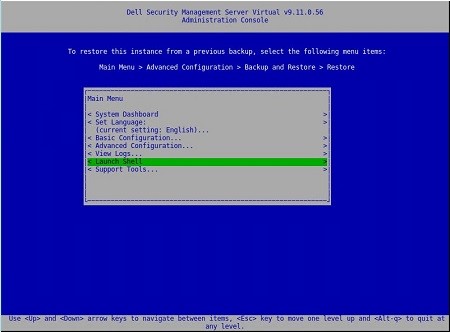
- 将用户更改为
dellsupport使用命令su dellsupport
 注:
注:- Dell Security Management Server Virtual 的默认凭据为:
- 用户名:
dellsupport - 密码:
dellsupport
- 用户名:
- 管理员可以更改产品的虚拟设备菜单中的默认密码。
- Dell Security Management Server Virtual 的默认凭据为:
- 确认以下项的密码:
dellsupport用户身份登录。

- 检查
netstat使用命令netstat --version。 - 如果
netstat未安装,您会看到以下错误。

- 运行命令
sudo apt install net-tools要安装 Net Tools。 - 运行
netstat --version再次验证netstat现已安装。

- 类型
exit并按 Enter 键注销dellsupport。

- 类型
exit并按 Enter 键从 shell 注销到主菜单。

Affected Products
Dell EncryptionArticle Properties
Article Number: 000202891
Article Type: Solution
Last Modified: 14 Sept 2026
Version: 3
Find answers to your questions from other Dell users
Support Services
Check if your device is covered by Support Services.