PowerProtect DD:如何设置和更改系统密码
Summary: 本文介绍在 Data Domain (DD) 系统上设置和更改密码的步骤。
This article applies to
This article does not apply to
This article is not tied to any specific product.
Not all product versions are identified in this article.
Instructions
必须先设置系统密码,然后系统才能支持数据加密或请求数字证书。
提醒:请确保将密码记录在一个安全的地方。密码无法恢复!
默认情况下,未设置系统密码长度。要确定是否为密码配置了最小长度,请执行以下作:
sysadmin@datadomain# system passphrase option show min-length
Option       Value
----------   ---------
min-length   (not set)
----------   ---------
从命令行 (CLI) 设置密码:
sysadmin@datadomain# system passphrase set
Enter new passphrase:
Re-enter new passphrase:
Passphrases matched.
The passphrase is set.
从 DD Web 界面 (GUI) 设置密码:
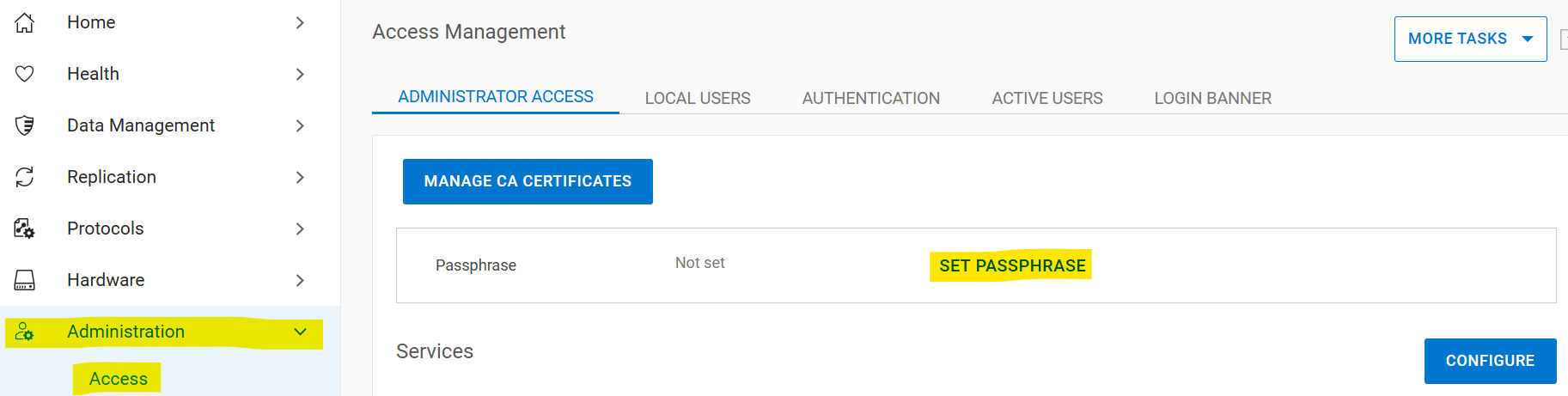
选择AdministrationAccessAdministrator >> AccessSet > Passphrase。如果未设置系统密码,Passphrase区域中将显示Set Passphrase按钮。如果配置了密码,则会显示Change Passphrase按钮,您的唯一选项是更改密码。
更改系统密码
更改密码的前提条件:
- 必须存在具有安全权限的帐户才能进行双用户身份验证
- 启用安全授权策略
- 禁用文件系统
如果没有安全监察官:
- 创建安全专员
sysadmin@datadomain# user add secuser role security Enter new password: Re-enter new password: Passwords matched. User "secuser" added. - 以安全专员身份登录,检查是否已启用安全授权策略。
secuser@datadomain# authorization policy show Runtime authorization policy is disabled. - 启用授权策略(如果已禁用)。
secusr@datadomain# authorization policy set security-officer enabled
Runtime authorization policy has been enabled.
从 CLI 中:
必须禁用文件系统才能更改密码。如果在运行命令时启用了文件系统,则密码更改将失败。sysadmin@datadomain# filesys disable
This action will disable the file system.
Applications may experience interruptions
while the file system is disabled.
Are you sure? (yes|no) [no]: yes
ok, proceeding.
Please wait........
The filesystem is now disabled.
sysadmin@datadomain# system passphrase change
This command requires authorization by a user having a 'security' role.
Please present credentials for such a user below.
Username: secuser
Password:
Enter current passphrase:
Enter new passphrase:
Re-enter new passphrase:
Passphrases matched.
The system passphrase has changed
sysadmin@datadomain# filesys enable
Please wait..........
The filesystem is now enabled.从 GUI:
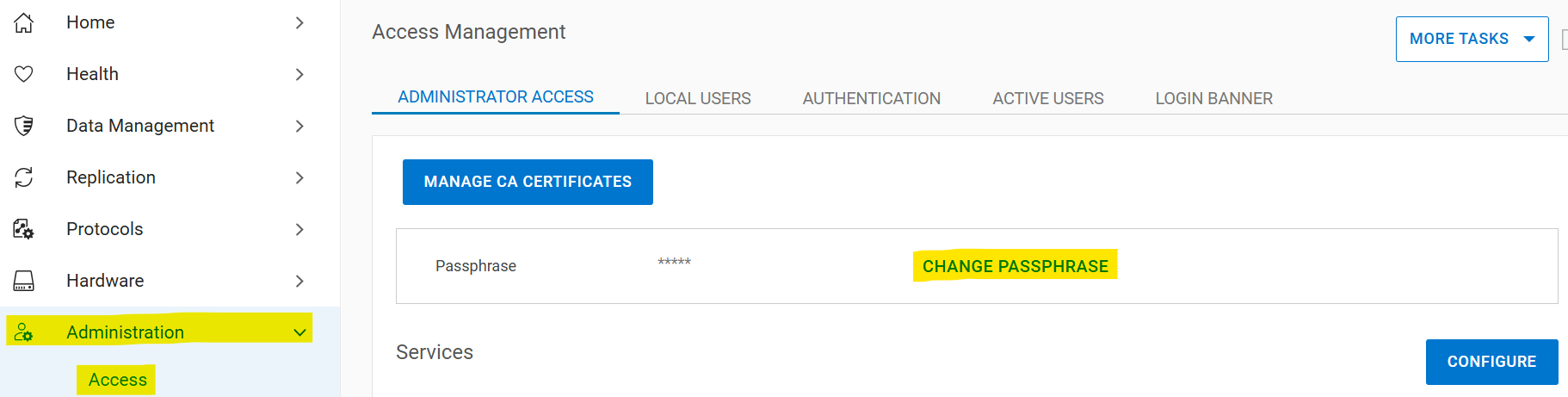
选择AdministrationAccessAdministrator >> AccessChange > Passphrase:
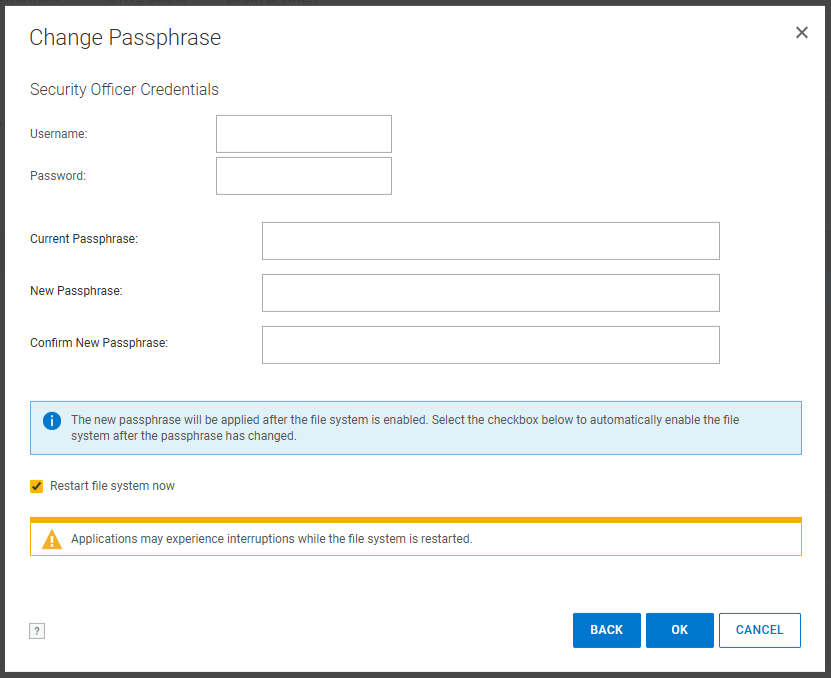
输入安全监察官凭据、当前密码和新密码。选中“Restart file system now”框:
如果在执行这些步骤后密码短语的问题未得到解决,请联系戴尔支持。
Additional Information
此内容已翻译成不同的语言:
| https://downloads.dell.com/TranslatedPDF/PT-BR_KB535800.pdf |
| https://downloads.dell.com/TranslatedPDF/ZH-CN_KB535800.pdf |
| https://downloads.dell.com/TranslatedPDF/ES_KB535800.pdf |
| https://downloads.dell.com/TranslatedPDF/DE_KB535800.pdf |
| https://downloads.dell.com/TranslatedPDF/FR_KB535800.pdf |
| https://downloads.dell.com/TranslatedPDF/IT_KB535800.pdf |
| https://downloads.dell.com/TranslatedPDF/JA_KB535800.pdf |
| https://downloads.dell.com/TranslatedPDF/NL_KB535800.pdf |
| https://downloads.dell.com/TranslatedPDF/KO_KB535800.pdf |
| https://downloads.dell.com/TranslatedPDF/RU_KB535800.pdf |
| https://downloads.dell.com/TranslatedPDF/PT_KB535800.pdf |
| https://downloads.dell.com/TranslatedPDF/SV_KB535800.pdf |
Affected Products
Data DomainProducts
Data Domain, DD OS 6.2, DD OS, DD OS 6.0, DD OS 6.1Article Properties
Article Number: 000019730
Article Type: How To
Last Modified: 12 Jan 2026
Version: 5
Find answers to your questions from other Dell users
Support Services
Check if your device is covered by Support Services.