ViPR Controller: database consistency check failed
Summary: ViPR Controller: database consistency check failed
Symptoms
If a database consistency check fails during its run, there are a few things that Customer Support should check for. It should be noted that if you are doing a scheduled upgrade, the upgrade can STILL OCCUR and is not blocked by getting a failure during the consistency check.
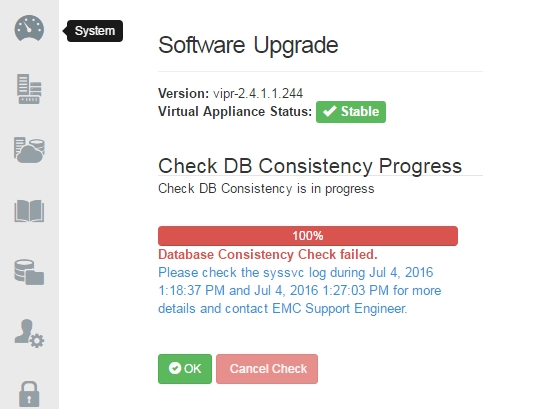
The ViPR C GUI will show:
Database Consistency Check failed.
Please check the syssvc log during <date> and <date> for more details and contact EMC Support Engineer.
Cause
The issue is due to objects that are not indexed properly or the presence of some stale records in the database.
Resolution
Workaround:
Per engineering, inconsistencies in the database are not a blocker for upgrade.
A backup of the database should be taken before proceeding with the upgrade.
Resolution:
After detecting the inconsistency error, the database may need to be cleaned up.
1. Perform a ViPR Controller database backup.
2. Trigger a database consistency check from the CLI (/opt/storageos/bin/dbutils check_db).
The DB consistency checker will generate at most three cleanup files automatically when inconsistency is found (in most cases, files cleanup-StorageOS.cql & cleanup-rebuildIndex.file are the ones present).
Files for different inconsistency types exist under /tmp path. The file names are:
-
/tmp/cleanup-StorageOS.cql
-
/tmp/cleanup-GeoStorageOS.cql
-
/tmp/cleanup-rebuildIndex.file
3. Open a database inconsistency Service Request with EMC ViPR Controller support and provide the following logs:
a. /opt/storageos/logs/dbutils.log
b. The generated "cleanup" files from /tmp
c. Output from "/opt/storageos/bin/diagutils -all_cfs" (ViPR Controller: How to use the Diagutils to collect ViPR data)
4. Once files have been reviewed and validated by VIPR Controller support, they will provide next steps to be taken.
Additional Information
This content is translated in other languages:
| https://downloads.dell.com/TranslatedPDF/PT-BR_KB534132.pdf |
| https://downloads.dell.com/TranslatedPDF/ZH-CN_KB534132.pdf |
| https://downloads.dell.com/TranslatedPDF/ES_KB534132.pdf |
| https://downloads.dell.com/TranslatedPDF/DE_KB534132.pdf |
| https://downloads.dell.com/TranslatedPDF/FR_KB534132.pdf |
| https://downloads.dell.com/TranslatedPDF/IT_KB534132.pdf |
| https://downloads.dell.com/TranslatedPDF/JA_KB534132.pdf |
| https://downloads.dell.com/TranslatedPDF/KO_KB534132.pdf |
| https://downloads.dell.com/TranslatedPDF/NL_KB534132.pdf |
| https://downloads.dell.com/TranslatedPDF/PT_KB534132.pdf |
| https://downloads.dell.com/TranslatedPDF/RU_KB534132.pdf |
| https://downloads.dell.com/TranslatedPDF/SV_KB534132.pdf |