Dell Networking OS9 How to configure a Manual DHCP Binding or Static DHCP binding
Summary: This article explains how to configure a Manual Dynamic Host Control Protocol (DHCP) Binding or Static DHCP binding in Dell Networking OS9.
Instructions
Index
What is Manual DHCP Binding
Configuration
Verify
Points to Remember
What is Manual DHCP Binding or Static DHCP binding?
The DHCP server assigns the client an available IP address automatically and then creates an entry in the binding table. However, the administrator can manually create an entry for a client. Manual bindings are useful when you want to guarantee that a network device receives a specific IP address.
Configuration
Dynamic Pool Configuration
|
Command |
Explanation |
|---|---|
DELL# configure |
Enter Configuration Mode |
DELL(conf)# ip dhcp server |
Enter DHCP mode |
DELL(config-dhcp)# pool <POOL NAME> |
Create the DHCP Pool |
DELL(config-dhcp-D-POOL)# network <Network/subnet mask> |
Specify the IP address |
DELL(config-dhcp-D-POOL)# default-router <Default Router IP> |
Specify default-router |
DELL(config-dhcp-D-POOL)# dns-server <DNS server IP> |
Specify DNS-Server |
Static Pool Configuration
|
Command |
Explanation |
|---|---|
DELL# configure |
Enter Configuration Mode |
DELL(conf)# ip dhcp server |
Enter DHCP mode |
DELL(config-dhcp)# pool <POOL NAME> |
Create DHCP Pool |
DELL(config-dhcp-S-POOL)# host-address <IP address> |
Specify IP address |
DELL(config-dhcp-S-POOL)# hardware-address <Mac address> |
Specify the client hardware address |
DELLconfig-dhcp-S-POOL)# default-router <Default Router IP> |
Specify default-router (Optional) |
DELL(config-dhcp-S-POOL)# dns-server <DNS server IP> |
Specify DNS-Server (Optional) |
Activate DHCP SERVER
|
Command |
Explanation |
|---|---|
DELL# configure |
Enter Configuration Mode |
DELL(conf)# ip dhcp server |
Enter DHCP mode |
DELL(config-dhcp)# no disable |
Activate DHCP Server |
Sample Configuration
Consider the below example where a Client with mac address 11:22:33:44:55:66 must receive IP address 10.0.0.100 from the DHCP server.
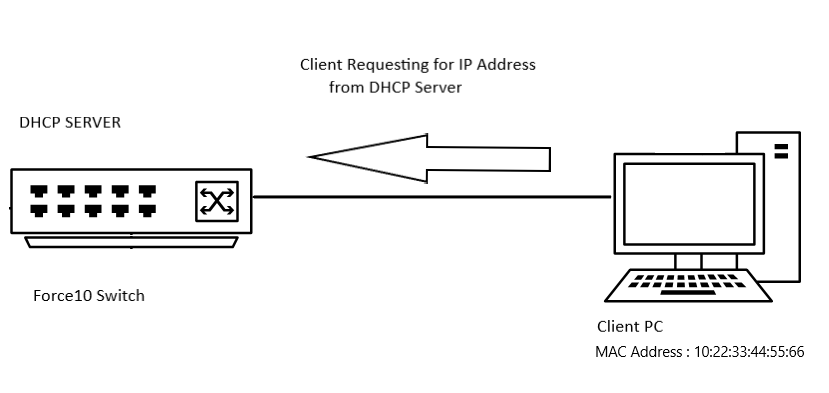
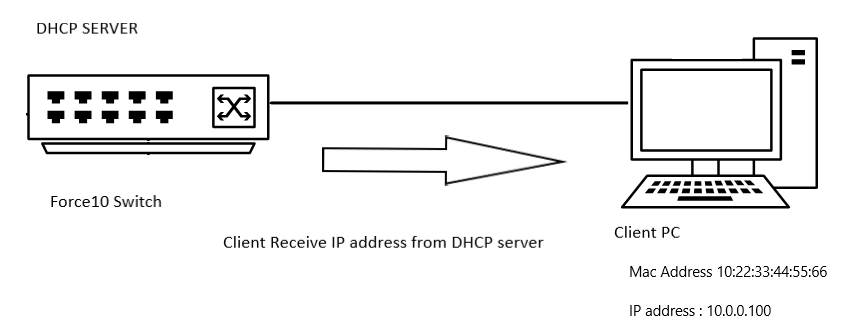
Sample Configuration
DELL# configure
DELL(conf)# ip dhcp server
DELL(config-dhcp)# pool DYNAMICPOOL
DELL(config-dhcp-DYNAMICPOOL)# network 10.0.0.0/24
DELL(config-dhcp-DYNAMICPOOL)# default-router 10.0.0.1
DELL(config-dhcp-DYNAMICPOOL)# dns-server 8.8.8.8
DELL(config-dhcp-DYNAMICPOOL)# exit
DELL(config-dhcp)#

DELL(config-dhcp)# pool STATICPOOL
DELL(config-dhcp-STATICPOOL)# host-address 10.0.0.100
DELL(config-dhcp-STATICPOOL)# hardware-address 10:22:33:44:55:66
DELL(config-dhcp-DYNAMICPOOL)# exit
DELL(config-dhcp)#

DELL(config-dhcp)# no disable
Verify
DHCP CONFIGURATION
To verify the DHCP server configuration and pool details use below command:
DELL# show ip dhcp configuration pool
Sample output
DELL# show ip dhcp configuration  pool

Pool Name            : DYNAMICPOOL
Pool Type            : Dynamic
Domain Name          :
Lease Time           : 1Day 0Hrs 0Mins
DNS Servers          : 8.8.8.8
Default Routers      : 10.0.0.1
Network              : 10.0.0.0 255.255.255.0

Pool Name            : STATICPOOL
Pool Type            : Manual
Domain Name          :
Lease Time           : 1Day 0Hrs 0Mins
DNS Servers          :
Default Routers      :
Hardware Address     : 10:22:33:44:55:66
Hardware Address Type: Ethernet
Host                 : 10.0.0.100 0.0.0.0
Binding
To verify the IP address provided by DHCP server use below command:
DELL# show ip dhcp binding

Sample output
DELLEMC#show ip dhcp binding
 IP address      Hardware address   Lease expiration     Type
10.0.0.100      10:22:33:44:55:66    infinite             Manual
Total number of entries in the table: 1
Points to remember
- You must have a dynamic pool range in that network for the static pool to work
- Manual bindings can be considered single-host address pools. There is no limit on the number of manual bindings,
- We can only configure one manual binding per host.
- Ensure that we are using valid host IP within the subnet range as the host IP.