Dell Unity: How to check Block Size (User Correctable)
Summary: How to identify the block size used to configure the storage resources accordingly for specific applications. The block size used varies by specific drive types.
This article applies to
This article does not apply to
This article is not tied to any specific product.
Not all product versions are identified in this article.
Instructions
Solid State Drives (SSD) use a block size of 520 bytes.
Serial Attached SCSI (SAS) uses a block size of 4160 bytes, which is equal to (8) 520-byte blocks.
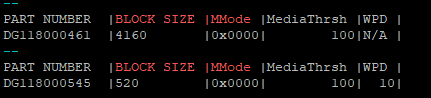
To verify the block size from the Unity CLI, run the following command:
svc_diag -s sas | grep -A 1 "BLOCK SIZE |MMode"
Example output:
Affected Products
Dell EMC UnityArticle Properties
Article Number: 000268474
Article Type: How To
Last Modified: 17 Jan 2025
Version: 1
Find answers to your questions from other Dell users
Support Services
Check if your device is covered by Support Services.