NVP-vProxy: vSphere-Plug-in erzeugt Verbindung zum angeforderten NetWorker-Server kann nicht hergestellt werden
Summary: Das Backup- und Recovery-Plug-in der virtuellen vSphere Web Client-VM (VM) kann keine Verbindung herstellen mit der Meldung "Verbindung zum angeforderten NetWorker-Server kann nicht hergestellt werden. Bitte überprüfen Sie Ihre Anmeldeinformationen." ...
Symptoms
Die Integration von NetWorker VMware Protection wird mit der vProxy-Appliance konfiguriert. Die Spalte emcauthctomcat kann entfernt werden, wenn die JRE-Installation (Java Runtime Environment) auf dem NetWorker-Server aktualisiert wird. Das vSphere Web Client-Plug-in kann mit dem folgenden Fehler keine Verbindung zum NetWorker-Server herstellen:
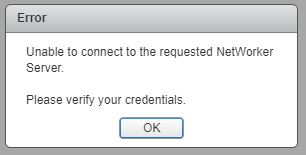
Abbildung 1: Verbindung zum angeforderten NetWorker-Server kann nicht hergestellt werden.
Die localhost_access_log. YYYY-MM-DD.txt zeigt die empfangene Anforderung an:
/nsr/authc/logs/localhost_access_log.YYYY-MM-DD.txt
Windows:
C:\Program Files\EMC NetWorker\nsr\authc-server\tomcat\logs\localhost_access_log.YYYY-MM-DD.txt
xxx.xxx.xxx.xxx - - [DD/MM/YYYY:HH:MM:SS -0500] "GET /nwrestapi/v2/ HTTP/1.1" 500 690
xxx.xxx.xxx.xxx - - [DD/MM/YYYY:HH:MM:SS -0500] "GET /nwrestapi/v2/internal/users/administrator HTTP/1.1" 500 718
xxx.xxx.xxx.xxx - - [DD/MM/YYYY:HH:MM:SS -0500] "POST /ebr-server/auth/login HTTP/1.1" 204 -
Die ebr-server.log zeigt die Authentifizierungsanforderung an:
/nsr/authc/logs/ebr-server.log
Windows:
C:\Program Files\EMC NetWorker\authc-server\tomcat\logs\ebr-server.log
YYYY-MM-DD HH:MM:SS INFO Logging into appliance with type: networker
YYYY-MM-DD HH:MM:SS INFO Attempting connection in NwConnectService
YYYY-MM-DD HH:MM:SS INFO Testing provided credentials for nw calls
YYYY-MM-DD HH:MM:SS INFO Call NW: [https://xxx.xxx.xxx.xxx:9090/nwrestapi/v2/]
YYYY-MM-DD HH:MM:SS INFO Testing provided credentials for nw calls
YYYY-MM-DD HH:MM:SS INFO Call NW: [https://xxx.xxx.xxx.xxx:9090/nwrestapi/v2/internal/users/administrator]
YYYY-MM-DD HH:MM:SS ERROR NetWorker login failed with given credentials - not admin
YYYY-MM-DD HH:MM:SS ERROR Failed to authentciate nw credentials for Administrator
org.apache.http.auth.AuthenticationException: Authentication Invalid
    at com.emc.nw.business.NwConnectBusiness.assertValidNetWorkerLogin(NwConnectBusiness.java:86)
...
YYYY-MM-DD HH:MM:SS ERROR Failed To Get VDR Info
org.apache.http.auth.AuthenticationException: Authentication with nw was unsuccessfull.
    at com.emc.nw.business.NwConnectBusiness.sessionConnect(NwConnectBusiness.java:44)
....
YYYY-MM-DD HH:MM:SS FATAL normally fatal, but seeing what happens when coming from vCenter for goldfish.
Die restapi.log zeigt eine Ausnahme an:
/nsr/logs/restapi/restapi.log
Windows:
C:\Program Files\EMC NetWorker\nsr\logs\restapi.log
YYYY-MM-DD HH:MM:SS DEBUG [http-nio-9090-exec-1] c.e.n.w.a.AuthcClient - Auth request: tenant 'null', domain 'null', userId 'administrator'.
YYYY-MM-DD HH:MM:SS WARN  [http-nio-9090-exec-1] o.a.c.p.PhaseInterceptorChain - Interceptor for {https://localhost:9090/auth-server/api/v1/sec/authenticate}WebClient has thrown exception, unwinding now
org.apache.cxf.interceptor.Fault: Could not send Message.
    at org.apache.cxf.interceptor.MessageSenderInterceptor$MessageSenderEndingInterceptor.handleMessage(MessageSenderInterceptor.java:64) ~[cxf-core-3.1.0.jar:3.1.0]
....
Caused by: javax.net.ssl.SSLHandshakeException: SSLHandshakeException invoking https://localhost:9090/auth-server/api/v1/sec/authenticate: sun.security.validator.ValidatorException: PKIX path building failed: sun.security.provider.certpath.SunCertPathBuilderException: unable to find valid certification path to requested target
    at sun.reflect.NativeConstructorAccessorImpl.newInstance0(Native Method) ~[na:1.8.0_121]
....
Caused by: javax.net.ssl.SSLHandshakeException: sun.security.validator.ValidatorException: PKIX path building failed: sun.security.provider.certpath.SunCertPathBuilderException: unable to find valid certification path to requested target
    at sun.security.ssl.Alerts.getSSLException(Unknown Source) ~[na:1.8.0_121]
....
YYYY-MM-DD HH:MM:SS ERROR [http-nio-9090-exec-1] c.e.n.w.WebApiExceptionMapper - Status 'Internal Server Error', msg: javax.net.ssl.SSLHandshakeException: SSLHandshakeException invoking https://localhost:9090/auth-server/api/v1/sec/authenticate: sun.security.validator.ValidatorException: PKIX path building failed: sun.security.provider.certpath.SunCertPathBuilderException: unable to find valid certification path to requested target
javax.ws.rs.ProcessingException: javax.net.ssl.SSLHandshakeException: SSLHandshakeException invoking https://localhost:9090/auth-server/api/v1/sec/authenticate: sun.security.validator.ValidatorException: PKIX path building failed: sun.security.provider.certpath.SunCertPathBuilderException: unable to find valid certification path to requested target
    at org.apache.cxf.jaxrs.client.AbstractClient.checkClientException(AbstractClient.java:557) ~[cxf-rt-rs-client-3.1.0.jar:3.1.0]
....
Cause
Die JRE-Installation verfügt nicht mehr über NetWorker Tomcat Authentication (emcauthctomcat) -Zertifikat, das vom vSphere Web Client-VM-Backup- und Recovery-Plug-in verwendet wird.
Resolution
Das emcauthctomcat-Zertifikat muss in die Java JRE-Keystore-Konfiguration importiert werden. Hier finden Sie eine Übersicht, um zu überprüfen, ob das Zertifikat vorhanden ist und um das Zertifikat zu importieren.
- Öffnen Sie eine Windows-Eingabeaufforderung oder eine Linux-Terminalsitzung auf dem NetWorker-Server.
- Wechseln Sie in das Java JRE-Installationsverzeichnis. Das Verzeichnis ändert sich je nach installierter Java JRE-Version.
- Windows:
C:\Program Files\Java\jre1.8.0_151\bin> - Linux:
/usr/java/jre1.8.0_151/bin
- Windows: C:\Programme\NRE\java\jre#.#.#_###\bin
- Linux: /opt/nre/java/latest/bin
- Verwenden Sie das Befehlszeilendienstprogramm keytool, um zu überprüfen, ob das Zertifikat nicht im Java JRE cacerts-Keystore vorhanden ist:
- Windows:
keytool -list -storepass changeit -keystore ..\lib\security\cacerts | findstr emc
- Linux:
keytool -storepass changeit -list keystore ../lib/security/cacerts | grep emc
- Verwenden Sie das Befehlszeilendienstprogramm keytool, um die Datei
emcauthctomcatZertifikat:- Windows:
keytool -importcert -storepass changeit -trustcacerts -alias emcauthctomcat -file "C:\Program Files\EMC NetWorker\nsr\authc-server\tomcat\conf\emcauthctomcat.cer" -keystore ..\lib\security\cacerts
- Linux:
keytool -importcert -storepass changeit -trustcacerts -alias emcauthctomcat -file /nsr/authc/conf/emcauthctomcat.cer -keystore ../lib/security/cacerts
- Verwenden Sie das Befehlszeilendienstprogramm keytool, um zu überprüfen, ob das Zertifikat jetzt im Java JRE cacerts-Keystore vorhanden ist:
- Windows:
keytool -list -storepass changeit -keystore ..\lib\security\cacerts | findstr emc
- Linux:
keytool -storepass changeit -list keystore ../lib/security/cacerts | grep emc
Additional Information
Beispielausgabe auf einem Windows NetWorker-Server mit JRE-Version 1.8.0_151.
C:\Program Files\Java\jre1.8.0_151\bin>keytool -list -storepass changeit -keystore ..\lib\security\cacerts |findstr emc

C:\Program Files\Java\jre1.8.0_151\bin>
C:\Program Files\Java\jre1.8.0_151\bin>keytool -importcert -storepass changeit -trustcacerts -alias emcauthctomcat -file "C:\Program Files\EMC NetWorker\nsr\authc-server\tomcat\conf\emcauthctomcat.cer"  -keystore ..\lib\security\cacerts
Owner: CN=mynetworkerserver.mydomain.emc.com
Issuer: CN=mynetworkerserver.mydomain.emc.com
Serial number: f492a88f
Valid from: Thu May 11 13:45:42 PDT 2017 until: Mon May 05 13:45:42 PDT 2042
Certificate fingerprints:
         MD5:  BA:A6:DC:CE:4F:96:9E:57:3D:2A:57:07:D9:CC:A8:1F
         SHA1: 4D:F6:B4:54:44:24:B9:B7:E7:7A:DB:C2:6E:AE:4F:CD:F9:57:F3:45
         SHA256: FA:A8:88:CD:A1:A4:45:3D:AF:50:D9:E1:6E:F0:E7:60:61:61:24:11:ED:34:91:CE:DE:92:DA:C8:ED:4C:CD:13
Signature algorithm name: SHA512withRSA
Subject Public Key Algorithm: 3072-bit RSA key
Version: 3

Extensions:

#1: ObjectId: 2.5.29.17 Criticality=false
SubjectAlternativeName [
  DNSName: localhost
  IPAddress: 127.0.0.1
  DNSName: mynetworkerserver.mydomain.emc.com
]

Trust this certificate? [no]:  yes
Certificate was added to keystore

C:\Program Files\Java\jre1.8.0_151\bin>
C:\Program Files\Java\jre1.8.0_151\bin>keytool -list -storepass changeit -keystore ..\lib\security\cacerts |findstr emc
emcauthctomcat, Nov 15, 2017, trustedCertEntry,
C:\Program Files\Java\jre1.8.0_151\bin>