NVP-vProxy: el plug-in de vSphere genera No se puede conectar al NetWorker Server solicitado
Summary: El plug-in de respaldo y recuperación de máquina virtual (VM) de vSphere Web Client no se puede conectar y se muestra el mensaje "No se pudo conectar al NetWorker Server solicitado. Por favor, verifique sus credenciales". ...
Symptoms
La integración de NetWorker VMware Protection se configura con el vProxy Appliance. La variable emcauthctomcat se puede quitar cuando se actualiza la instalación de Java Runtime Environment (JRE) en NetWorker Server. El plug-in de vSphere Web Client no se puede conectar a NetWorker Server y presenta el siguiente error:
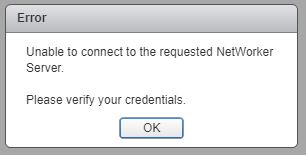
Figura 1: No se puede conectar al servidor NetWorker Server solicitado.
El localhost_access_log. YYYY-MM-DD.txt muestra la solicitud recibida:
/nsr/authc/logs/localhost_access_log.YYYY-MM-DD.txt
Windows:
C:\Program Files\EMC NetWorker\nsr\authc-server\tomcat\logs\localhost_access_log.YYYY-MM-DD.txt
xxx.xxx.xxx.xxx - - [DD/MM/YYYY:HH:MM:SS -0500] "GET /nwrestapi/v2/ HTTP/1.1" 500 690
xxx.xxx.xxx.xxx - - [DD/MM/YYYY:HH:MM:SS -0500] "GET /nwrestapi/v2/internal/users/administrator HTTP/1.1" 500 718
xxx.xxx.xxx.xxx - - [DD/MM/YYYY:HH:MM:SS -0500] "POST /ebr-server/auth/login HTTP/1.1" 204 -
La ebr-server.log muestra la solicitud de autenticación:
/nsr/authc/logs/ebr-server.log
Windows:
C:\Program Files\EMC NetWorker\authc-server\tomcat\logs\ebr-server.log
YYYY-MM-DD HH:MM:SS INFO Logging into appliance with type: networker
YYYY-MM-DD HH:MM:SS INFO Attempting connection in NwConnectService
YYYY-MM-DD HH:MM:SS INFO Testing provided credentials for nw calls
YYYY-MM-DD HH:MM:SS INFO Call NW: [https://xxx.xxx.xxx.xxx:9090/nwrestapi/v2/]
YYYY-MM-DD HH:MM:SS INFO Testing provided credentials for nw calls
YYYY-MM-DD HH:MM:SS INFO Call NW: [https://xxx.xxx.xxx.xxx:9090/nwrestapi/v2/internal/users/administrator]
YYYY-MM-DD HH:MM:SS ERROR NetWorker login failed with given credentials - not admin
YYYY-MM-DD HH:MM:SS ERROR Failed to authentciate nw credentials for Administrator
org.apache.http.auth.AuthenticationException: Authentication Invalid
    at com.emc.nw.business.NwConnectBusiness.assertValidNetWorkerLogin(NwConnectBusiness.java:86)
...
YYYY-MM-DD HH:MM:SS ERROR Failed To Get VDR Info
org.apache.http.auth.AuthenticationException: Authentication with nw was unsuccessfull.
    at com.emc.nw.business.NwConnectBusiness.sessionConnect(NwConnectBusiness.java:44)
....
YYYY-MM-DD HH:MM:SS FATAL normally fatal, but seeing what happens when coming from vCenter for goldfish.
La restapi.log muestra una excepción:
/nsr/logs/restapi/restapi.log
Windows:
C:\Program Files\EMC NetWorker\nsr\logs\restapi.log
YYYY-MM-DD HH:MM:SS DEBUG [http-nio-9090-exec-1] c.e.n.w.a.AuthcClient - Auth request: tenant 'null', domain 'null', userId 'administrator'.
YYYY-MM-DD HH:MM:SS WARN  [http-nio-9090-exec-1] o.a.c.p.PhaseInterceptorChain - Interceptor for {https://localhost:9090/auth-server/api/v1/sec/authenticate}WebClient has thrown exception, unwinding now
org.apache.cxf.interceptor.Fault: Could not send Message.
    at org.apache.cxf.interceptor.MessageSenderInterceptor$MessageSenderEndingInterceptor.handleMessage(MessageSenderInterceptor.java:64) ~[cxf-core-3.1.0.jar:3.1.0]
....
Caused by: javax.net.ssl.SSLHandshakeException: SSLHandshakeException invoking https://localhost:9090/auth-server/api/v1/sec/authenticate: sun.security.validator.ValidatorException: PKIX path building failed: sun.security.provider.certpath.SunCertPathBuilderException: unable to find valid certification path to requested target
    at sun.reflect.NativeConstructorAccessorImpl.newInstance0(Native Method) ~[na:1.8.0_121]
....
Caused by: javax.net.ssl.SSLHandshakeException: sun.security.validator.ValidatorException: PKIX path building failed: sun.security.provider.certpath.SunCertPathBuilderException: unable to find valid certification path to requested target
    at sun.security.ssl.Alerts.getSSLException(Unknown Source) ~[na:1.8.0_121]
....
YYYY-MM-DD HH:MM:SS ERROR [http-nio-9090-exec-1] c.e.n.w.WebApiExceptionMapper - Status 'Internal Server Error', msg: javax.net.ssl.SSLHandshakeException: SSLHandshakeException invoking https://localhost:9090/auth-server/api/v1/sec/authenticate: sun.security.validator.ValidatorException: PKIX path building failed: sun.security.provider.certpath.SunCertPathBuilderException: unable to find valid certification path to requested target
javax.ws.rs.ProcessingException: javax.net.ssl.SSLHandshakeException: SSLHandshakeException invoking https://localhost:9090/auth-server/api/v1/sec/authenticate: sun.security.validator.ValidatorException: PKIX path building failed: sun.security.provider.certpath.SunCertPathBuilderException: unable to find valid certification path to requested target
    at org.apache.cxf.jaxrs.client.AbstractClient.checkClientException(AbstractClient.java:557) ~[cxf-rt-rs-client-3.1.0.jar:3.1.0]
....
Cause
La instalación de JRE ya no tiene la autenticación Tomcat de NetWorker (emcauthctomcat) certificado utilizado por el plug-in de respaldo y recuperación de VM de vSphere Web Client.
Resolution
El certificado emcauthctomcat se debe importar a la configuración del almacenamiento de claves de JRE de Java. Esta es una visión general para comprobar si el certificado existe e importarlo.
- Abra un símbolo del sistema de Windows o una sesión de terminal de Linux en NetWorker Server.
- Cambie al directorio de instalación de JRE de Java. El directorio cambia según la versión de JRE de Java instalada.
- Windows:
C:\Program Files\Java\jre1.8.0_151\bin> - Linux:
/usr/java/jre1.8.0_151/bin
- Windows: C:\Archivos de programa\NRE\java\jre#.#.#_####\bin
- Linux: /opt/nre/java/latest/bin
- Utilice la utilidad de línea de comandos keytool para validar si el certificado no existe en el almacenamiento de claves cacerts de Java JRE:
- Windows:
keytool -list -storepass changeit -keystore ..\lib\security\cacerts | findstr emc
- Linux:
keytool -storepass changeit -list keystore ../lib/security/cacerts | grep emc
- Utilice la utilidad de línea de comandos keytool para importar el
emcauthctomcatcertificado:- Windows:
keytool -importcert -storepass changeit -trustcacerts -alias emcauthctomcat -file "C:\Program Files\EMC NetWorker\nsr\authc-server\tomcat\conf\emcauthctomcat.cer" -keystore ..\lib\security\cacerts
- Linux:
keytool -importcert -storepass changeit -trustcacerts -alias emcauthctomcat -file /nsr/authc/conf/emcauthctomcat.cer -keystore ../lib/security/cacerts
- Utilice la utilidad de línea de comandos keytool para validar si el certificado ahora existe en el almacenamiento de claves cacerts de Java JRE:
- Windows:
keytool -list -storepass changeit -keystore ..\lib\security\cacerts | findstr emc
- Linux:
keytool -storepass changeit -list keystore ../lib/security/cacerts | grep emc
Additional Information
Ejemplo de resultado en un NetWorker Server Windows con JRE versión 1.8.0_151.
C:\Program Files\Java\jre1.8.0_151\bin>keytool -list -storepass changeit -keystore ..\lib\security\cacerts |findstr emc

C:\Program Files\Java\jre1.8.0_151\bin>
C:\Program Files\Java\jre1.8.0_151\bin>keytool -importcert -storepass changeit -trustcacerts -alias emcauthctomcat -file "C:\Program Files\EMC NetWorker\nsr\authc-server\tomcat\conf\emcauthctomcat.cer"  -keystore ..\lib\security\cacerts
Owner: CN=mynetworkerserver.mydomain.emc.com
Issuer: CN=mynetworkerserver.mydomain.emc.com
Serial number: f492a88f
Valid from: Thu May 11 13:45:42 PDT 2017 until: Mon May 05 13:45:42 PDT 2042
Certificate fingerprints:
         MD5:  BA:A6:DC:CE:4F:96:9E:57:3D:2A:57:07:D9:CC:A8:1F
         SHA1: 4D:F6:B4:54:44:24:B9:B7:E7:7A:DB:C2:6E:AE:4F:CD:F9:57:F3:45
         SHA256: FA:A8:88:CD:A1:A4:45:3D:AF:50:D9:E1:6E:F0:E7:60:61:61:24:11:ED:34:91:CE:DE:92:DA:C8:ED:4C:CD:13
Signature algorithm name: SHA512withRSA
Subject Public Key Algorithm: 3072-bit RSA key
Version: 3

Extensions:

#1: ObjectId: 2.5.29.17 Criticality=false
SubjectAlternativeName [
  DNSName: localhost
  IPAddress: 127.0.0.1
  DNSName: mynetworkerserver.mydomain.emc.com
]

Trust this certificate? [no]:  yes
Certificate was added to keystore

C:\Program Files\Java\jre1.8.0_151\bin>
C:\Program Files\Java\jre1.8.0_151\bin>keytool -list -storepass changeit -keystore ..\lib\security\cacerts |findstr emc
emcauthctomcat, Nov 15, 2017, trustedCertEntry,
C:\Program Files\Java\jre1.8.0_151\bin>