NVP-vProxy: vSphere 플러그인이 요청한 NetWorker Server에 연결할 수 없음
Summary: vSphere Web Client VM(Virtual Machine) 백업 및 복구 플러그인이 "요청한 NetWorker Server에 연결할 수 없습니다. 자격 증명을 확인하십시오."
This article applies to
This article does not apply to
This article is not tied to any specific product.
Not all product versions are identified in this article.
Symptoms
NetWorker VMware Protection 통합은 vProxy 어플라이언스로 구성됩니다. 이 emcauthctomcat NetWorker Server에서 JRE(Java Runtime Environment) 설치를 업그레이드할 때 제거될 수 있습니다. vSphere Web Client 플러그인이 NetWorker Server에 연결하지 못하고 다음 오류가 표시됩니다.
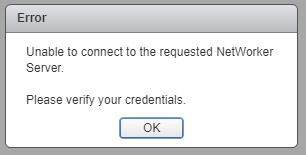
그림 1: 요청한 NetWorker Server에 연결할 수 없습니다.
localhost_access_log. YYYY-MM-DD.txt에는 수신된 요청이 표시됩니다.
Linux:
Windows:
/nsr/authc/logs/localhost_access_log.YYYY-MM-DD.txt
Windows:
C:\Program Files\EMC NetWorker\nsr\authc-server\tomcat\logs\localhost_access_log.YYYY-MM-DD.txt
xxx.xxx.xxx.xxx - - [DD/MM/YYYY:HH:MM:SS -0500] "GET /nwrestapi/v2/ HTTP/1.1" 500 690
xxx.xxx.xxx.xxx - - [DD/MM/YYYY:HH:MM:SS -0500] "GET /nwrestapi/v2/internal/users/administrator HTTP/1.1" 500 718
xxx.xxx.xxx.xxx - - [DD/MM/YYYY:HH:MM:SS -0500] "POST /ebr-server/auth/login HTTP/1.1" 204 -
ebr-server.log에는 인증 요청이 표시됩니다.
Linux:
Windows:
/nsr/authc/logs/ebr-server.log
Windows:
C:\Program Files\EMC NetWorker\authc-server\tomcat\logs\ebr-server.log
YYYY-MM-DD HH:MM:SS INFO Logging into appliance with type: networker
YYYY-MM-DD HH:MM:SS INFO Attempting connection in NwConnectService
YYYY-MM-DD HH:MM:SS INFO Testing provided credentials for nw calls
YYYY-MM-DD HH:MM:SS INFO Call NW: [https://xxx.xxx.xxx.xxx:9090/nwrestapi/v2/]
YYYY-MM-DD HH:MM:SS INFO Testing provided credentials for nw calls
YYYY-MM-DD HH:MM:SS INFO Call NW: [https://xxx.xxx.xxx.xxx:9090/nwrestapi/v2/internal/users/administrator]
YYYY-MM-DD HH:MM:SS ERROR NetWorker login failed with given credentials - not admin
YYYY-MM-DD HH:MM:SS ERROR Failed to authentciate nw credentials for Administrator
org.apache.http.auth.AuthenticationException: Authentication Invalid
    at com.emc.nw.business.NwConnectBusiness.assertValidNetWorkerLogin(NwConnectBusiness.java:86)
...
YYYY-MM-DD HH:MM:SS ERROR Failed To Get VDR Info
org.apache.http.auth.AuthenticationException: Authentication with nw was unsuccessfull.
    at com.emc.nw.business.NwConnectBusiness.sessionConnect(NwConnectBusiness.java:44)
....
YYYY-MM-DD HH:MM:SS FATAL normally fatal, but seeing what happens when coming from vCenter for goldfish.
restapi.log에는 예외가 표시됩니다.
Linux:
Windows:
/nsr/logs/restapi/restapi.log
Windows:
C:\Program Files\EMC NetWorker\nsr\logs\restapi.log
YYYY-MM-DD HH:MM:SS DEBUG [http-nio-9090-exec-1] c.e.n.w.a.AuthcClient - Auth request: tenant 'null', domain 'null', userId 'administrator'.
YYYY-MM-DD HH:MM:SS WARN  [http-nio-9090-exec-1] o.a.c.p.PhaseInterceptorChain - Interceptor for {https://localhost:9090/auth-server/api/v1/sec/authenticate}WebClient has thrown exception, unwinding now
org.apache.cxf.interceptor.Fault: Could not send Message.
    at org.apache.cxf.interceptor.MessageSenderInterceptor$MessageSenderEndingInterceptor.handleMessage(MessageSenderInterceptor.java:64) ~[cxf-core-3.1.0.jar:3.1.0]
....
Caused by: javax.net.ssl.SSLHandshakeException: SSLHandshakeException invoking https://localhost:9090/auth-server/api/v1/sec/authenticate: sun.security.validator.ValidatorException: PKIX path building failed: sun.security.provider.certpath.SunCertPathBuilderException: unable to find valid certification path to requested target
    at sun.reflect.NativeConstructorAccessorImpl.newInstance0(Native Method) ~[na:1.8.0_121]
....
Caused by: javax.net.ssl.SSLHandshakeException: sun.security.validator.ValidatorException: PKIX path building failed: sun.security.provider.certpath.SunCertPathBuilderException: unable to find valid certification path to requested target
    at sun.security.ssl.Alerts.getSSLException(Unknown Source) ~[na:1.8.0_121]
....
YYYY-MM-DD HH:MM:SS ERROR [http-nio-9090-exec-1] c.e.n.w.WebApiExceptionMapper - Status 'Internal Server Error', msg: javax.net.ssl.SSLHandshakeException: SSLHandshakeException invoking https://localhost:9090/auth-server/api/v1/sec/authenticate: sun.security.validator.ValidatorException: PKIX path building failed: sun.security.provider.certpath.SunCertPathBuilderException: unable to find valid certification path to requested target
javax.ws.rs.ProcessingException: javax.net.ssl.SSLHandshakeException: SSLHandshakeException invoking https://localhost:9090/auth-server/api/v1/sec/authenticate: sun.security.validator.ValidatorException: PKIX path building failed: sun.security.provider.certpath.SunCertPathBuilderException: unable to find valid certification path to requested target
    at org.apache.cxf.jaxrs.client.AbstractClient.checkClientException(AbstractClient.java:557) ~[cxf-rt-rs-client-3.1.0.jar:3.1.0]
....
Cause
JRE 설치에 더 이상 NetWorker Tomcat 인증(emcauthctomcat) vSphere Web Client VM 백업 및 복구 플러그인에서 사용하는 인증서입니다.
Resolution
emcauthctomcat 인증서를 Java JRE 키 저장소 구성으로 가져와야 합니다. 다음은 인증서가 있는지 확인하고 인증서를 가져오는 개요입니다.
- NetWorker Server에서 Windows 명령 프롬프트 또는 Linux 터미널 세션을 엽니다.
- Java JRE 설치 디렉토리로 변경합니다. 디렉토리는 설치된 Java JRE 버전에 따라 변경됩니다.
JRE 1.8.0_151의 설치 경로 예
- Windows:
C:\Program Files\Java\jre1.8.0_151\bin> - Linux:
/usr/java/jre1.8.0_151/bin
NRE(NetWorker Runtime Environment) 설치 예:
- Windows: C:\Program Files\NRE\java\jre#.#.#_###\bin
- Linux: /opt/nre/java/latest/bin
- keytool 명령줄 유틸리티를 사용하여 인증서가 Java JRE cacerts 키 저장소에 존재하지 않는지 확인합니다.
- Windows:
keytool -list -storepass changeit -keystore ..\lib\security\cacerts | findstr emc
- Linux:
keytool -storepass changeit -list keystore ../lib/security/cacerts | grep emc
- keytool 명령줄 유틸리티를 사용하여
emcauthctomcat증명서:- Windows:
keytool -importcert -storepass changeit -trustcacerts -alias emcauthctomcat -file "C:\Program Files\EMC NetWorker\nsr\authc-server\tomcat\conf\emcauthctomcat.cer" -keystore ..\lib\security\cacerts
- Linux:
keytool -importcert -storepass changeit -trustcacerts -alias emcauthctomcat -file /nsr/authc/conf/emcauthctomcat.cer -keystore ../lib/security/cacerts
- keytool 명령줄 유틸리티를 사용하여 인증서가 이제 Java JRE cacerts 키 저장소에 있는지 확인합니다.
- Windows:
keytool -list -storepass changeit -keystore ..\lib\security\cacerts | findstr emc
- Linux:
keytool -storepass changeit -list keystore ../lib/security/cacerts | grep emc
Additional Information
JRE 버전이 1.8.0_151인 Windows NetWorker Server의 출력 예
C:\Program Files\Java\jre1.8.0_151\bin>keytool -list -storepass changeit -keystore ..\lib\security\cacerts |findstr emc

C:\Program Files\Java\jre1.8.0_151\bin>
C:\Program Files\Java\jre1.8.0_151\bin>keytool -importcert -storepass changeit -trustcacerts -alias emcauthctomcat -file "C:\Program Files\EMC NetWorker\nsr\authc-server\tomcat\conf\emcauthctomcat.cer"  -keystore ..\lib\security\cacerts
Owner: CN=mynetworkerserver.mydomain.emc.com
Issuer: CN=mynetworkerserver.mydomain.emc.com
Serial number: f492a88f
Valid from: Thu May 11 13:45:42 PDT 2017 until: Mon May 05 13:45:42 PDT 2042
Certificate fingerprints:
         MD5:  BA:A6:DC:CE:4F:96:9E:57:3D:2A:57:07:D9:CC:A8:1F
         SHA1: 4D:F6:B4:54:44:24:B9:B7:E7:7A:DB:C2:6E:AE:4F:CD:F9:57:F3:45
         SHA256: FA:A8:88:CD:A1:A4:45:3D:AF:50:D9:E1:6E:F0:E7:60:61:61:24:11:ED:34:91:CE:DE:92:DA:C8:ED:4C:CD:13
Signature algorithm name: SHA512withRSA
Subject Public Key Algorithm: 3072-bit RSA key
Version: 3

Extensions:

#1: ObjectId: 2.5.29.17 Criticality=false
SubjectAlternativeName [
  DNSName: localhost
  IPAddress: 127.0.0.1
  DNSName: mynetworkerserver.mydomain.emc.com
]

Trust this certificate? [no]:  yes
Certificate was added to keystore

C:\Program Files\Java\jre1.8.0_151\bin>
C:\Program Files\Java\jre1.8.0_151\bin>keytool -list -storepass changeit -keystore ..\lib\security\cacerts |findstr emc
emcauthctomcat, Nov 15, 2017, trustedCertEntry,
C:\Program Files\Java\jre1.8.0_151\bin>
Article Properties
Article Number: 000048913
Article Type: Solution
Last Modified: 15 Oct 2025
Version: 4
Find answers to your questions from other Dell users
Support Services
Check if your device is covered by Support Services.