Logitech BRIO 4K Ultra HD Webcam Only Reaches 1080p Quality When Connected to a Monitor Hub Using USB Type-C
Summary: Learn about what to do if the Logitech BRIO 4K Ultra HD webcam only captures 1080p video quality.
Symptoms
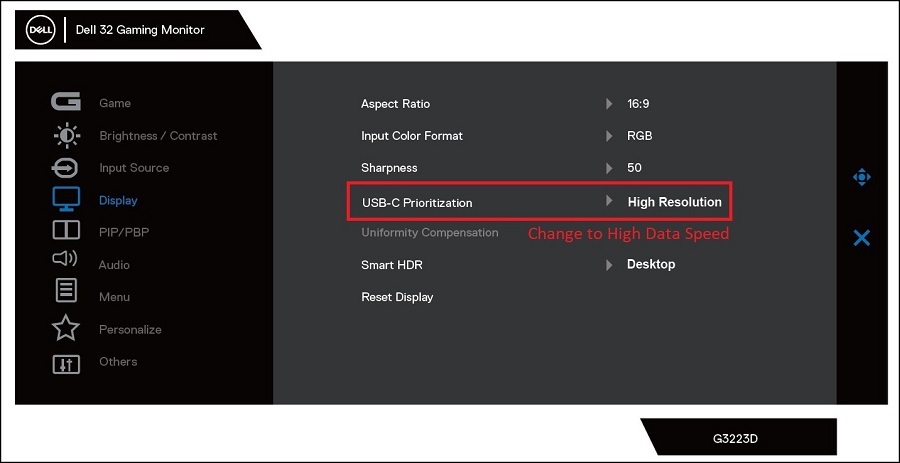
This occurs when the Logitech BRIO 4K Ultra HD webcam is plugged into the external monitor USB-A port and the monitor is connected to USB-C with display port using the monitor USB-C cable. The Dell monitor's USB-C prioritization default is High Resolution. With this configuration, the Logitech BRIO 4K Ultra HD webcam cannot be set to 4K for photo or 2K for video with the Windows Camera application.
This does not happen when connecting with the Thunderbolt port.
Affected Platforms:
- Alienware X14 R2
- Dell G15 5530
- Dell G16 7630
Cause
The Dell monitor USB-C prioritization default is High Resolution. The High Resolution prioritization downgrades the USB hub speed to USB 2.0 from USB 3.0 speed. The USB 2.0 speed cannot meet the 4K bandwidth requirement.
Resolution
Connect the camera directly to the computer.
Alternatively, change the USB-C Prioritization to High Data Speed from High Resolution in the monitor's on-screen display (OSD) menu.