Openshift:叢集 LCM 在節點重新開機期間失敗
Summary: LCM 在節點重新開機期間失敗,因為 CSI 控制器 Pod 和 depot Manager Pod 發生鎖死。
This article applies to
This article does not apply to
This article is not tied to any specific product.
Not all product versions are identified in this article.
Symptoms
LCM 在 OCP 升級或節點重新開機期間失敗,失去更新 UI 的存取權限。
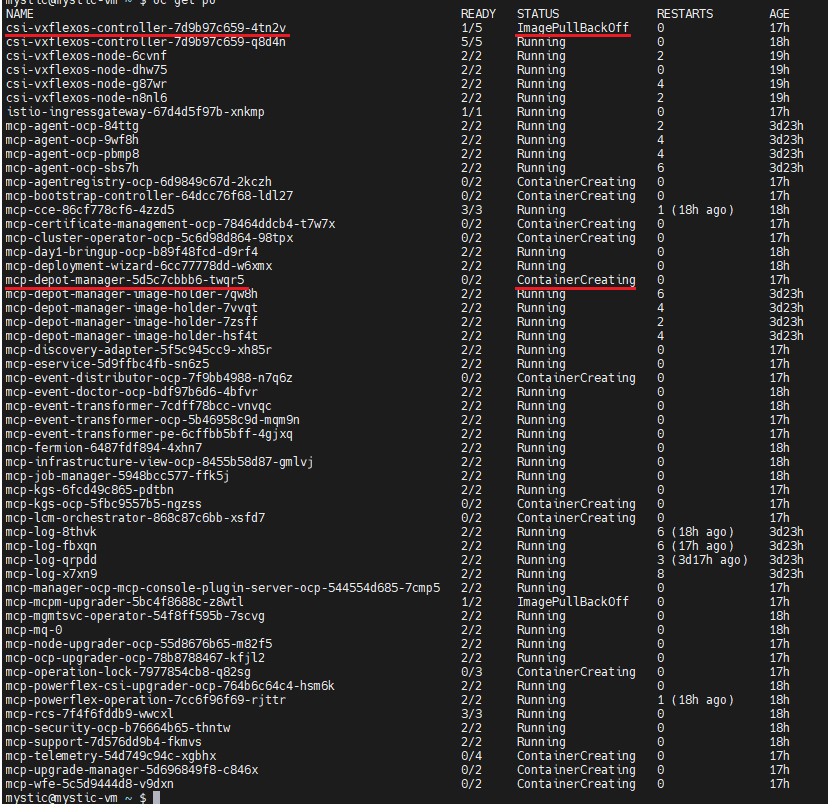
登入 OCP 執行「oc get pods -n dell-acp」命令以檢查 pod 狀態,請尋找一個處於 ImagePullBackoff 狀態的 csi-vxflexos-controller pod,以及一個處於「ContainerCreating 中」狀態的 mcp-depot-manager pod。例如:
執行「oc logs <pod_name> -n dell-acp -c driver」命令來檢查 pod 記錄。
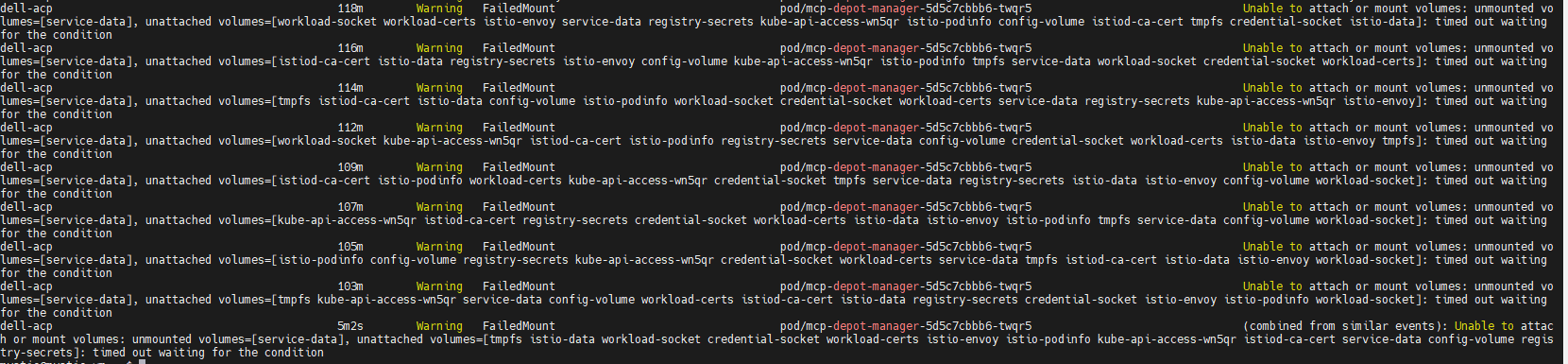
執行「oc describe pod <pod_name> -n dell-acp」命令來檢查 ContainerCreating mcp-depot-manager (在上述範例螢幕擷取畫面中,pod 名稱為 mcp-depot-manager-5d5c7cbbb6-twqr5),報告 FailedMount 警告,如下所示:
執行「oc get nodes」命令檢查節點狀態,有一個節點處於「SchedulingDisabled」狀態,例如:

登入 OCP 執行「oc get pods -n dell-acp」命令以檢查 pod 狀態,請尋找一個處於 ImagePullBackoff 狀態的 csi-vxflexos-controller pod,以及一個處於「ContainerCreating 中」狀態的 mcp-depot-manager pod。例如:
執行「oc logs <pod_name> -n dell-acp -c driver」命令來檢查 pod 記錄。
- 在執行中的 csi-vxflexos-controller pod 中,記錄顯示其正在嘗試取得領導者租約,例如:
mystic@mystic-VM:~$ OC 記錄 CSI-VxFlexOS-Controller-7D9B97C659-Q8D4N -N Dell-ACP -C driver
I0918 08:33:23.460955 1 leaderelection.go:248] 嘗試取得 Leader 租賃 Dell-ACP/Driver-CSI-VxFlexos-DellEMC-com...
I0918 08:33:23.460955 1 leaderelection.go:248] 嘗試取得 Leader 租賃 Dell-ACP/Driver-CSI-VxFlexos-DellEMC-com...
- 在 ImagePullBackOff csi-vxflexos-controller pod 中,記錄會顯示其已成功取得領導者租約,例如:
mystic@mystic-vm:~$ OC 記錄 CSI-VxFlexOS-控制器-7d9b97c659-4tn2v -n dell-acp -c driver
I0918 09:07:30.076298 1 leaderelection.go:248] 嘗試取得 Leader 租賃 Dell-ACP/Driver-CSI-VxFlexos-DellEMC-com...
I0918 09:07:46.074524 1 leaderelection.go:258] 成功取得租約 dell-acp/driver-csi-vxflexos-dellemc-com
time=“2023-09-18T09:07:46Z” level=info msg=“configured 69de1f95f50e390f” allSystemNames= endpoint=“https://dellpowerflex.h01.com” isDefault=true nasName=0xc000489950 nfsAcls= password=“********” skipCertificateValidation=false systemID=69de1f95f50e390f user=admin
time=“2023-09-18T09:07:46Z” level=info msg=“driver configuration file ” file=/vxflexos-config-params/driver-config-params.yaml
time=“2023-09-18T09:07:46Z” level=info msg=“從日誌配置檔讀取CSI_LOG_FORMAT” format=text
time=“2023-09-18T09:07:46Z” level=info msg=“從日誌配置檔讀取CSI_LOG_LEVEL” fields.level=debug
time=“2023-09-18T09:07:46Z” level=info msg=“陣列配置檔” file=/vxflexos-config/config
time=“2023-09-18T09:07:46Z” level=info msg=“探測所有陣列。陣列數量:1“
time=”2023-09-18T09:07:46Z“ level=info msg=”預設陣列設定為陣列 ID:69de1f95f50e390f“
time=”2023-09-18T09:07:46Z“ level=info msg=”69de1f95f50e390f 是預設陣列,略過 VolumePrefixToSystems 對應更新。\n“
time=”2023-09-18T09:07:46Z“ level=info msg=”array 69de1f95f50e390f 探測成功“
time=”2023-09-18T09:07:46Z“ level=info msg=”configured csi-vxflexos.dellemc.com“ isApproveSDCEnabled=false IsHealthMonitorEnabled=false IsQuotaEnabled=false IsSdcRenameEnabled=false MaxVolumesPerNode=0 allowRWOMultiPodAccess=false autoprobe=true externalAccess= mode=controller nfsAcls= privatedir=/dev/disk/csi-vxflexos sdcGUID= sdcPrefix= thickprovision=false
time=“2023-09-18T09:07:46Z” level=info msg=“標識服務已註冊”
time=“2023-09-18T09:07:46Z” level=info msg=“控制器服務已註冊”
time=“2023-09-18T09:07:46Z” level=info msg=“註冊其他 GRPC 伺服器”
time=“2023-09-18T09:07:46Z” level=info msg=服務終結點=“unix:///var/run/csi/csi.sock”
I0918 09:07:30.076298 1 leaderelection.go:248] 嘗試取得 Leader 租賃 Dell-ACP/Driver-CSI-VxFlexos-DellEMC-com...
I0918 09:07:46.074524 1 leaderelection.go:258] 成功取得租約 dell-acp/driver-csi-vxflexos-dellemc-com
time=“2023-09-18T09:07:46Z” level=info msg=“configured 69de1f95f50e390f” allSystemNames= endpoint=“https://dellpowerflex.h01.com” isDefault=true nasName=0xc000489950 nfsAcls= password=“********” skipCertificateValidation=false systemID=69de1f95f50e390f user=admin
time=“2023-09-18T09:07:46Z” level=info msg=“driver configuration file ” file=/vxflexos-config-params/driver-config-params.yaml
time=“2023-09-18T09:07:46Z” level=info msg=“從日誌配置檔讀取CSI_LOG_FORMAT” format=text
time=“2023-09-18T09:07:46Z” level=info msg=“從日誌配置檔讀取CSI_LOG_LEVEL” fields.level=debug
time=“2023-09-18T09:07:46Z” level=info msg=“陣列配置檔” file=/vxflexos-config/config
time=“2023-09-18T09:07:46Z” level=info msg=“探測所有陣列。陣列數量:1“
time=”2023-09-18T09:07:46Z“ level=info msg=”預設陣列設定為陣列 ID:69de1f95f50e390f“
time=”2023-09-18T09:07:46Z“ level=info msg=”69de1f95f50e390f 是預設陣列,略過 VolumePrefixToSystems 對應更新。\n“
time=”2023-09-18T09:07:46Z“ level=info msg=”array 69de1f95f50e390f 探測成功“
time=”2023-09-18T09:07:46Z“ level=info msg=”configured csi-vxflexos.dellemc.com“ isApproveSDCEnabled=false IsHealthMonitorEnabled=false IsQuotaEnabled=false IsSdcRenameEnabled=false MaxVolumesPerNode=0 allowRWOMultiPodAccess=false autoprobe=true externalAccess= mode=controller nfsAcls= privatedir=/dev/disk/csi-vxflexos sdcGUID= sdcPrefix= thickprovision=false
time=“2023-09-18T09:07:46Z” level=info msg=“標識服務已註冊”
time=“2023-09-18T09:07:46Z” level=info msg=“控制器服務已註冊”
time=“2023-09-18T09:07:46Z” level=info msg=“註冊其他 GRPC 伺服器”
time=“2023-09-18T09:07:46Z” level=info msg=服務終結點=“unix:///var/run/csi/csi.sock”
執行「oc describe pod <pod_name> -n dell-acp」命令來檢查 ContainerCreating mcp-depot-manager (在上述範例螢幕擷取畫面中,pod 名稱為 mcp-depot-manager-5d5c7cbbb6-twqr5),報告 FailedMount 警告,如下所示:
執行「oc get nodes」命令檢查節點狀態,有一個節點處於「SchedulingDisabled」狀態,例如:
Cause
如果作用中的 csi-controller pod 和 mcp-depot-manager 位於同一個節點上,則當 LCM 將節點重新開機時,csi-controller 和 depot-manager 會重新排程至新節點。在 Pod 開機期間,csi 控制器和 depot 管理員會遇到鎖死狀態,無法開機。
Resolution
1.執行「oc get pods -n dell-acp |grep csi」命令,以識別狀態不佳的 CSI 控制器 pod 的 pod 名稱。
2.執行「oc delete pod <pod_name> -n dell-acp」命令,以刪除識別的 pod/pod。
例如:

3.等待幾分鐘,然後執行「oc get pods -n dell-acp」命令,確定所有 pod 都處於執行中狀態。如果仍有 csi-controller pod 或 mcp-depot-manager 未執行,請重試上述步驟。
4.在所有 POD 都處於執行中狀態之前,請重試 LCM 以繼續叢集升級。
2.執行「oc delete pod <pod_name> -n dell-acp」命令,以刪除識別的 pod/pod。
例如:
3.等待幾分鐘,然後執行「oc get pods -n dell-acp」命令,確定所有 pod 都處於執行中狀態。如果仍有 csi-controller pod 或 mcp-depot-manager 未執行,請重試上述步驟。
4.在所有 POD 都處於執行中狀態之前,請重試 LCM 以繼續叢集升級。
Article Properties
Article Number: 000217992
Article Type: Solution
Last Modified: 18 Sept 2026
Version: 4
Find answers to your questions from other Dell users
Support Services
Check if your device is covered by Support Services.