NVP-vProxy:Windows VM FLR 失败,并显示“Error while browsing:200: 从 vProxy 收到错误“无法获取目录内容:”
Summary: 由于虚拟机操作系统上的管理员审批模式(或增强的 UAC)设置,通过 NetWorker VMware Protection (NVP) vProxy 一体机执行的 Microsoft Windows 虚拟机 FLR 无法浏览目录内容
This article applies to
This article does not apply to
This article is not tied to any specific product.
Not all product versions are identified in this article.
Symptoms
Microsoft Windows 虚拟机的 vProxy 文件级恢复 (FLR) 失败,并显示以下错误:
Error while browsing: 200: Error received from vProxy "could not get directory contents: Unable to retrieve file list from 'host' (vm-moref) path 'path'"
Windows 虚拟机不包含 Windows 分布式文件系统 (DFS):NVP vProxy:虚拟机 FLR 始终失败,并显示“Could not get the directory content...”
Cause
如果在操作系统上启用了管理员批准模式 (AAM),则可能会出现此错误。这可防止管理用户对最终用户的配置文件执行 FLR。对于任何用户帐户控制 (UAC) 交互,管理员必须等待装载操作完成,然后访问目标机器上的装载点。
Resolution
有三个可用选项:
选项 1:
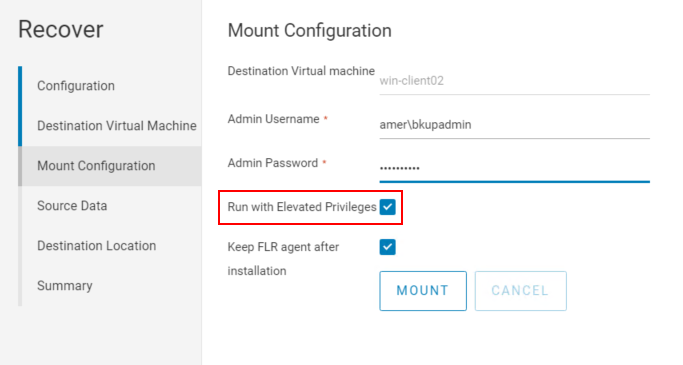
从 NetWorker Web 用户界面 (NWUI) 执行 FLR。FLR 进程中有一个名为“Run with elevated privileges”的选项。在执行 FLR 时选中此选项。此选项在 NetWorker Management Console (NMC) 中不可用。
选项 2:
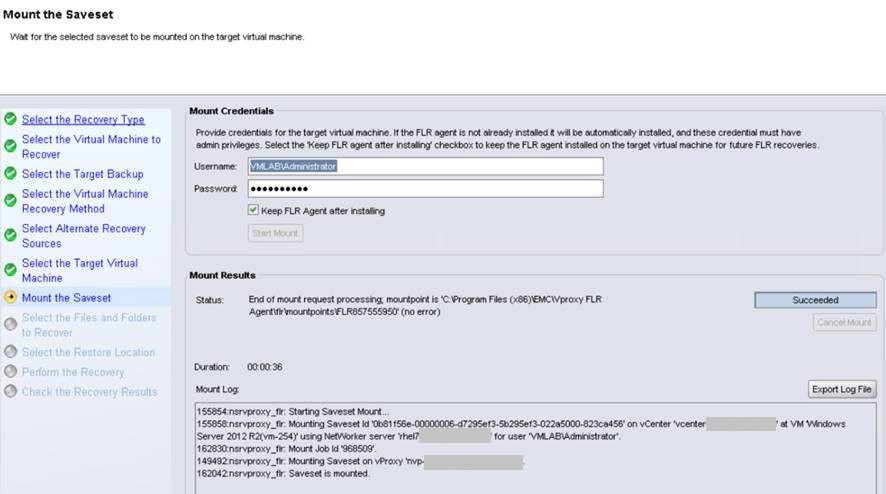
1.从 NetWorker Management Console (NMC) 启动 FLR 装载:
2.请勿继续从 NMC 进行还原。登录到目标还原虚拟机,然后使用 Windows 文件资源管理器转至“C:\Program Files (x86)\EMC\vProxy FLR Agent\flr\mountpoints”。打开从 NMC 启动的装载的装载点,例如:
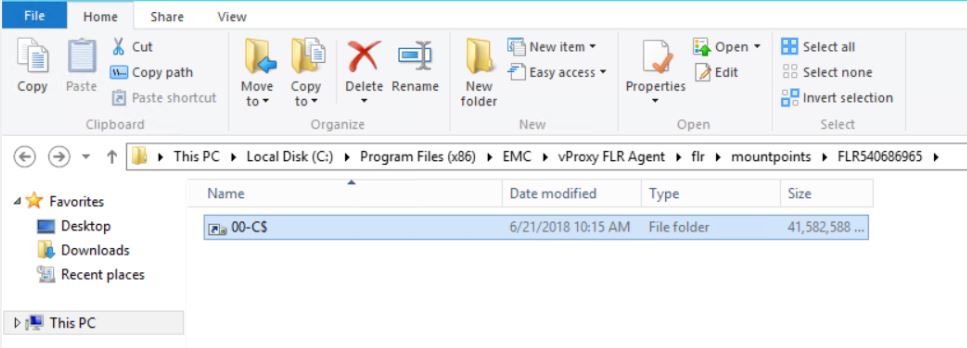
您可以浏览到所需的文件夹/文件,并将它们复制到虚拟机。还可以使用 xcopy : xcopy mountpoint_folder/file recover_destination /EH
3 复制文件。完成后,关闭 NMC 中的恢复向导以断开装载点的连接。
: xcopy mountpoint_folder/file recover_destination /EH
3 复制文件。完成后,关闭 NMC 中的恢复向导以断开装载点的连接。
选项 3:
即时访问还原也可用作 FLR 解决方法。此过程记录在以下位置:
NVP vProxy:如何在 FLR 失败或虚拟机不支持时执行文件级恢复
Additional Information
Affected Products
NetWorkerProducts
NetWorkerArticle Properties
Article Number: 000044625
Article Type: Solution
Last Modified: 28 Jul 2026
Version: 7
Find answers to your questions from other Dell users
Support Services
Check if your device is covered by Support Services.