Dell VxRail:CloudIQでのインテリジェント マルチシステム ジョブのエラー ステータス
Summary: このナレッジベース記事では、CloudIQの事前チェック/ダウンロード/アップデート操作に関する一般的なエラー メッセージと推奨されるソリューションについて説明します。
This article applies to
This article does not apply to
This article is not tied to any specific product.
Not all product versions are identified in this article.
Symptoms
CloudIQでクラスターの事前チェック/ダウンロード/アップデート操作を実行します。操作が失敗した場合は、[CloudIQ]>[Admin]>[Jobs]に移動します。
ジョブを選択し、[Job Details]を表示すると、詳細なエラー メッセージが表示されます。例: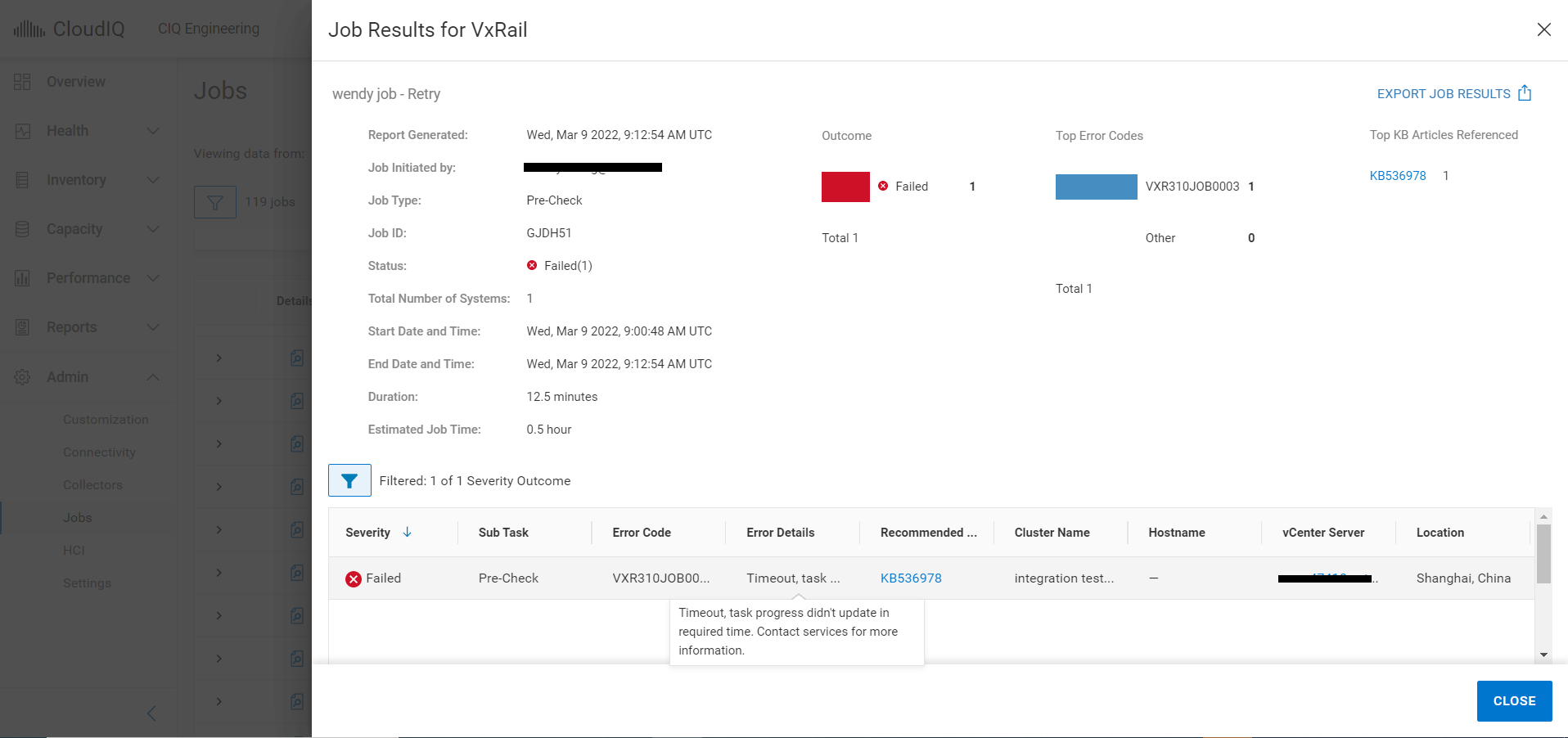
以下は、一般的なエラー コードおよびその詳細なエラー メッセージのリストです。
| # | エラー コード | 影響 | エラーの詳細 | |
| 1 | VXR310JOB0008 | すべて | 「The job cannot be started at this time. Try again later. If this problem persists contact your support provider.」 | |
| 2 | VXR310SRS0001 | すべて | 「The job cannot be started at this time.Try again later.If this problem persists contact your support provider..」 | |
| 3 | VXR310SRS0002 | すべて | 「The job cannot be started at this time.Try again later.If this problem persists contact your support provider.」 | |
| 4 | VXR310JOB0007 | 更新 | 「The job cannot be started at this time.Try again later.If this problem persists contact your support provider.」 | |
| 5 | VXR310JOB0003 | すべて | 「The job did not complete within the due time.」 | |
| 6 | VXR310JOB0009 | ダウンロード | 「The job cannot be started at this time.Try again later.If this problem persists contact your support provider.」 | |
| 7 | VXR310JOB0005 | すべて | 「The job cannot be started at this time.Try again later.If this problem persists contact your support provider.」 | |
| 8 | VXR310JOB0004 | ダウンロード | 「Download failed.File is not valid.」 | |
| 9 | VXR310JOB0002 | すべて | 「The job cannot be started at this time.Try again later.If this problem persists contact your support provider.」 | |
| 10 | VXR310ADC0004 | ダウンロード | 「Download failed.Post-processing failed.」 | |
| 11 | VXR310ADC0003 | 更新 | 「Unable to start the update.」 | |
| 12 | VXR310ADC0002 | 事前チェック | 「Unable to perform pre-check.」 | |
| 13 | VXR314ADC0006 | 更新 | 「Intelligent multi-cluster system updates are not supported because the ADC component is not at the latest version.」 | |
| 14 | VXR314ADC0005 | 事前チェック | 「Intelligent multi-cluster system updates are not supported because the ADC component is not at the latest version.」 | |
| 15 | VXR314ADC0001 | すべて | 「Intelligent multi-cluster system updates are not supported because the ADC component is not at the latest version.」 | |
| 16 | VXR104LCM0001 | ダウンロード | 「There is insufficient free space to update the cluster. | |
Cause
エラー#1~#3は、CloudIQとVxRail Manager間の接続が不安定な場合に発生する可能性があり、CloudIQはVxRail Managerに操作コマンドを送信できません。これは、すべてのジョブ タイプに影響します。
エラー#4~#5は、VxRail Manager側で接続が失われた場合に発生する可能性があります。
その他のエラーは、CloudIQバックエンド インフラストラクチャの問題またはVxRail環境の問題が原因で発生する可能性があります。
エラー#4~#5は、VxRail Manager側で接続が失われた場合に発生する可能性があります。
その他のエラーは、CloudIQバックエンド インフラストラクチャの問題またはVxRail環境の問題が原因で発生する可能性があります。
Resolution
エラー#1~#3の場合
数分後にジョブを再試行または再作成します。エラーが解決しない場合は、テクニカル サポートにお問い合わせください。
エラー#4~#5の場合
SRSゲートウェイ接続ステータスを確認するには、次の手順に従います。
1. https://[SRS VE IP]:9443を使用してSRS管理GUIにログインします。
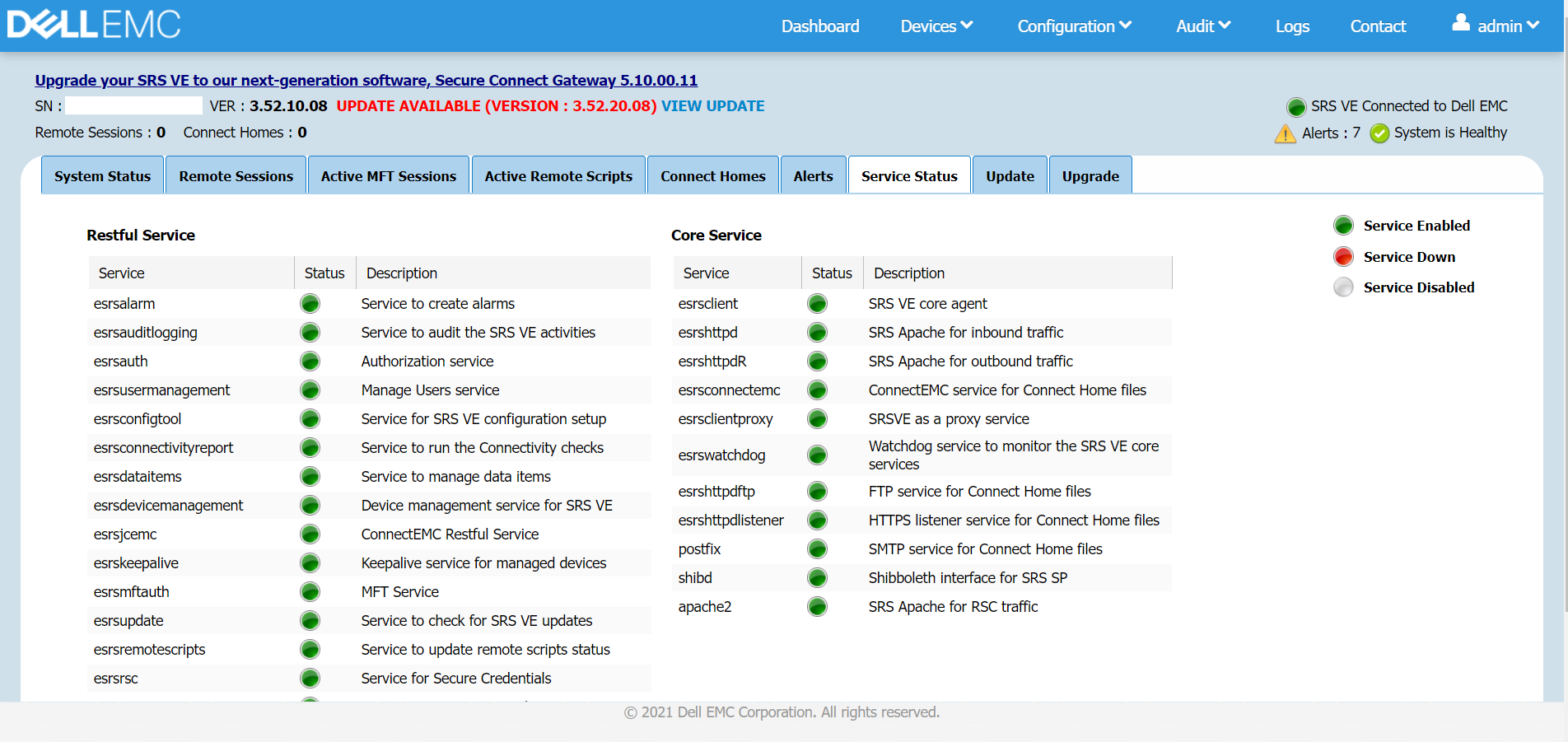
2. [Dashboard]>[Service Status]をクリックし、SRS VEがDellに接続されているかどうかを確認します。
すべてのサービスが正常な状態で実行されている必要があります。いずれかのサービスがダウンしている場合は、SRS VEを再起動します。
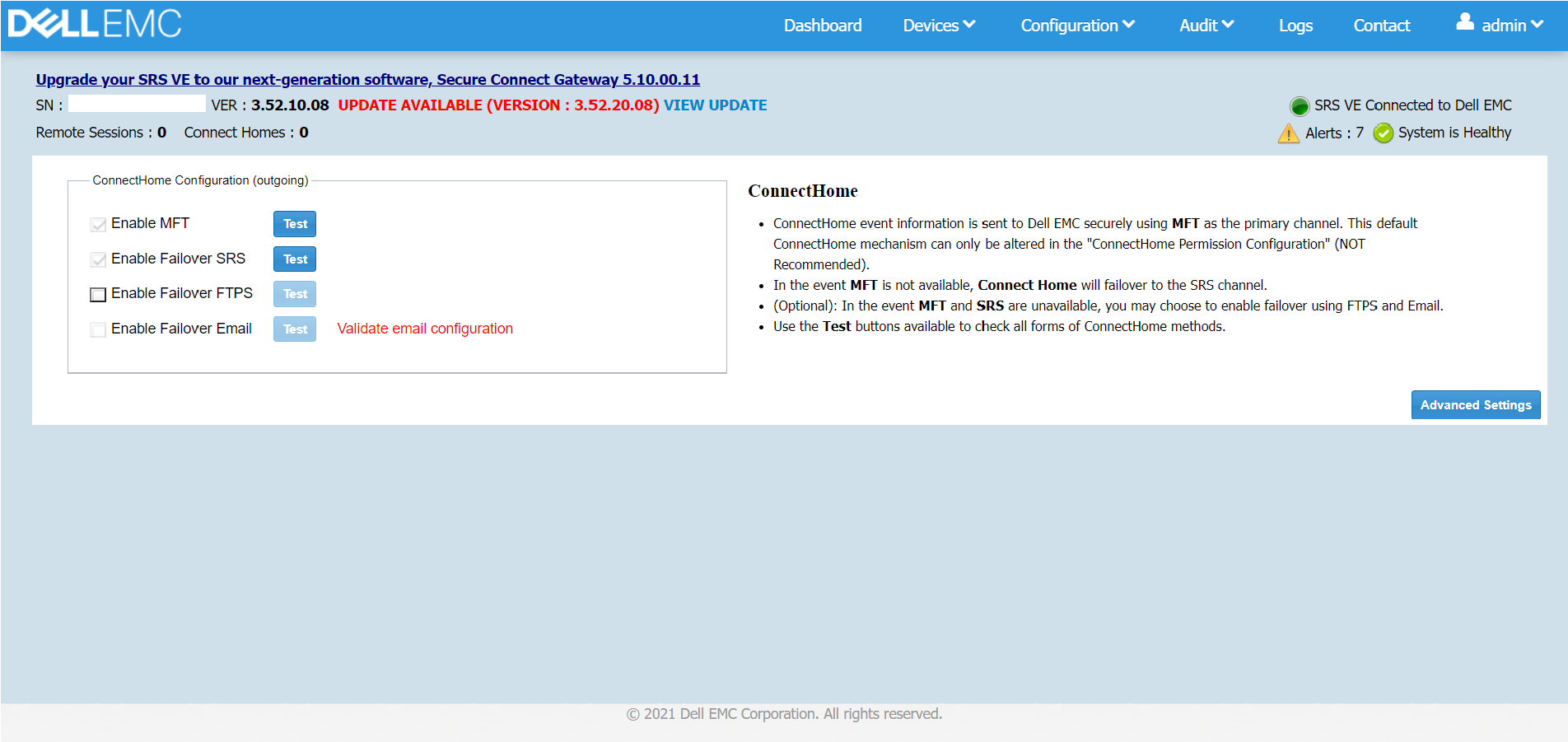
3. MFT機能をテストします。[Configuration]>[Connect Home]をクリックします。
[Enable MFT]のチェックボックスがオンでない場合はオンにし、[Test]をクリックします。「Test connect home using MFT was successful」というポップアップ メッセージが表示されます。
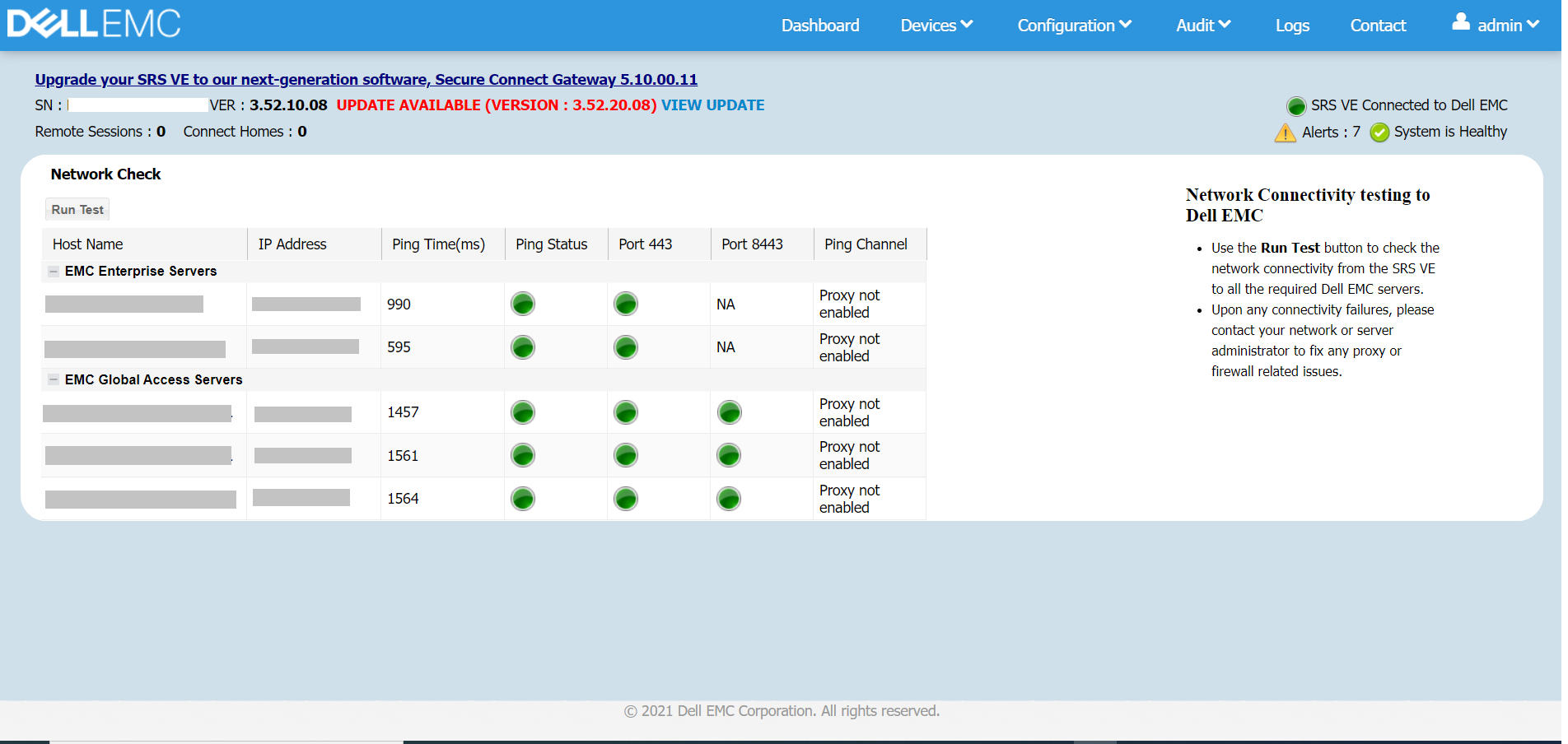
4. ネットワーク チェックを実行します。[Configuration]>[Network]をクリックし、[Run Test]をクリックします。
ポート443および8443が開いていて、SRS VEがEMCエンタープライズ サーバーおよびEMCグローバル アクセス サーバーに接続できることを確認します。
5. 次に、CloudIQに移動してジョブを再試行または再作成します。エラーが解決しない場合は、テクニカル サポートにお問い合わせください。
その他のエラーの場合
テクニカル サポートにお問い合わせください。
数分後にジョブを再試行または再作成します。エラーが解決しない場合は、テクニカル サポートにお問い合わせください。
エラー#4~#5の場合
SRSゲートウェイ接続ステータスを確認するには、次の手順に従います。
1. https://[SRS VE IP]:9443を使用してSRS管理GUIにログインします。
2. [Dashboard]>[Service Status]をクリックし、SRS VEがDellに接続されているかどうかを確認します。
すべてのサービスが正常な状態で実行されている必要があります。いずれかのサービスがダウンしている場合は、SRS VEを再起動します。
3. MFT機能をテストします。[Configuration]>[Connect Home]をクリックします。
[Enable MFT]のチェックボックスがオンでない場合はオンにし、[Test]をクリックします。「Test connect home using MFT was successful」というポップアップ メッセージが表示されます。
4. ネットワーク チェックを実行します。[Configuration]>[Network]をクリックし、[Run Test]をクリックします。
ポート443および8443が開いていて、SRS VEがEMCエンタープライズ サーバーおよびEMCグローバル アクセス サーバーに接続できることを確認します。
5. 次に、CloudIQに移動してジョブを再試行または再作成します。エラーが解決しない場合は、テクニカル サポートにお問い合わせください。
その他のエラーの場合
テクニカル サポートにお問い合わせください。
Affected Products
CloudIQ, VxRail SoftwareArticle Properties
Article Number: 000197490
Article Type: Solution
Last Modified: 08 Jul 2025
Version: 11
Find answers to your questions from other Dell users
Support Services
Check if your device is covered by Support Services.