重新安装 Thunderbolt 控制器驱动程序时英特尔错误代码0x80070643
Summary: 了解在戴尔计算机上重新安装 Thunderbolt 控制器驱动程序时显示英特尔错误0x80070643。
This article applies to
This article does not apply to
This article is not tied to any specific product.
Not all product versions are identified in this article.
Symptoms
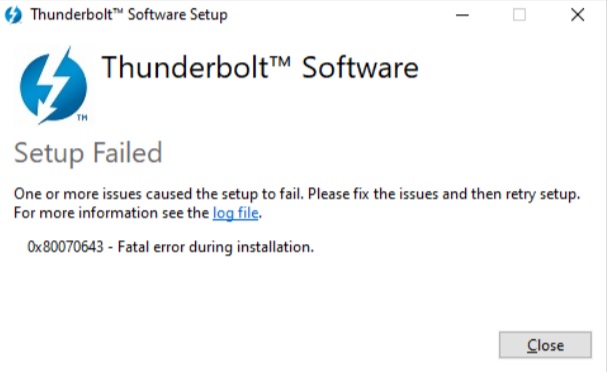
安装过程中出现致命错误。
在计算机上重新安装 Thunderbolt 控制器驱动程序时英特尔您可能会遇到错误代码0x80070643。
Cause
无可用的原因信息。
Resolution
英特尔 Thunderbolt 控制器驱动程序
步骤 1:从应用程序和功能卸载英特尔 Thunderbolt 控制器驱动程序
- 按 Windows 键 + X,然后单击 “应用程序和功能”。
- 搜索 Thunderbolt。
- 单击 英特尔 Thunderbolt 控制中心 ,然后单击卸载。
- 等待更新完成。
- 重新启动计算机。
步骤 2:从设备管理器卸载 Thunderbolt(TM) 控制器
- 按 Windows 键 + X,然后单击 设备管理器。
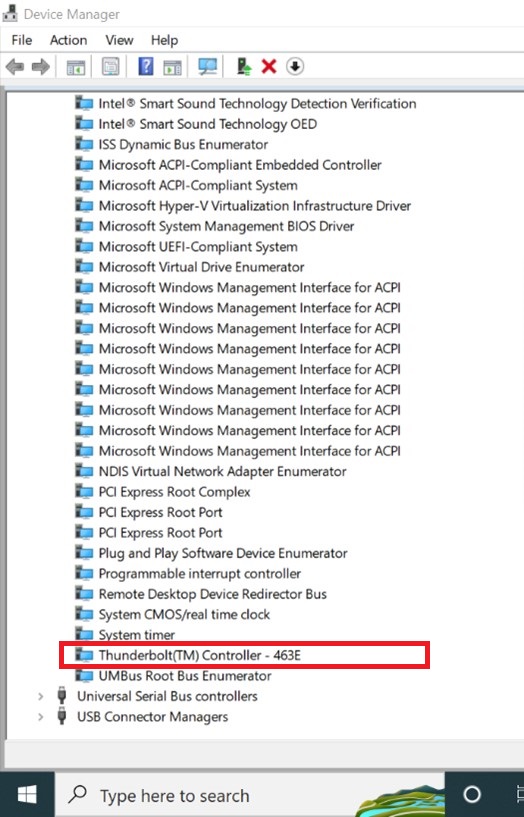
- 进入设备管理器窗口后,在系统设备下查找 Thunderbolt(TM) 控制器。
- 右键单击 Thunderbolt(TM) 控制器,然后单击 卸载。
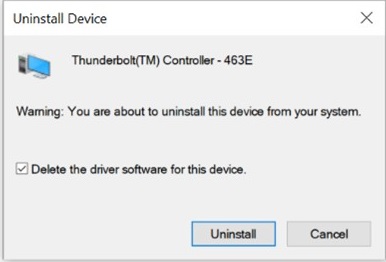
- 确保选择 删除此设备的驱动程序软件,然后单击 卸载 以确认卸载。
步骤 3:从戴尔驱动程序和下载安装英特尔 Thunderbolt 控制器驱动程序
- 浏览至 英特尔 Thunderbolt 控制器驱动程序。
- 单击 Download,将文件保存到您的计算机。
- 打开文件资源管理器并浏览至保存下载文件的位置。
- 双击下载的音频驱动程序设置文件,然后按屏幕上的说明完成安装过程。
重新安装 Thunderbolt 控制器驱动程序时英特尔错误代码0x80070643
时长:00:01:25 (hh:mm:ss)
如果有的话,可使用此视频播放器上的 CC 图标来选择字幕语言设置。
如果您在 Thunderbolt 问题方面需要更多帮助,请查看以下资源:
Additional Information
推荐的文章
以下是您可能会感兴趣的与此主题相关的一些推荐文章。
Affected Products
Alienware 13 R3, Alienware 13 R2, Alienware 15 R3, Alienware 15 R2, Alienware 15 R4, Alienware Area-51m, Alienware 17 R4, Alienware 17 R3, Alienware 17 R5, Alienware Area-51m R2, Alienware M15, Alienware M15 R2, Alienware M15 R3, Alienware m15 R4
, Alienware m15 R6, Alienware M17, Alienware M17 R2, Alienware M17 R3, Alienware m17 R4, Alienware x15 R1, Alienware x17 R1, Dell G3 15 3500, Dell G3 3579, Dell G5 15 5500, Dell G15 5510, Dell G15 5511, Dell G5 15 5587, Dell G5 15 5590, Dell G7 15 7500, Dell G7 15 7588, Dell G7 15 7590, Dell G3 3779, Dell G7 17 7700, Dell G7 17 7790, Inspiron 5301, Inspiron 13 5310, Inspiron 7300 2-in-1, Inspiron 7300, Inspiron 7306 2-in-1, Inspiron 7391 2-in-1, Inspiron 5406 2-in-1, Inspiron 14 5410/5418, Inspiron 7400, Inspiron 7490, Inspiron 15 5510/5518, Inspiron 7500 2-in-1 Black, Inspiron 7500, Inspiron 7501, Inspiron 7506 2-in-1, Inspiron 15 7510, Inspiron 15 Gaming 7577, Inspiron 7590, Inspiron 7591 2-in-1, Inspiron 7591, Inspiron 16 7610, Inspiron 7706 2-in-1, Inspiron 7791 2-in-1, Latitude 5290 2-in-1, Latitude 7200 2-in-1, Latitude 7210 2-in-1, Latitude 7280, Latitude 7285 2-in-1, Latitude 7290, Latitude 5300 2-in-1, Latitude 5300, Latitude 5310 2-in-1, Latitude 5310, Latitude 5320, Latitude 7300, Latitude 7310, Latitude 7320, Latitude 7320 Detachable, Latitude 7370, Latitude 7380, Latitude 7390 2-in-1, Latitude 7390, Latitude 3420, Latitude 5400, Latitude 5401, Latitude 5410, Latitude 5411, Latitude 5421, Latitude 5480/5488, Latitude 5491, Latitude 7400 2-in-1, Latitude 7400, Latitude 7410, Latitude 7420, Latitude 7480, Latitude 7490, Latitude 9410, Latitude 9420, Latitude 3520, Latitude 5500, Latitude 5501, Latitude 5510, Latitude 5511, Latitude 5520, Latitude 5521, Latitude 5580, Latitude 5591, Latitude 7520, Latitude 9510, Latitude 9520, Latitude 5420, Latitude 7275, Latitude E5570, OptiPlex 7090 Ultra, Precision 3520, Precision 3530, Precision 3540, Precision 3541, Precision 3550, Precision 3551, Precision 3560, Precision 3561, Precision 5520, Precision 5530 2 in 1, Precision 5530, Precision 5540, Precision 5550, Precision 5560, Precision 7520, Precision 7530, Precision 7540, Precision 7550, Precision 7560, Precision 5750, Precision 5760, Precision 7720, Precision 7730, Precision 7740, Precision 7750, Precision 7760, Precision 3510, Precision 5510, Precision 7510, Precision 7710, Vostro 13 5310, Vostro 14 5410, Vostro 15 5510, Vostro 7500, Vostro 15 7510, Vostro 15 7570, Vostro 7590, XPS 13 7390 2-in-1, XPS 13 7390, XPS 13 9300, XPS 13 9305, XPS 13 9310 2-in-1, XPS 13 9310, XPS 13 9360, XPS 13 9365 2-in-1, XPS 13 9370, XPS 13 9380, XPS 15 7590, XPS 15 9500, XPS 15 9510, XPS 15 9570, XPS 15 9575 2-in-1, XPS 17 9700, XPS 17 9710
...
Article Properties
Article Number: 000209675
Article Type: Solution
Last Modified: 21 Aug 2026
Version: 9
Find answers to your questions from other Dell users
Support Services
Check if your device is covered by Support Services.