Unisphere para PowerMax: ¿Cómo configurar la notificación de SNMP?
Summary: Unisphere para PowerMax: ¿Cómo configurar la notificación de SNMP?
This article applies to
This article does not apply to
This article is not tied to any specific product.
Not all product versions are identified in this article.
Instructions
Unisphere para PowerMax admite SNMPv1, SNMPv3 y SNMPv3 con notificaciones de TLS
Para configurar notificaciones de SNMP (SNMPv1, SNMPv3 o SNMPv3 con TLS):
Pasos
- Escoger
 .
. - Seleccione Alerts > Notifications para abrir la página Notifications.
- En la parte SNMP del panel, haga clic en Configure.
- Ver los destinos trap de SNMP ya agregados. Se muestra la dirección IP/nombre completo del host, el puerto, la versión de SNMP y el nombre de usuario para cada destino.
- Haga clic en Add para agregar un destino trap de SNMP.
- Ingrese una dirección IP o un nombre de host.
- Introduzca un número de puerto.
- Realice una de las siguientes acciones:
- V1
- Seleccione el botón de opción V1.
- Haga clic en Aceptar.
- V3
- Seleccione el botón de opción V3.
- Ingrese un nombre de usuario.
- Ingrese una contraseña y confírmela.
- Ingrese una frase de contraseña y confírmela.
- Haga clic en Aceptar.
- V3 con TLS
- Seleccione el botón de opción V3 con TLS .
- Haga clic en DOWNLOAD para descargar un certificado Storevntd.
- Haga clic en Choose File para seleccionar un archivo de autoridad de certificación del servidor.
- Ingrese un nombre de seguridad.
- Haga clic en Aceptar.
- V1
- Para verificar la configuración de SNMP, haga clic en VERIFY.
- Opcional: Para editar la configuración de notificaciones SNMP, selecciónela y haga clic en
 .
. - Opcional: Para eliminar la configuración de notificaciones SNMP, selecciónela y haga clic en

- Haga clic en Aceptar.

SNMPv1:
SNMPv3: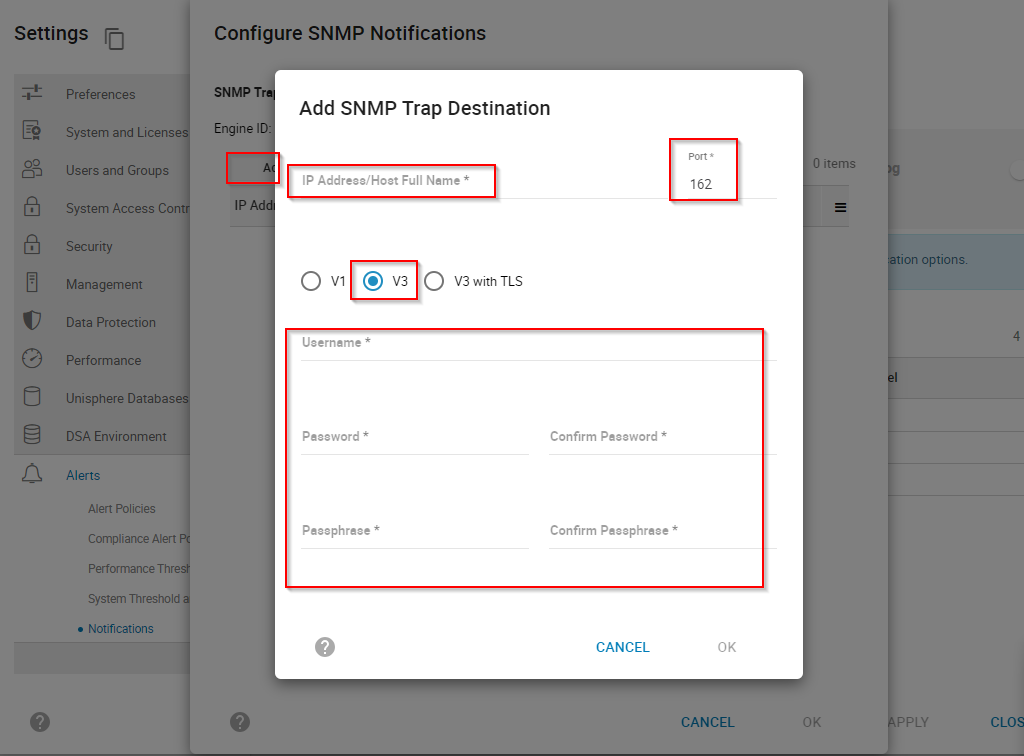
SNMPv3 con TLS: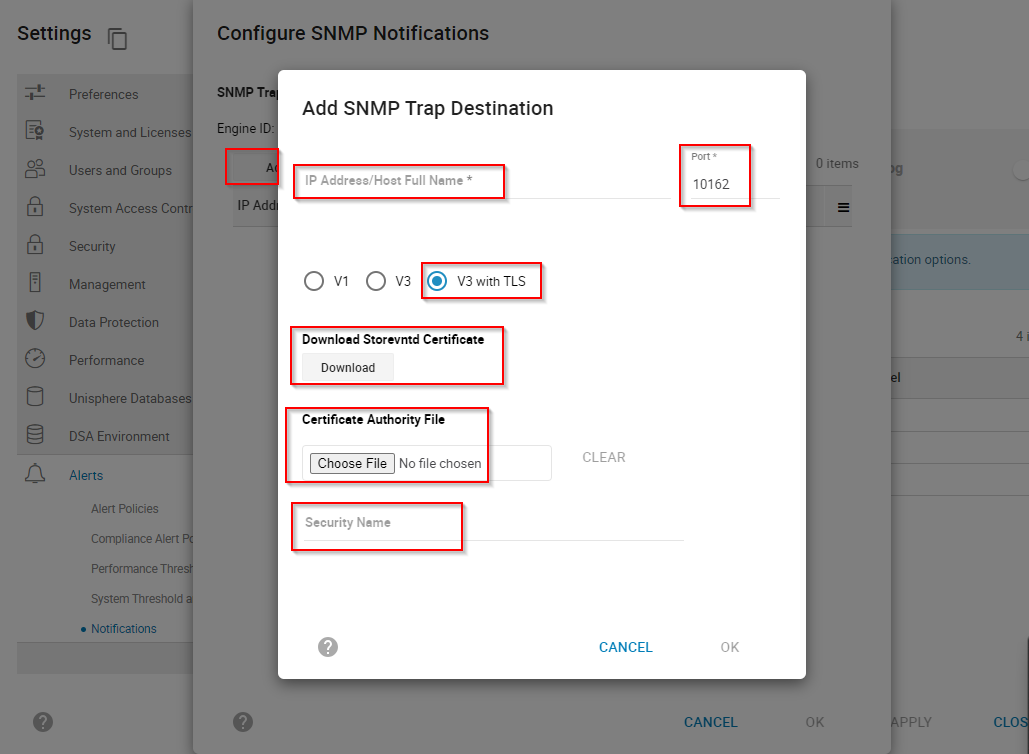
Una vez finalizada la configuración de SNMP anterior. Configure la notificación de alerta según sus requisitos:
Pasos
- Para habilitar las notificaciones de alerta:
- Escoger
 para abrir el panel Configuración.
 - Seleccione Alerts > Notifications para abrir la página Notifications.
- Escoger

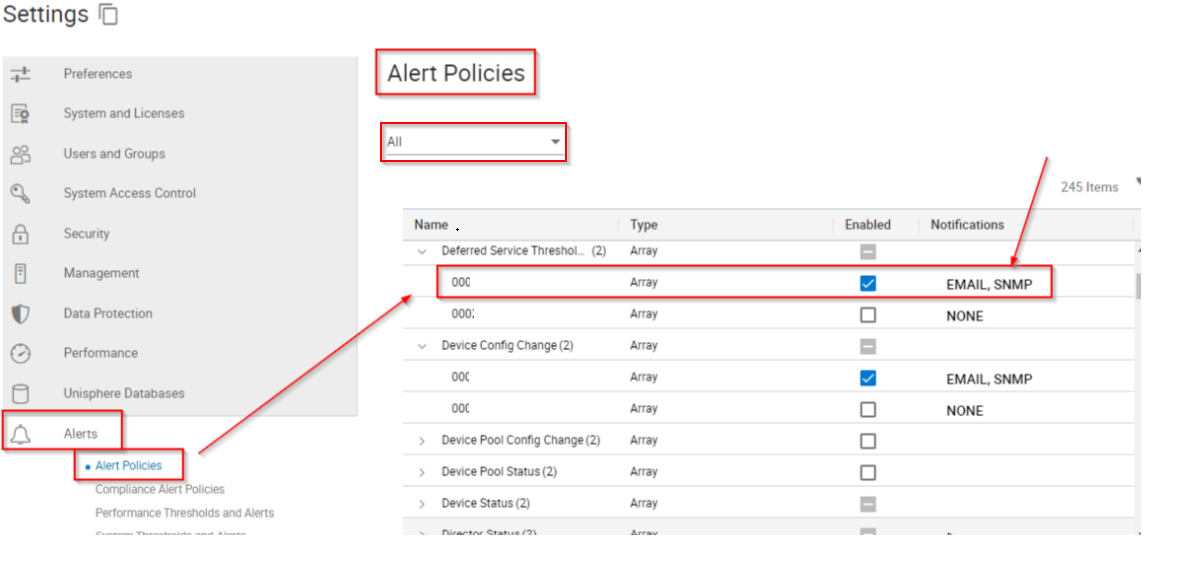
Configure la política de alertas según las alertas que desee reenviar a través del servidor SNMP:
Pasos
- Escoger
 para abrir el panel Configuración.
 - Seleccione Alerts > Alert Policies.
- Seleccione todos o un sistema de almacenamiento específico en la lista desplegable Select Array.
Para configurar SNMP v3 con TLS, consulte este enlace
: Para obtener información sobre los archivos de MIB, consulte este enlace:
Additional Information
NA
Affected Products
Unisphere for PowerMaxArticle Properties
Article Number: 000229355
Article Type: How To
Last Modified: 08 Oct 2024
Version: 1
Find answers to your questions from other Dell users
Support Services
Check if your device is covered by Support Services.