Unisphere For PowerMax:如何配置 SNMP 通知?
Summary: Unisphere For PowerMax:如何配置 SNMP 通知?
This article applies to
This article does not apply to
This article is not tied to any specific product.
Not all product versions are identified in this article.
Instructions
Unisphere for PowerMax 支持 SNMPv1、SNMPv3、带 TLS 的 SNMPv3 通知
要设置 SNMP(SNMPv1 或 SNMPv3 或带 TLS 的 SNMPv3)通知,请执行以下操作:
步骤
- 选择
 。
。 - 选择AlertsNotifications>以打开Notifications页面。
- 在面板的SNMP部分中,单击Configure。
- 查看已添加的 SNMP 陷阱目标。将显示每个目标的 IP 地址/主机全名、端口、SNMP 版本和用户名。
- 单击Add以添加 SNMP 陷阱目标。
- 输入 IP 地址或主机名。
- 输入端口号。
- 请执行以下操作之一:
- V1版
- 选择 V1单选按钮。
- 单击 OK。
- V3
- 选择V3单选按钮。
- 输入用户名。
- 输入密码并确认。
- 输入密码短语并确认。
- 单击 OK。
- 带 TLS 的 V3V3
- 选择V3 with TLS 单选按钮。
- 单击DOWNLOAD以下载 Storevntd 证书。
- 单击Choose File以选择服务器证书颁发机构文件。
- 输入安全名称。
- 单击 OK。
- V1版
- 要验证 SNMP 配置,请单击验证。
- 可选:要编辑 SNMP 通知配置,请选择它并单击
 。
。 - 可选:要删除 SNMP 通知配置,请选择它并单击

- 单击 OK。

SNMPv1:
SNMPv3:
使用 TLS 的 SNMPv3:
上述SNMP配置完成后。根据您的要求设置警报通知:
步骤
- 要启用警报通知,请执行以下操作:
- 选择
 以打开“设置”面板。
 - 选择AlertsNotifications>以打开Notifications页面。
- 选择
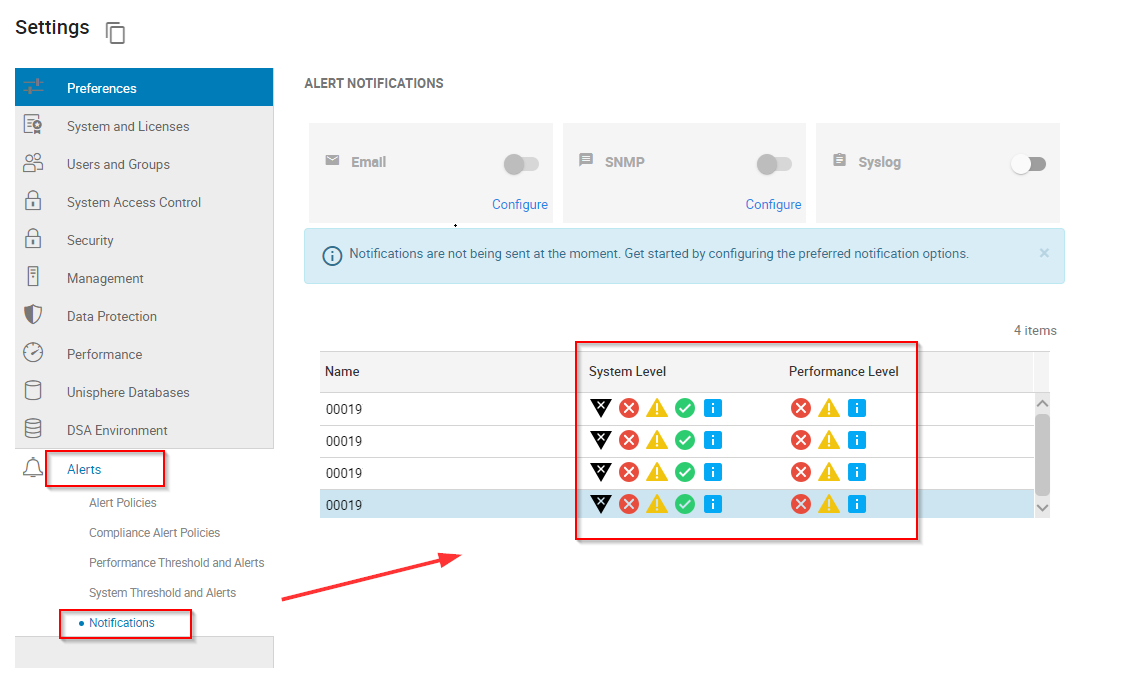
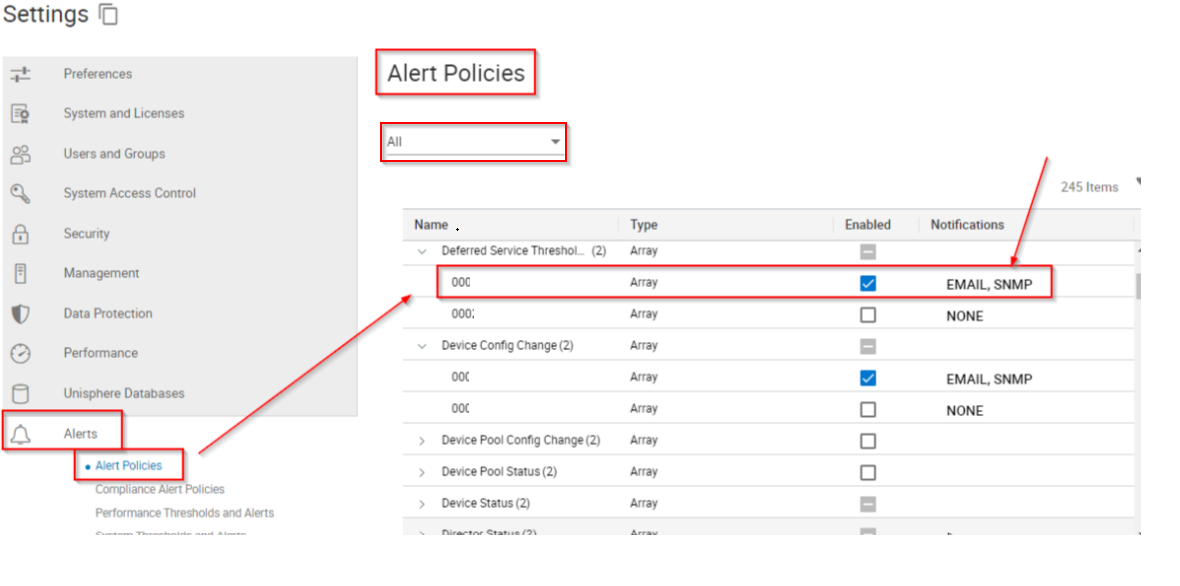
根据要通过 SNMP 服务器转发的警报设置警报策略:
步骤
- 选择
 以打开“设置”面板。
 - 选择AlertsAlert > Policies。
- 从Select Array下拉列表中选择所有或特定存储系统。
Additional Information
不适用
Affected Products
Unisphere for PowerMaxArticle Properties
Article Number: 000229355
Article Type: How To
Last Modified: 08 Oct 2024
Version: 1
Find answers to your questions from other Dell users
Support Services
Check if your device is covered by Support Services.