切換網路後,使用 Dell Encryption Enterprise 的 PBA 開機時間過長
Summary: 客戶可能會報告,在計算機連接到具有不同IP範圍(例如192.168.1.X作為公司網路,192.168.178.X作為專用網路)的網路后,他們必須等待三分鐘或更長時間,直到他們可以在第一次啟動時在預啟動身份驗證環境中輸入其憑據。
This article applies to
This article does not apply to
This article is not tied to any specific product.
Not all product versions are identified in this article.
Symptoms
受影響的產品:
- Dell Full Disk Encryption
- Dell Encryption Enterprise Self-Encrypting Drive Manager
受影響的版本:
- 10.7 版
- 10.8 版
- 10.9.0.3 版
受影響的作業系統:
- Windows
Cause
當客戶未使用 Dell Security Management Server 前端伺服器時,便會發生此行為。
Resolution
若要解決此問題,請更新至最新版本的 Dell Full Disk Encryption 或 Dell Encryption Enterprise Self-Encrypting Drive Manager。
此問題已在 v10.9.1.1 及更新版本中解決。
您可以在 PBA 中按一下 選項 (左下角),然後選取 關於,以檢查已安裝的 PBA 版本。
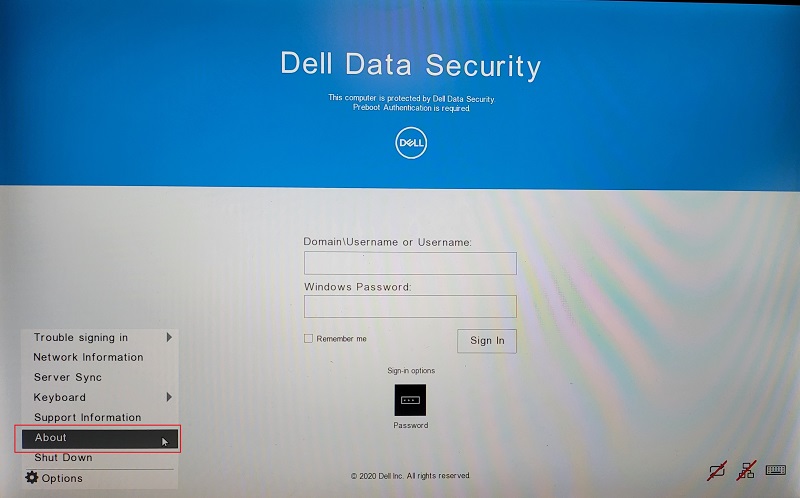
圖 1:(僅英文)選取選項和關於
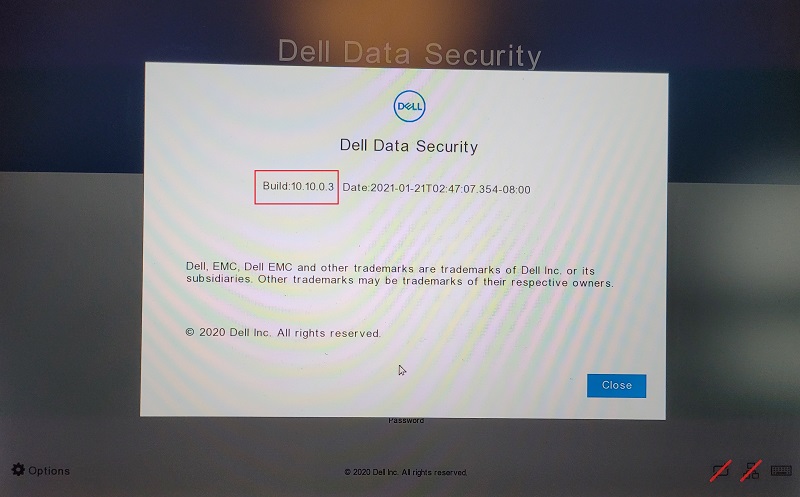
圖 2:(僅英文)Dell Data Security 組建資訊
如要聯絡支援部門,請參閱 Dell Data Security 國際支援電話號碼。
請前往 TechDirect,以線上產生技術支援要求。
如需更多深入見解與資源,請加入 Dell 安全性社群論壇。
Additional Information
Videos
Affected Products
Dell EncryptionArticle Properties
Article Number: 000186109
Article Type: Solution
Last Modified: 08 May 2024
Version: 11
Find answers to your questions from other Dell users
Support Services
Check if your device is covered by Support Services.