切换网络后使用 Dell Encryption Enterprise 时 PBA 中的启动时间较长
Summary: 客户可能会报告,在计算机连接到具有不同 IP 范围的网络(例如,192.168.1.X 作为公司网络,192.168.178.X 作为专用网络)后,他们必须等待三分钟或更长时间,才能在第一次启动时在启动前身份验证环境中输入凭据。
This article applies to
This article does not apply to
This article is not tied to any specific product.
Not all product versions are identified in this article.
Symptoms
受影响的产品:
- Dell Full Disk Encryption
- Dell Encryption Enterprise Self-Encrypting Drive Manager
受影响的版本:
- V10.7
- V10.8
- v10.9.0.3
受影响的操作系统:
- Windows
Cause
当客户不使用 Dell Security Management Server 前端服务器时,可以观察到此行为。
Resolution
要解决此问题,请更新到最新版本的 Dell Full Disk Encryption 或 Dell Encryption Enterprise Self-Encrypting Drive Manager。
此问题已在 v10.9.1.1 及更高版本中得到解决。
您可以通过单击 PBA 中的 选项 (左下角)并选择 “关于”来检查已安装的 PBA 版本。
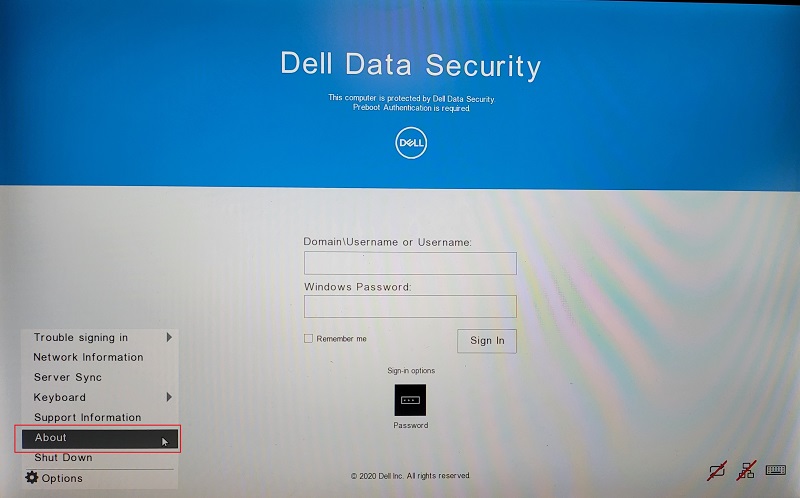
图 1:(仅限英文)选择选项和关于
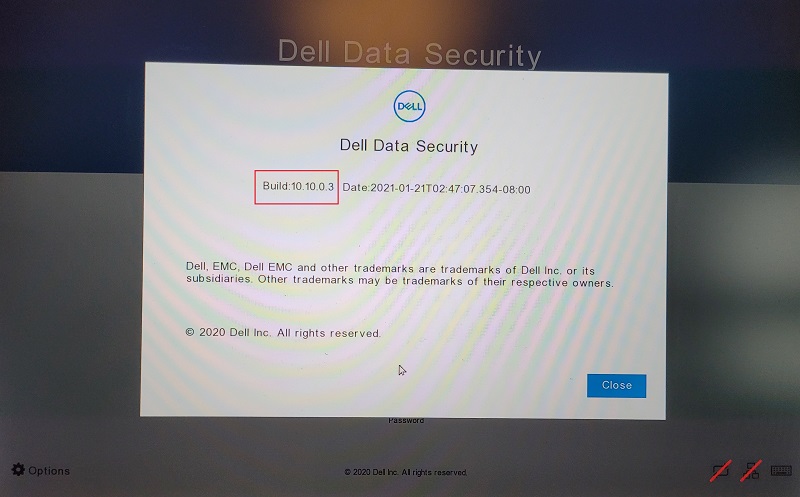
图 2:(仅限英文)Dell Data Security 构建信息
要联系支持部门,请参阅 Dell Data Security 国际支持电话号码。
转至 TechDirect,在线生成技术支持请求。
要获得更多见解和资源,请加入戴尔安全社区论坛。
Additional Information
Videos
Affected Products
Dell EncryptionArticle Properties
Article Number: 000186109
Article Type: Solution
Last Modified: 08 May 2024
Version: 11
Find answers to your questions from other Dell users
Support Services
Check if your device is covered by Support Services.