VMware: ESXi MCE PSOD:n virheenkorjaus
Summary: ESXi Machine Check Exception (MCE) purple diagnostic screen (PSOD) -virheenkorjaus ja esimerkki.
Instructions
ESXi-palvelimet saattavat pysähtyä ja näyttöön tulee violetti diagnostiikkanäyttö (PSOD) MCE (Machine Check Exception) -virheiden vuoksi. MCE-virheet johtuvat laitteisto-ongelmista.
MCE Purple -diagnostiikkanäytössä näkyy useita kohteita. Näistä MCi_STATUS Rekisteristä on hyötyä ongelman vianmäärityksessä.
Rekisterin tiedot:
- pikanäppäimellä
MCi_STATUSRekisteri sisältää tietoja koneen tarkistusvirheestä. - Rekisteri näkyy kohdan " vieressä
S:" Kuten alla olevasta esimerkistä näkyy:
MC: PCPU18 B:13 S:0xfe20004000011166 M:0x7246040086 A:0x38c989b100 5
Bitit ja niiden merkitys:
| 63 | 62 | 61 | 60 | 59 | 58 | 57 | 53-56 | 38-52 | 32-37 | 16-31 | 0-15 |
| KELVOLLINEN merkintä - Jos määritetty, tiedot kelpaavat. | OVERFLOW-lippu - Jos asetettu, se voi tarkoittaa, että lähellä toisiaan on esiintynyt useita MCE:itä. | UNC-lippu - Jos määritetty, CPU ei voinut korjata virhettä. | FI lippu | MISCV-lippu - Jos määritetty, MISC-rekisteri sisältää lisätietoja. | ADDRV - Jos asetettu, ADDR-rekisteri sisältää virheen tapahtumapaikan. | PCC-lippu - Jos asetettu, se tarkoittaa, että prosessori on saattanut vioittua. | Arkkitehtoninen, jos bitti 11 on asetettu, muuten "muuta tietoa". | Arkkitehtoninen, jos bitti 10 on asetettu, muuten "muut tiedot". | Muita tietoja | CPU:n mallikohtainen virhekoodi | Koneen tarkistuksen virhekoodi |
Voit tehdä virheenkorjauksen seuraamalla MCi_STATUS Rekisteri on tärkeä. Nämä bitit ilmaisevat yksinkertaisen tai yhdistetyn virheen.
Vaihtoehto 1: Automaattisen työkalun käyttäminen
VMware Purple Diagnostic Screen (PSOD) -virheenlukija

Vaihtoehto 2: Manuaalisten vaiheiden käyttäminen
- Yksinkertaiset virheet on nopea korjata
0000 0000 0000 0000 -- No Error reported to this bank of error-reporting registers.
0000 0000 0000 0001 -- Unclassified - Error has not been classified.
0000 0000 0000 0010 -- Parity error in internal microcode ROM.
0000 0000 0000 0011 -- External error-BINIT# from another processor caused this processor MCE. Happens only if BINIT# observation enabled during power on.
0000 0000 0000 0100 -- Functional redundancy check master/slave error.
0000 0000 0000 0101 -- Internal parity error.
0000 0000 0000 0110 -- SMM handler tried to execute outside the ranges specified by SMRR.
0000 0100 0000 0000 -- Internal timer error.
0000 1110 0000 1011 -- I/O error.
0000 01xx xxxx xxxx -- Internal unclassified error. Atleast one X must be equal to 1.
- Yhdistetyt virheet
000F 0000 0000 11LL - Generic Cache Hierarchy error.
000F 0000 0001 TTLL - {TT}TLB{LL}_ERR. TLB errors.
000F 0000 1MMM CCCC - {MMM}_Channel{CCCC}_ERR - Memory controller errors.
000F 0001 RRRR TTLL - {TT}CACHE{LL}_{RRRR}_ERR - Cache Hierarchy errors.
000F 1PPT RRRR IILL - BUS{LL}_{PP}_{RRRR}_{II}_T_ERR - Bus and Interconnect errors.
- F - Lomakkeen lippu
0 – Normal Filtering
1 – Corrected Filtering
Suodatus tarkoittaa, että joitakin tai kaikkia tämän rakenteen merkinnän myöhempiä korjauksia ei kirjata.
- TT - Koskee kohtia 2 ja 4 edellä.
Ilmaisee tapahtuman tyypin:
00 - Instruction
01 - Data
10 - Generic
- LL - Koskee yllä olevia kohtia 1, 2, 4 ja 5.
Tämä ilmaisee muistihierarkian tason, jolla virhe ilmeni.
00 - Level 0 - L0
01 - Level 1 - L1
10 - Level 2 - L2
11 - Generic – LG (It is shown only when processor cannot determine the hierarchy level)
- RRRR - Ilmaisee virheeseen liittyvän toiminnon tyypin. Toimet ovat seuraavat:
0000 - Generic Error - ERR
0001 - Generic Read - RD
0010 - Generic Write - WR
0011 - Data Read - DRD
0100 - Data Write - DWR
0101 - Instruction Fetch - IRD
0110 - Prefetch - PREFETCH
0111 - Eviction - EVICT
1000 - Snoop - SNOOP
- PP (osallistuminen) - Kuvaa paikallisen suorittimen roolin virheessä.
00 - SRC - Local processor originated request
01 - RES - Local processor responded to request
10 - OBS - Local processor observed error as third party
11 - Generic
- T (aikakatkaisu) - 1 = Pyyntö aikakatkaistiin.
- II (muisti tai I/O)
00 - M - Memory Access
10 - IO - I/O
01 - Reserved
11 - Other transaction
- Muistiohjaimen virheet – MMM- ja CCCC-alikenttien määrittämät yllä
- MMM – Muistivirhe
000 - GEN - Generic undefined request
001 - RD - Memory read error
010 - WR - Memory write error
011 - AC - Address/Command error
100 - MS - Memory Scrubbing error
101-111 - Reserved
- CCCC - kanava, jossa on virhe
0000-1110 - CHN - Channel number
1111 - Channel not specified
Tässä on esimerkki MCE: n violetin diagnostisen näyttökuvan analysoinnista:
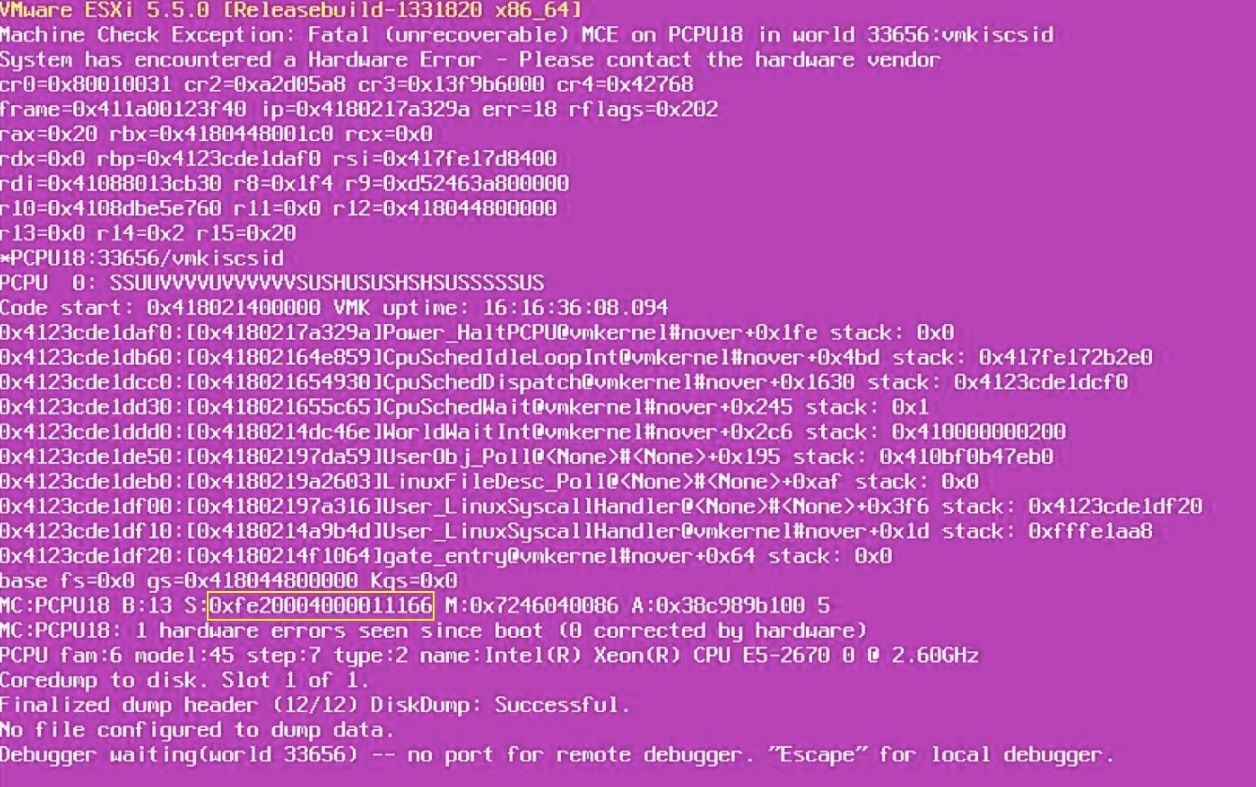
- Kirjoita muistiin
MCi_STATUSrekisterin arvo. Tässä se on:
0xfe20004000011166.
- Muunna se binaariksi:
1111 1110 0010 0000 0000 0000 0100 0000 0000 0000 0000 0001 0001 0001 0110 0110
- Ota alemmat 16 bittiä
MCi_STATUSRekisteröidy:
0001 0001 0110 0110
Vertaa sitä yhdistelmävirheisiin. Tässä tapauksessa kyseessä on välimuistihierarkiavirhe (tyyppi 4).
- Käytä arvoja:
F = 1
RRRR = 0110 – Prefetch
TT = 01 – Transaction type - Data
LL = 10 – Level 2 cache
Johtopäätös:
- Näyttää siltä, että violetti diagnostiikkanäyttö tapahtui, kun suorittimen L2-välimuistissa oli esihaku joillekin tiedoille.
- Tämä voi siis olla ongelma suorittimen L2-välimuistissa.
- Siksi CPU on vaihdettava ensin ja tarkistettava sitten, onko ongelma ratkaistu. Jos ongelma ilmenee uudelleen, emolevy voidaan vaihtaa.