VMware: Debug di ESXi MCE PSOD
Summary: Come eseguire il debug della schermata di diagnostica viola (PSOD) MCE (Machine Check Exception) ESXi con un esempio.
Instructions
I server ESXi potrebbero arrestarsi con una schermata di diagnostica viola (PSOD) a causa di errori Machine Check Exception (MCE). Gli errori MCE sono dovuti a problemi hardware.
La schermata di diagnostica viola MCE visualizza più elementi. Di questi, il MCi_STATUS Register è utile per il debug del problema.
Dettagli del registro:
- La colonna
MCi_STATUSIl registro contiene informazioni sull'errore di controllo del computer. - Il registro viene visualizzato accanto a "
S:" Come mostrato nell'esempio seguente:
MC: PCPU18 B:13 S:0xfe20004000011166 M:0x7246040086 A:0x38c989b100 5
I bit e il loro significato:
| 63 | 62 | 61 | 60 | 59 | 58 | 57 | 53-56 | 38-52 | 32-37 | 16-31 | 0-15 |
| Flag VALID: se impostato, le informazioni sono valide. | Flag OVERFLOW: se impostato, potrebbe indicare che più MCE si sono verificati vicini l'uno all'altro. | Flag UNC: se impostato, la CPU non è in grado di correggere l'errore. | Bandiera EN | Flag MISCV: se impostato, il registro MISC contiene ulteriori informazioni. | ADDRV: se impostato, il registro ADDR contiene la posizione in cui si è verificato l'errore. | Flag PCC: se impostato, significa che il processore potrebbe essere stato danneggiato. | Architetturale se il bit 11 è impostato, altrimenti "altre informazioni". | Architetturale se il bit 10 è impostato, altrimenti "altre informazioni". | Altre informazioni | Codice di errore specifico del modello per la CPU | Codice di errore di controllo del computer |
Per eseguire il debug dell'errore, i 16 bit bassi del MCi_STATUS registrazione sono importanti. Questi bit indicano un errore semplice o composto.
Opzione 1: Utilizzo dello strumento automatico
Lettore errori PSOD (VMware Purple Diagnostic Screen)

Opzione 2. Utilizzo della procedura manuale
- Gli errori semplici sono veloci da debuggare
0000 0000 0000 0000 -- No Error reported to this bank of error-reporting registers.
0000 0000 0000 0001 -- Unclassified - Error has not been classified.
0000 0000 0000 0010 -- Parity error in internal microcode ROM.
0000 0000 0000 0011 -- External error-BINIT# from another processor caused this processor MCE. Happens only if BINIT# observation enabled during power on.
0000 0000 0000 0100 -- Functional redundancy check master/slave error.
0000 0000 0000 0101 -- Internal parity error.
0000 0000 0000 0110 -- SMM handler tried to execute outside the ranges specified by SMRR.
0000 0100 0000 0000 -- Internal timer error.
0000 1110 0000 1011 -- I/O error.
0000 01xx xxxx xxxx -- Internal unclassified error. Atleast one X must be equal to 1.
- Errori composti
000F 0000 0000 11LL - Generic Cache Hierarchy error.
000F 0000 0001 TTLL - {TT}TLB{LL}_ERR. TLB errors.
000F 0000 1MMM CCCC - {MMM}_Channel{CCCC}_ERR - Memory controller errors.
000F 0001 RRRR TTLL - {TT}CACHE{LL}_{RRRR}_ERR - Cache Hierarchy errors.
000F 1PPT RRRR IILL - BUS{LL}_{PP}_{RRRR}_{II}_T_ERR - Bus and Interconnect errors.
- F - Flag di forma
0 – Normal Filtering
1 – Corrected Filtering
Filtraggio significa che alcune o tutte le correzioni successive a questa voce in questa struttura non vengono registrate.
- TT - Si applica ai punti 2 e 4 di cui sopra.
Indica il tipo di transazione:
00 - Instruction
01 - Data
10 - Generic
- LL - Si applica ai punti 1, 2, 4 e 5 precedenti.
Indica il livello nella gerarchia di memoria in cui si è verificato l'errore.
00 - Level 0 - L0
01 - Level 1 - L1
10 - Level 2 - L2
11 - Generic – LG (It is shown only when processor cannot determine the hierarchy level)
- RRRR: indica il tipo di azione associata all'errore. Le azioni sono:
0000 - Generic Error - ERR
0001 - Generic Read - RD
0010 - Generic Write - WR
0011 - Data Read - DRD
0100 - Data Write - DWR
0101 - Instruction Fetch - IRD
0110 - Prefetch - PREFETCH
0111 - Eviction - EVICT
1000 - Snoop - SNOOP
- PP (partecipazione) - Descrive il ruolo del processore locale nell'errore.
00 - SRC - Local processor originated request
01 - RES - Local processor responded to request
10 - OBS - Local processor observed error as third party
11 - Generic
- T (Timeout) - 1 = Timeout richiesta.
- II (memoria o I/O)
00 - M - Memory Access
10 - IO - I/O
01 - Reserved
11 - Other transaction
- Errori del controller di memoria - Definiti dai sottocampi MMM e CCCC sopra
- MMM - Errore di memoria
000 - GEN - Generic undefined request
001 - RD - Memory read error
010 - WR - Memory write error
011 - AC - Address/Command error
100 - MS - Memory Scrubbing error
101-111 - Reserved
- CCCC - Canale con errore
0000-1110 - CHN - Channel number
1111 - Channel not specified
Di seguito è riportato un esempio di come analizzare uno screenshot diagnostico viola MCE:
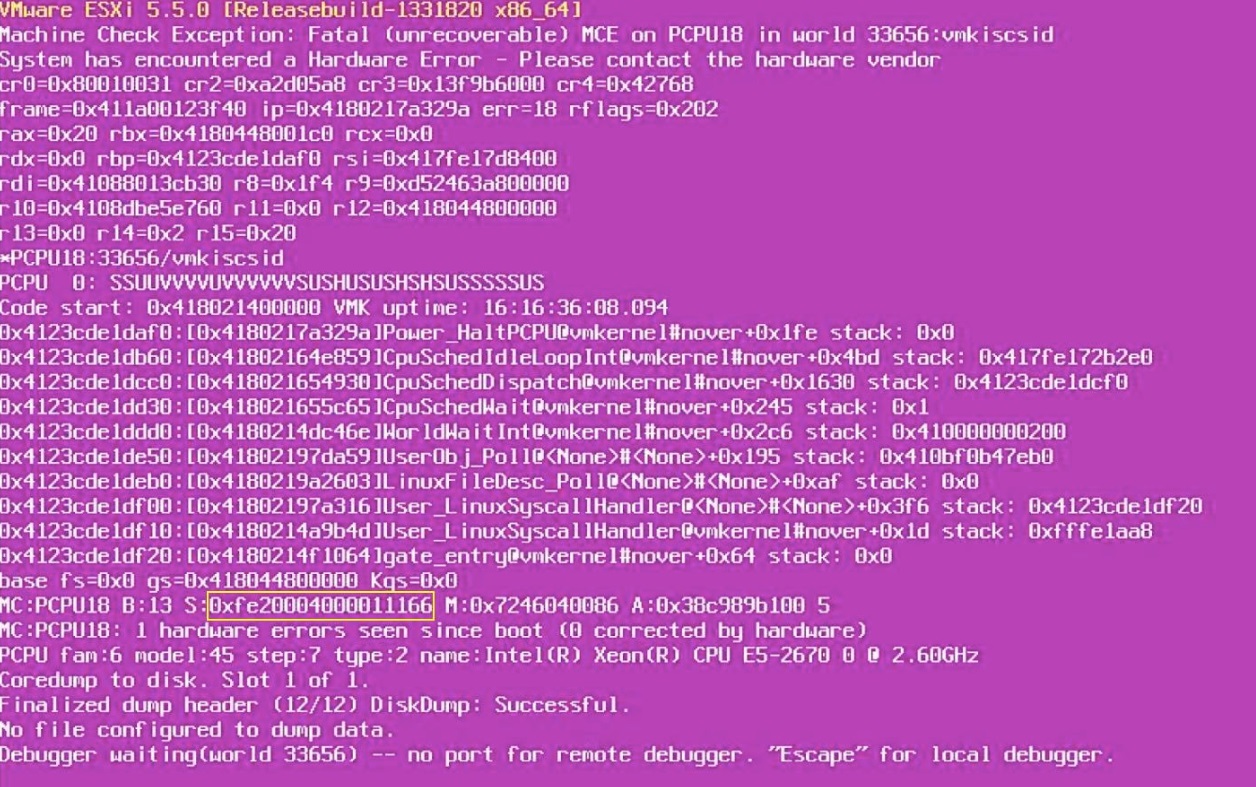
- Annotare il
MCi_STATUSvalore di registro. Eccolo:
0xfe20004000011166.
- Convertirlo in binario:
1111 1110 0010 0000 0000 0000 0100 0000 0000 0000 0000 0001 0001 0001 0110 0110
- Prendere i 16 bit inferiori del
MCi_STATUSRegistro:
0001 0001 0110 0110
Confrontalo con gli errori composti. In questo caso, sembra trattarsi di un errore di gerarchia della cache (tipo 4).
- Applicare i valori:
F = 1
RRRR = 0110 – Prefetch
TT = 01 – Transaction type - Data
LL = 10 – Level 2 cache
Conclusione:
- Sembra che la schermata di diagnostica viola si sia verificata durante un'operazione di pre-fetch su alcuni dati nella cache L2 del processore.
- Pertanto, potrebbe trattarsi di un problema con la cache L2 sul processore.
- Pertanto, è necessario prima sostituire la CPU e quindi verificare se il problema è stato risolto. Nel caso in cui il problema si ripresenti, è possibile sostituire la scheda madre.