PowerFlex 3.X:將 PFxM 中的新磁碟新增至簡報伺服器後,探索這些磁碟
Summary: 詳細說明在將新增磁碟區新增至簡報伺服器後,如何讓新增磁碟區顯示在 PowerFlex Manager 中。
This article applies to
This article does not apply to
This article is not tied to any specific product.
Not all product versions are identified in this article.
Instructions
將新磁碟區新增至簡報伺服器後,讓其顯示在 PowerFlex Manager 中 -
1.在 PowerFlex Manager 中,按一下使用者介面頂端的「資源」功能表。

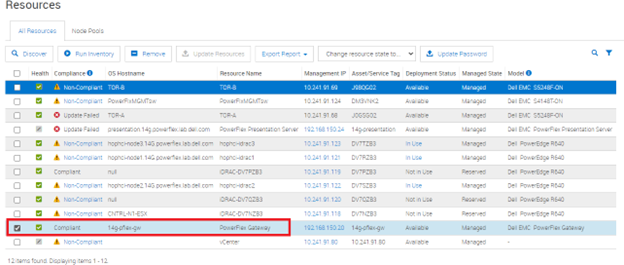
2.找到並選中閘道旁邊的框。
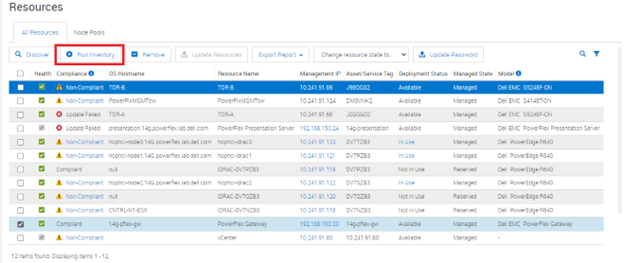
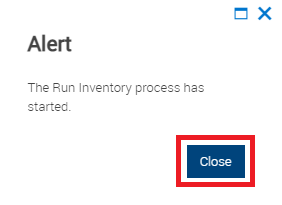
3.按一下上方的「執行清查」按鈕,然後關閉彈出式方塊。
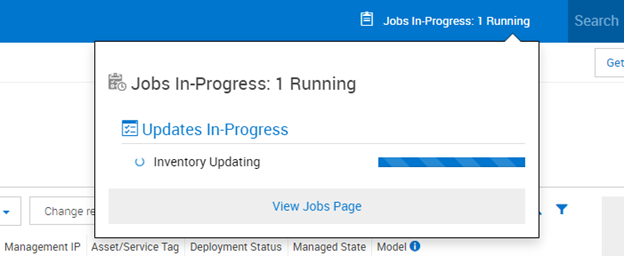
4.等待工作完成。
5.前往「服務」區段,然後選取新增磁碟機的服務。

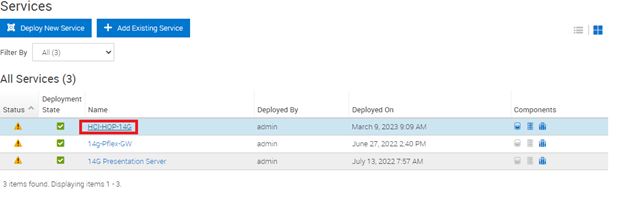
6.在右側的「服務動作」下,選取「更新服務詳細資料」按鈕。

7.在功能表上,驗證操作系統和 SVM 是否使用來自憑據管理器的正確憑據,然後選擇下一步。給它一些時間與所有伺服器聯繫。


8.在下一個螢幕上,驗證它是否看到新驅動器,然後選擇下一步。在我們的範例中,沒有任何變化,但您應該會在即時環境中看到清單變化。


9.現在服務應包含新增的磁碟機。
Affected Products
PowerFlex rack, PowerFlex rack connectivity, PowerFlex rack HWArticle Properties
Article Number: 000213012
Article Type: How To
Last Modified: 08 Dec 2025
Version: 4
Find answers to your questions from other Dell users
Support Services
Check if your device is covered by Support Services.