PowerFlex 3.X:在演示服务器中添加新磁盘后,在 PFxM 中发现新磁盘
Summary: 详细说明在演示服务器中添加添加的卷后如何在 PowerFlex Manager 中显示添加的卷。
This article applies to
This article does not apply to
This article is not tied to any specific product.
Not all product versions are identified in this article.
Instructions
将新卷添加到演示服务器后,在 PowerFlex Manager 中显示新卷 -
1.在 PowerFlex Manager 中,单击用户界面顶部的“Resources”菜单。

2.找到并选中网关旁边的框。
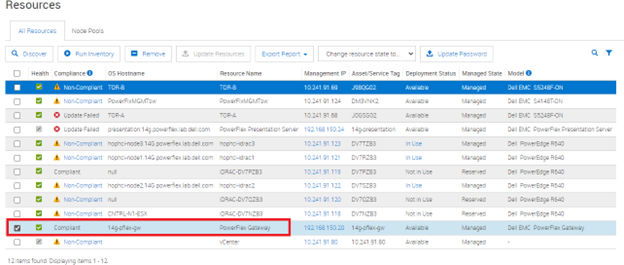
3.单击顶部的“Run Inventory”按钮,然后关闭弹出框。


4.等待作业完成。

5.转至“Services”部分,然后选择添加了驱动器的服务。


6.在右侧“Service Actions”下,选择“Update Service Details”按钮。

7.在菜单上,验证作系统和 SVM 是否使用凭据管理器中的正确凭据,然后选择 Next。给它一些时间来联系所有服务器。
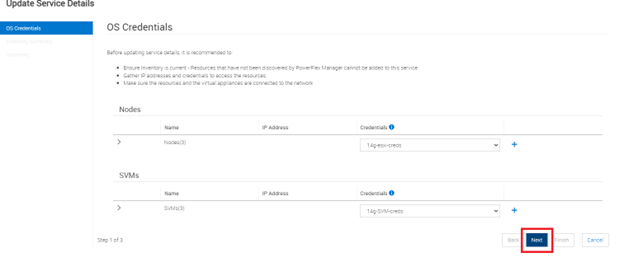

8.在下一个屏幕上,验证它是否看到新驱动器,然后选择 Next。在我们的示例中,没有任何变化,但您应该会看到实时环境中的资源清册更改。


9.现在,服务应包含添加的驱动器。
Affected Products
PowerFlex rack, PowerFlex rack connectivity, PowerFlex rack HWArticle Properties
Article Number: 000213012
Article Type: How To
Last Modified: 08 Dec 2025
Version: 4
Find answers to your questions from other Dell users
Support Services
Check if your device is covered by Support Services.