Data Domain: DS600/ES120 Solid amber light on LCCs
Summary: Solid amber LED light seen on DS600 or ES120 shelves Link Controller Card (LCC) attached to DD9410, DD9910, or DD6410.
This article applies to
This article does not apply to
This article is not tied to any specific product.
Not all product versions are identified in this article.
Instructions
Applies to:
- DS600 or ES120 attached storage enclosure
Supported on DD9410, DD9910, or DD6410
Symptoms:
- Solid amber LED seen on DS600 and ES120 LCC SAS ports connected to HBA
Cause:
This reflects the 48G SAS connection speed (for example: to SAS HBA in the head controller).
The lower SAS speed of 48G is expected for this hardware configuration.
The LCC expects a 'Full' speed connection of 96G, but the HBAs only support 48 GB connections.
This is expected behavior and not a fault condition.
The system is running as designed.
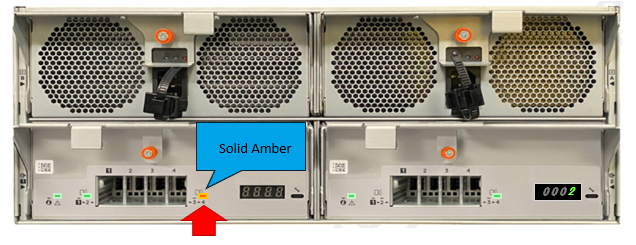
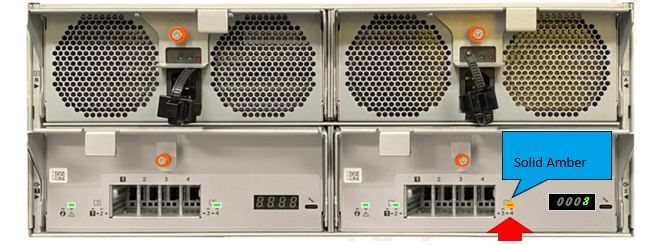
SOLUTION:
- This is expected behavior on DS600 and ES120 shelves attached to DD9410, DD9910, or DD6410 head units.
- No further action is required.
Additional Information
LED Status on DS600:
Four Bicolor Amber or Green LEDs controlled by CPLD for mini-SAS HD status:
-
- Solid green - Port link up
- Blink green 1s, off 1s - Traffic Flowing (Activity)
- Solid amber - Port link up in a degraded speed state (<96GB)
- Blink amber 2s, off 1s - Fault on the port
- Off - Port off, disable, or unplugged
- Port link up at 48GB speed (LED - solid amber)
- Port link up at 96GB speed (LED-off)
Any other lower link speed below 48GB would be degraded (LED - solid amber).
Affected Products
DD9410 Appliance, DD9910 ApplianceProducts
Data DomainArticle Properties
Article Number: 000349219
Article Type: How To
Last Modified: 08 Oct 2025
Version: 3
Find answers to your questions from other Dell users
Support Services
Check if your device is covered by Support Services.