PowerEdge: PERC 배터리 오류 이해
Summary: 이 문서에서는 다양한 배터리 오류 코드, 가능한 원인 및 예에 대한 정보를 제공합니다.
Instructions
목차:
- BAT0015: PERC 배터리가 부족합니다.
- BAT0020: PERC1 배터리가 준비되지 않았습니다.
- BAT0017: PERC 배터리에 장애가 발생했습니다.
- BAT0021: PERC 배터리의 가용 수명이 다했거나 장애가 발생했습니다.
배터리 경고 및 오류 이벤트의 일반적인 원인:
- 펌웨어 문제
- 배터리 재학습 진행 중
- 배터리 감지 문제
- 배터리 비활성화
- 배터리 충전 오류
- 배터리 상태 점검 실패
경고 이벤트:
BAT0015    The PERC battery is low.
BAT0020    The PERC1 battery is not ready either because the battery is not fully charged or a transient battery event is observed.
중요 이벤트:
BAT0017    The PERC1 battery has failed.
BAT0021    The PERC1 battery has reached the end of its usable life or has failed.
BAT1029    The battery on Integrated RAID Controller 1 can no longer recharge. (Deprecated replaced with BAT0017)
BAT0015: PERC 배터리가 부족합니다.
이 오류 코드는 배터리 학습 주기 또는 충전이 유지되지 않는 배터리로 인해 발생할 수 있습니다. 문제를 해결하려면 컨트롤러 로그에서 아래 예를 확인하십시오.
-
예: 학습 주기 예약됨

07/30/25  1:55:45: C0:EVT#01861-07/30/25  1:55:45: 151=Battery relearn started
07/30/25  1:56:50: C0:EVT#01862-07/30/25  1:56:50: 152=Battery relearn in progress
07/30/25  2:32:35: C0:EVT#01863-07/30/25  2:32:35: 148=Battery is discharging
07/30/25  3:49:30: C1:Learn completed successfully.
07/30/25  3:49:30: C0:EVT#01864-07/30/25  3:49:30: 153=Battery relearn completed
이것은 설계된 대로 작동하고 있으며 학습 주기가 충전 능력을 제대로 테스트하려면 배터리를 방전해야 합니다.
권장 사항: 대부분의 컨트롤러가 학습 주기 동안 메시지를 숨기도록 펌웨어를 업데이트했으므로 PERC 펌웨어를 업데이트합니다.
-
충전 문제의 예:
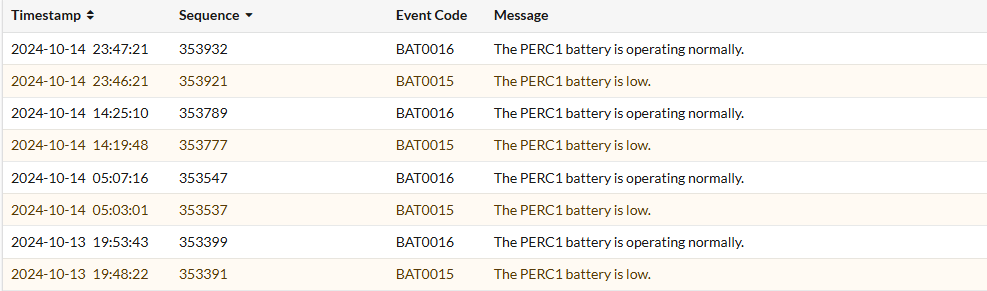
10/14/24 8:26:29: C0: Remaining Capacity : 134 mAh Full Charge Capacity: 602 mAh 10/14/24 8:26:29: C0: Relative State of Charge: 22 % FwBBUState : 1 10/14/24 8:31:54: C0:EVT#185874-10/14/24 8:31:54:
147=Battery started charging10/14/24 8:31:54: C0: Remaining Capacity : 140 mAh Full Charge Capacity: 605 mAh 10/14/24 8:31:54: C0: Relative State of Charge: 23 % FwBBUState : 1 10/14/24 9:54:14: C0:EVT#185878-10/14/24 9:54:14:148=Battery is discharging10/14/24 17:41:09: C0: Remaining Capacity : 134 mAh Full Charge Capacity: 604 mAh 10/14/24 17:41:09: C0: Relative State of Charge: 22 % FwBBUState : 1 10/14/24 17:45:29: C0:EVT#185882-10/14/24 17:45:29:147=Battery started charging10/14/24 17:46:34: C0: Remaining Capacity : 141 mAh Full Charge Capacity: 618 mAh 10/14/24 17:46:34: C0: Relative State of Charge: 22 % FwBBUState : 1컨트롤러 로그를 보면 방전을 시작하기 전에 최대 100%까지 완전히 충전되지 않아 계속 반복적으로 충전해야 하는 방법을 알 수 있으며, 이는 배터리에 문제가 있거나 컨트롤러의 충전 실패일 수 있음을 나타냅니다.
권장 사항: PERC 펌웨어를 업데이트하고 오류가 지속되는지 모니터링합니다. 오류가 지속되면 Dell 기술 지원 부서에 문의하는 것이 좋습니다.
-
예: 배터리가 반복적으로 비활성화됨
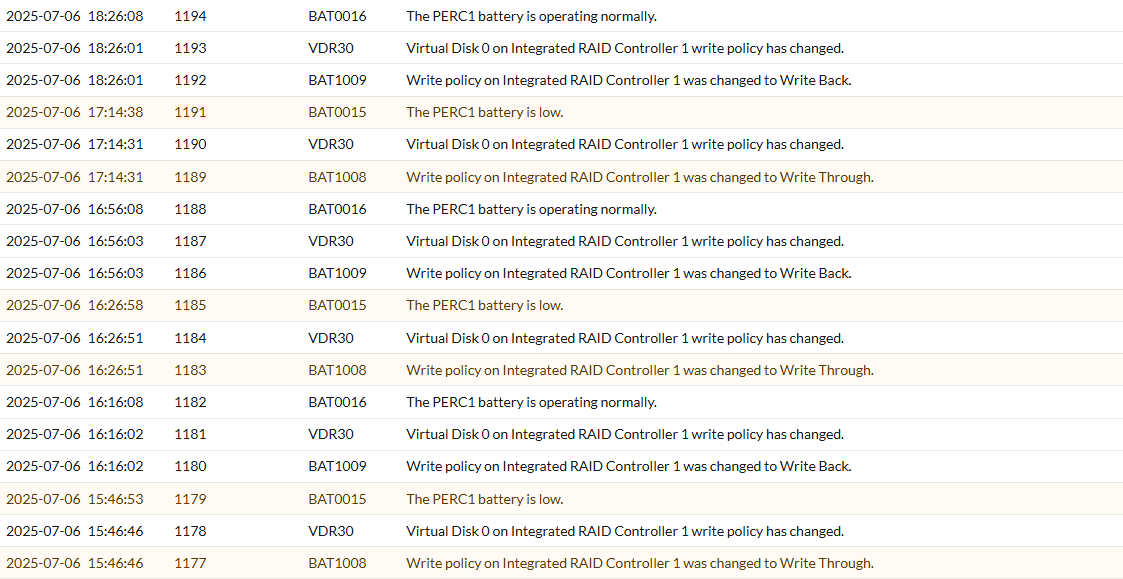
07/06/25 13:25:30: C1: _____________________________________________ 07/06/25 13:25:30: C1: *** BATTERY MONITORED INFORMATION *** 07/06/25 13:25:30: C1: ____________________________________________________________________________ 07/06/25 13:25:30: C1: Temperature : 33 C Voltage : 3904 mV 07/06/25 13:25:30: C1: Current : 0 mA GasGaugeStat : 138 07/06/25 13:25:30: C1: GPID : 20357815 ChargerStatus : 1 07/06/25 13:25:30: C1: Remaining Capacity : 95 mAh Full Charge Capacity: 128 mAh 07/06/25 13:25:30: C1: Relative State of Charge: 75 % FwBBUState : 1 07/06/25 13:25:30: C1: ____________________________________________________________________________ 07/06/25 13:17:56: C0:EVT#01712-07/06/25 13:17:56: 195=
BBU disabled; changing WB virtual disks to WT, Forced WB VDs are not affected 07/06/25 13:25:30: C0:EVT#01714-07/06/25 13:25:30: 194=BBU enabled; changing WT virtual disks to WB 07/06/25 15:25:46: C0:EVT#01720-07/06/25 15:25:46: 195=BBU disabled; changing WB virtual disks to WT, Forced WB VDs are not affected 07/06/25 15:35:30: C0:EVT#01722-07/06/25 15:35:30: 194=BBU enabled; changing WT virtual disks to WB 07/06/25 16:26:28: C0:EVT#01724-07/06/25 16:26:28: 195=BBU disabled; changing WB virtual disks to WT, Forced WB VDs are not affected 07/06/25 16:36:10: C0:EVT#01726-07/06/25 16:36:10: 194=BBU enabled; changing WT virtual disks to WB 07/06/25 17:30:20: C0:EVT#01728-07/06/25 17:30:20: 195=BBU disabled; changing WB virtual disks to WT, Forced WB VDs are not affected 07/06/25 17:35:45: C0:EVT#01730-07/06/25 17:35:45: 194=BBU enabled; changing WT virtual disks to WB컨트롤러 로그를 보면 배터리가 비활성화되었다가 충전되지 않고 다시 활성화되는 것을 볼 수 있으므로 배터리 부족 경고는 비활성화된 배터리로 인해 트리거됩니다.
권장 사항: PERC 펌웨어를 업데이트한 후 전체 종료 및 전력 소모로 인해 배터리 인벤토리가 새로 트리거되고 배터리 재학습 주기가 트리거됩니다.
BAT0020: PERC1 배터리가 준비되지 않았습니다.
이 오류 코드는 배터리 학습 주기 또는 비활성화된 배터리로 인해 발생할 수도 있습니다.
-
예: 학습 주기
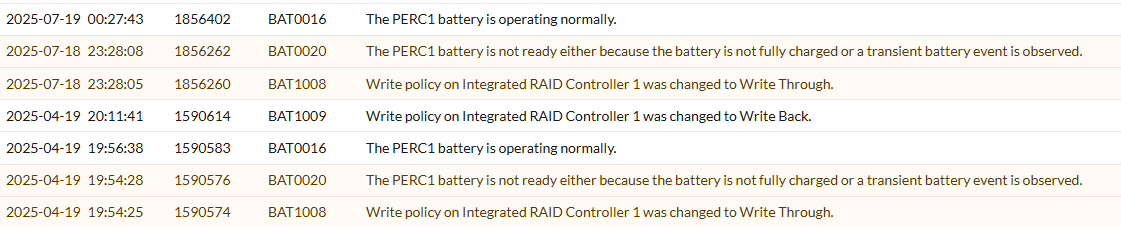
07/19/25  0:23:47: C1:Battery fully charged: Starting a Learn cycle
07/19/25  0:23:47: C0:EVT#01120-07/19/25  0:23:47: 151=Battery relearn started
07/19/25  0:24:52: C0:EVT#01121-07/19/25  0:24:52: 152=Battery relearn in progress
07/19/25  5:54:12: C1:Learn completed successfully.
07/19/25  5:54:12: C0:EVT#01128-07/19/25  5:54:12: 153=Battery relearn completed

07/19/25  5:54:12: C1:Next Learn will start on 10 17 2025
07/19/25  5:54:12: C1:	 Auto Learn Period      : 90  days
07/19/25  5:54:12: C1:	 Next Learn Time        : 813995652
07/19/25  5:54:12: C1:	 Delayed Learn Interval : 0  hours from scheduled time
07/19/25  5:54:12: C1:	 Next Learn scheduled on: 10 17 2025   5:54:12
여기서는 배터리가 정상적인 재학습 주기를 거치고 있었고 성공적으로 완료되었음을 알 수 있습니다. 그리고 다음 예약 실행을 기준으로 배터리가 재학습을 위한 기본 3개월 주기임을 알 수 있습니다. 이는 3개월 전 4월 19일의 로그에 있는 이전 메시지를 설명합니다.
권장 사항: 대부분의 컨트롤러가 학습 주기 동안 메시지를 숨기도록 펌웨어를 업데이트했으므로 PERC 펌웨어를 업데이트합니다.
-
예: 배터리가 반복적으로 비활성화됨
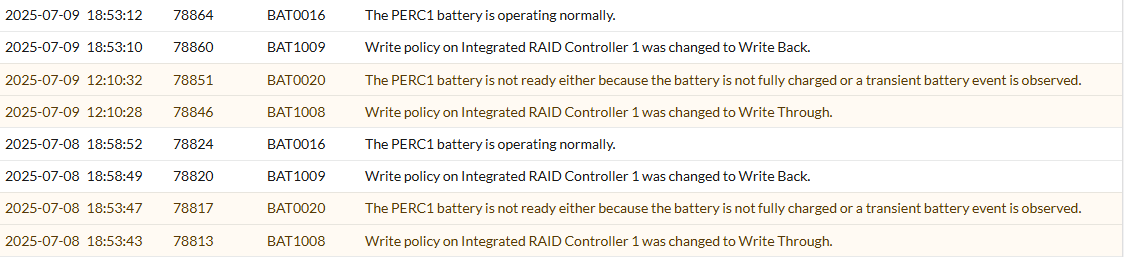
07/08/25 18:53:39: C0:EVT#03167-07/08/25 18:53:39: 195=
BBU disabled; changing WB virtual disks to WT, Forced WB VDs are not affected 07/08/25 18:58:48: C0:EVT#03171-07/08/25 18:58:48: 194=BBU enabled; changing WT virtual disks to WB 07/09/25 12:10:23: C0:EVT#03175-07/09/25 12:10:23: 195=BBU disabled; changing WB virtual disks to WT, Forced WB VDs are not affected 07/09/25 18:53:08: C0:EVT#03179-07/09/25 18:53:08: 194=BBU enabled; changing WT virtual disks to WB이 예시에서 로그에는 배터리(BBU)가 비활성화된 후 잠시 후 다시 비활성화되는 것이 표시됩니다. 이는 펌웨어 문제 및 컨트롤러 충전 문제로 인해 발생할 수 있습니다.
권장 사항: PERC 펌웨어 및 모니터를 업데이트합니다. 오류가 계속되면 Dell 기술 지원 부서에 문의하십시오.
BAT0017 - PERC 배터리에 장애가 발생했습니다.
이 오류 코드는 사용 수명이 다했거나 장애가 발생한 배터리로 인해 발생할 수 있습니다. 문제를 해결하려면 컨트롤러 로그에서 배터리 장애, 충전 또는 감지 문제를 확인하십시오.
-
예: 배터리 상태 점검 실패
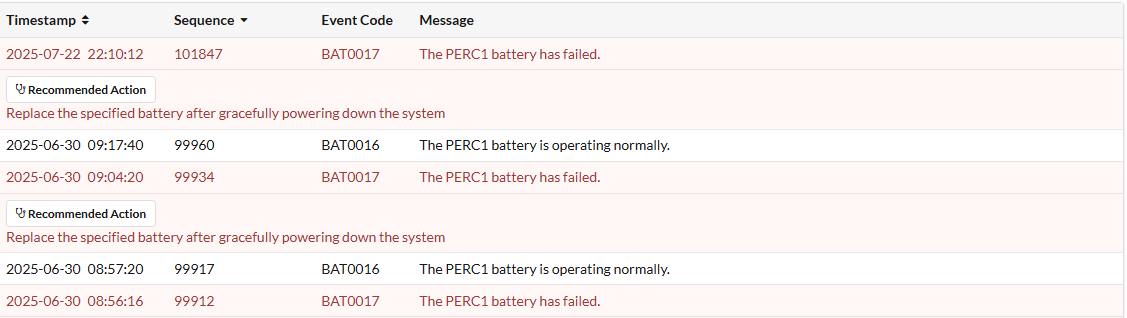
T15: C0:EVT#02053-T15:
150=Battery has failed and cannot support data retention. Please replace the batteryT15: C0:EVT#02054-T15: 162=Current capacity of the battery is below threshold T15: C0:EVT#02055-T15: 155=Battery relearn pending: Battery is under charge 07/18/25 2:59:59: C0:EVT#02068-07/18/25 2:59:59: 242=Battery charge complete 07/18/25 2:59:59: C1:Battery fully charged: Starting a Learn cycle 07/18/25 2:59:59: C0:EVT#02069-07/18/25 2:59:59: 151=Battery relearn started 07/18/25 3:01:04: C0:EVT#02070-07/18/25 3:01:04: 152=Battery relearn in progress 07/18/25 6:48:34: C0:EVT#02071-07/18/25 6:48:34: 148=Battery is discharging 07/18/25 7:51:24: C1:Learn completed successfully. 07/18/25 7:51:24: C0:EVT#02072-07/18/25 7:51:24: 153=Battery relearn completed 07/18/25 7:51:24: C1:Next Learn will start on 10 16 2025 07/18/25 7:52:29: C0:EVT#02073-07/18/25 7:52:29: 162=Current capacity of the battery is below threshold 07/18/25 7:52:29: C0:EVT#02074-07/18/25 7:52:29: 152=Battery relearn in progress여기에서 컨트롤러를 초기화할 때 수행된 초기 배터리 상태 점검에서 부팅 중에 배터리에 장애가 발생한 것을 확인하고 교체를 제안했음을 확인할 수 있습니다.
이는 배터리 상태가 임계값 미만이기 때문이지만 배터리가 완전히 방전되지 않았기 때문에 배터리를 방전하고 충전하는 재학습을 반복해서 트리거하여 학습 주기를 완료하고 충전할 수 있기 때문에 실패에서 정상으로 전환되지만 오래 유지되지 않고 다시 학습을 다시 트리거하는 것을 볼 수 있습니다.권장 사항: Dell 기술 지원 부서에 문의하십시오.
-
예: 배터리 제거 또는 충전 오류
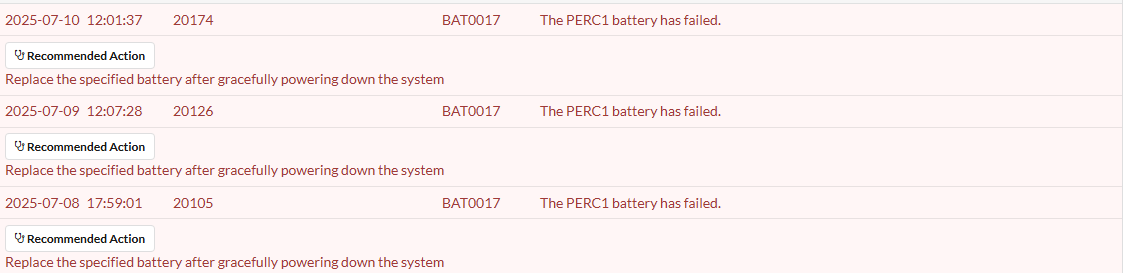
07/09/25 18:39:15:
C1:Charger detected Battery removal or Charger Fault condition07/09/25 18:44:15: C1:Charger detected Battery removal or Charger Fault condition 07/09/25 18:49:15: C1:Charger detected Battery removal or Charger Fault condition T11: C0: disableAutoRebuild=0, disableBatteryWarning=0, eccBucketSize=ff T11: C0:Charger detected Battery removal or Charger Fault condition T11: C0:EVT#56196-T11:161=Battery removed07/10/25 11:59:03: C0:Charger detected Battery removal or Charger Fault condition 07/10/25 11:59:03: C0:Charger detected Battery removal or Charger Fault condition 07/10/25 12:02:42: C1:Charger detected Battery removal or Charger Fault condition 07/10/25 12:07:42: C1:Charger detected Battery removal or Charger Fault condition이 예에서는 컨트롤러가 배터리 제거 또는 충전기 결함을 감지하여 배터리가 제대로 감지되지 않는 것을 볼 수 있습니다.
여기서 배터리가 물리적으로 분리되지 않았다면 펌웨어 문제, 배터리 오류 또는 컨트롤러 충전 오류일 수 있습니다.권장 사항: PERC 펌웨어를 업데이트하고 배터리 상태를 확인합니다. 오류가 계속되면 Dell 기술 지원 부서에 문의하십시오.
BAT0021 - PERC 배터리의 가용 수명이 다했거나 장애가 발생했습니다.
이 오류 코드는 사용 수명이 다했거나 장애가 발생한 배터리로 인해 발생할 수 있습니다. 문제를 해결하려면 컨트롤러 로그에서 배터리 장애, 충전 또는 감지 문제를 확인하십시오.
-
예: 배터리 또는 충전 문제가 감지됨

T8: C0:Unknown DPN,
please check batteryT8: C0:EVT#00606-T8:200=Battery/charger problems detected; SOH BadT8: C0:EVT#00607-T8: 195=BBU disabled; changing WB virtual disks to WT, Forced WB VDs are not affected T8: C0:Battery type is unsupported T8: C0:Unable to read Battery Pack-Side EEPROM 128 bytes from Offset =0x0.Err - 1 T8: C0:Unable to read Battery Pack-Side EEPROM bytes.Err - 1부팅 초기화 중에 배터리가 불량한 것으로 확인되었습니다.
SOH Bad이 메시지는 배터리에 장애가 발생했음을 직접적으로 나타냅니다. 또한 배터리가 지원되지 않는다는 메시지가 표시되어 더 이상 유효한 배터리로 올바르게 감지하지 못한다는 내용도 볼 수 있습니다.권장 사항: Dell 기술 지원 부서에 문의하십시오.