PowerEdge:瞭解 PERC 電池錯誤
Summary: 本文提供各種電池錯誤代碼、其可能原因和範例的相關資訊。
Instructions
目錄:
電池警告和故障事件的常見原因:
- 韌體問題
- A 電池正在重新學習
- 電池偵測問題
- 電池已停用
- 電池充電失敗
- 電池執行狀況檢查失敗
警告事件:
BAT0015    The PERC battery is low.
BAT0020    The PERC1 battery is not ready either because the battery is not fully charged or a transient battery event is observed.
嚴重事件:
BAT0017    The PERC1 battery has failed.
BAT0021    The PERC1 battery has reached the end of its usable life or has failed.
BAT1029    The battery on Integrated RAID Controller 1 can no longer recharge. (Deprecated replaced with BAT0017)
BAT0015:PERC 電池電量過低
此錯誤代碼可能是因為電池記憶週期或電池未保持電量所導致。若要進行故障診斷,請檢查控制器記錄,以取得以下範例。
-
範例:已排定學習週期

07/30/25  1:55:45: C0:EVT#01861-07/30/25  1:55:45: 151=Battery relearn started
07/30/25  1:56:50: C0:EVT#01862-07/30/25  1:56:50: 152=Battery relearn in progress
07/30/25  2:32:35: C0:EVT#01863-07/30/25  2:32:35: 148=Battery is discharging
07/30/25  3:49:30: C1:Learn completed successfully.
07/30/25  3:49:30: C0:EVT#01864-07/30/25  3:49:30: 153=Battery relearn completed
此為設計運作方式,必須排空電池電力,才能讓記憶週期正確測試其充電能力。
建議:更新 PERC 韌體,因為大多數控制器都已更新韌體,以便在記憶週期期間隱藏訊息。
-
充電問題範例:
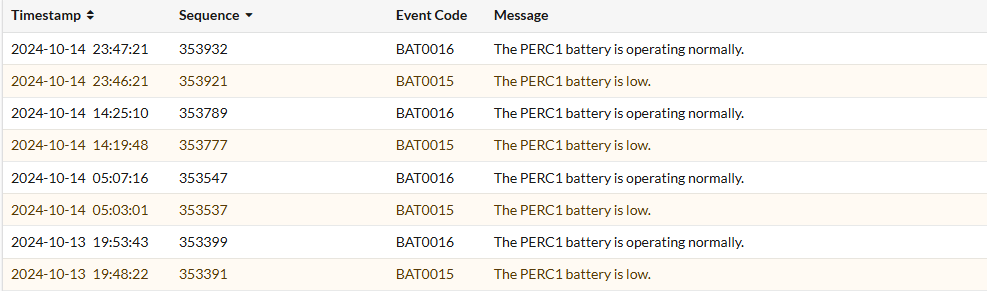
10/14/24 8:26:29: C0: Remaining Capacity : 134 mAh Full Charge Capacity: 602 mAh 10/14/24 8:26:29: C0: Relative State of Charge: 22 % FwBBUState : 1 10/14/24 8:31:54: C0:EVT#185874-10/14/24 8:31:54:
147=Battery started charging10/14/24 8:31:54: C0: Remaining Capacity : 140 mAh Full Charge Capacity: 605 mAh 10/14/24 8:31:54: C0: Relative State of Charge: 23 % FwBBUState : 1 10/14/24 9:54:14: C0:EVT#185878-10/14/24 9:54:14:148=Battery is discharging10/14/24 17:41:09: C0: Remaining Capacity : 134 mAh Full Charge Capacity: 604 mAh 10/14/24 17:41:09: C0: Relative State of Charge: 22 % FwBBUState : 1 10/14/24 17:45:29: C0:EVT#185882-10/14/24 17:45:29:147=Battery started charging10/14/24 17:46:34: C0: Remaining Capacity : 141 mAh Full Charge Capacity: 618 mAh 10/14/24 17:46:34: C0: Relative State of Charge: 22 % FwBBUState : 1查看控制器日誌,我們可以看到它在開始放電之前從未充電到100%滿電,這導致它不斷必須反覆充電,表明電池保持電量的問題或可能是控制器的充電失敗。
建議:更新 PERC 韌體並監控錯誤是否持續存在。如果錯誤持續存在,建議您聯絡 Dell 技術支援部門。
-
範例:電池重複停用
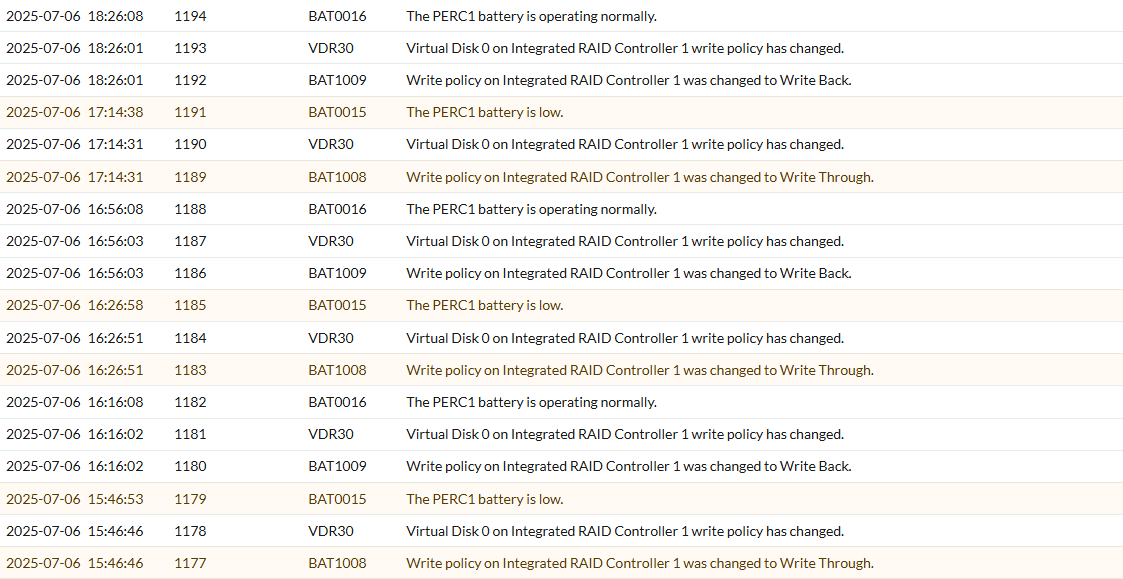
07/06/25 13:25:30: C1: _____________________________________________ 07/06/25 13:25:30: C1: *** BATTERY MONITORED INFORMATION *** 07/06/25 13:25:30: C1: ____________________________________________________________________________ 07/06/25 13:25:30: C1: Temperature : 33 C Voltage : 3904 mV 07/06/25 13:25:30: C1: Current : 0 mA GasGaugeStat : 138 07/06/25 13:25:30: C1: GPID : 20357815 ChargerStatus : 1 07/06/25 13:25:30: C1: Remaining Capacity : 95 mAh Full Charge Capacity: 128 mAh 07/06/25 13:25:30: C1: Relative State of Charge: 75 % FwBBUState : 1 07/06/25 13:25:30: C1: ____________________________________________________________________________ 07/06/25 13:17:56: C0:EVT#01712-07/06/25 13:17:56: 195=
BBU disabled; changing WB virtual disks to WT, Forced WB VDs are not affected 07/06/25 13:25:30: C0:EVT#01714-07/06/25 13:25:30: 194=BBU enabled; changing WT virtual disks to WB 07/06/25 15:25:46: C0:EVT#01720-07/06/25 15:25:46: 195=BBU disabled; changing WB virtual disks to WT, Forced WB VDs are not affected 07/06/25 15:35:30: C0:EVT#01722-07/06/25 15:35:30: 194=BBU enabled; changing WT virtual disks to WB 07/06/25 16:26:28: C0:EVT#01724-07/06/25 16:26:28: 195=BBU disabled; changing WB virtual disks to WT, Forced WB VDs are not affected 07/06/25 16:36:10: C0:EVT#01726-07/06/25 16:36:10: 194=BBU enabled; changing WT virtual disks to WB 07/06/25 17:30:20: C0:EVT#01728-07/06/25 17:30:20: 195=BBU disabled; changing WB virtual disks to WT, Forced WB VDs are not affected 07/06/25 17:35:45: C0:EVT#01730-07/06/25 17:35:45: 194=BBU enabled; changing WT virtual disks to WB查看控制器記錄,我們發現電池正在停用並重新啟用,沒有進行任何充電,因此電池電量不足警告是由電池被停用觸發。
建議:更新 PERC 韌體,接著完全關機和排空電力,這會觸發全新的電池清查和電池重新記憶週期。
BAT0020:PERC1 電池尚未就緒
此錯誤代碼也可能是因為電池記憶週期或電池已停用所導致。
-
範例:學習週期
07/19/25  0:23:47: C1:Battery fully charged: Starting a Learn cycle
07/19/25  0:23:47: C0:EVT#01120-07/19/25  0:23:47: 151=Battery relearn started
07/19/25  0:24:52: C0:EVT#01121-07/19/25  0:24:52: 152=Battery relearn in progress
07/19/25  5:54:12: C1:Learn completed successfully.
07/19/25  5:54:12: C0:EVT#01128-07/19/25  5:54:12: 153=Battery relearn completed

07/19/25  5:54:12: C1:Next Learn will start on 10 17 2025
07/19/25  5:54:12: C1:	 Auto Learn Period      : 90  days
07/19/25  5:54:12: C1:	 Next Learn Time        : 813995652
07/19/25  5:54:12: C1:	 Delayed Learn Interval : 0  hours from scheduled time
07/19/25  5:54:12: C1:	 Next Learn scheduled on: 10 17 2025   5:54:12
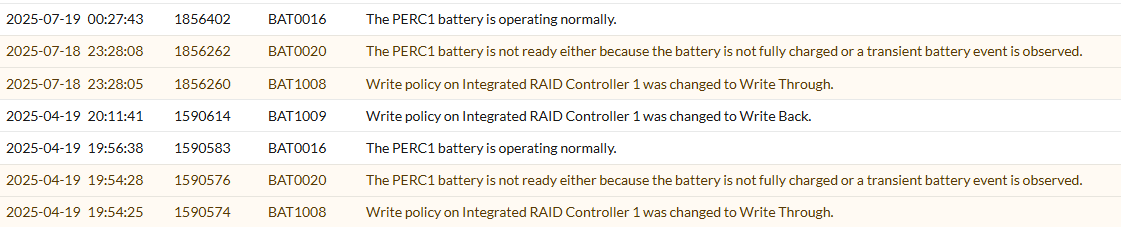
我們可以看到電池正在進行正常的重新學習週期,然後成功完成,而且我們可以根據下一次排定的執行,確認其為預設的三個月週期以重新學習,這說明了三個月前 4 月 19 日記錄中先前的訊息。
建議:更新 PERC 韌體,因為大多數控制器都已更新韌體,以便在記憶週期期間隱藏訊息。
-
範例:電池重複停用
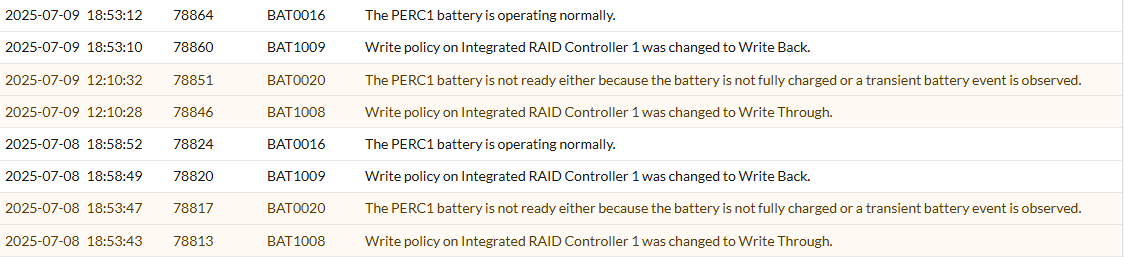
07/08/25 18:53:39: C0:EVT#03167-07/08/25 18:53:39: 195=
BBU disabled; changing WB virtual disks to WT, Forced WB VDs are not affected 07/08/25 18:58:48: C0:EVT#03171-07/08/25 18:58:48: 194=BBU enabled; changing WT virtual disks to WB 07/09/25 12:10:23: C0:EVT#03175-07/09/25 12:10:23: 195=BBU disabled; changing WB virtual disks to WT, Forced WB VDs are not affected 07/09/25 18:53:08: C0:EVT#03179-07/09/25 18:53:08: 194=BBU enabled; changing WT virtual disks to WB在此範例中,記錄會顯示電池 (BBU) 已停用,然後在再次啟用後不久又一遍。這可能是由韌體問題和控制器充電問題所導致。
建議:更新 PERC 韌體和顯示器。如果錯誤仍然存在,請聯絡 Dell 技術支援部門。
BAT0017 - PERC 電池故障
此錯誤代碼可能是因為電池已達到其使用壽命或發生故障。若要進行故障診斷,請檢查控制器記錄是否有電池故障、充電或偵測問題。
-
範例:電池執行狀況檢查失敗
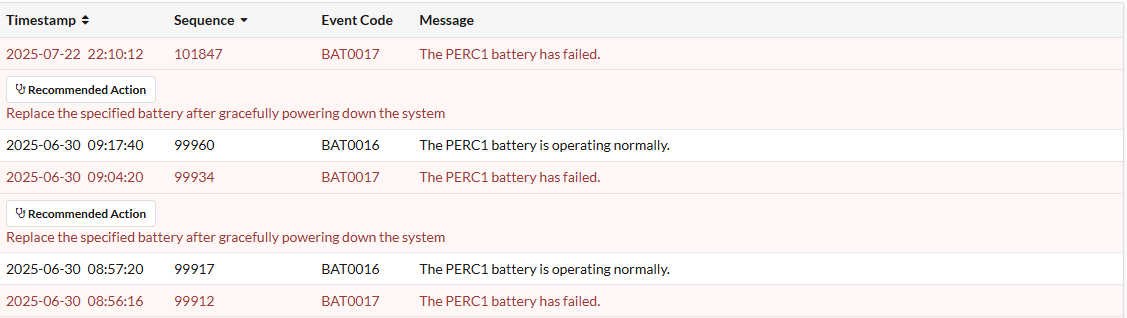
T15: C0:EVT#02053-T15:
150=Battery has failed and cannot support data retention. Please replace the batteryT15: C0:EVT#02054-T15: 162=Current capacity of the battery is below threshold T15: C0:EVT#02055-T15: 155=Battery relearn pending: Battery is under charge 07/18/25 2:59:59: C0:EVT#02068-07/18/25 2:59:59: 242=Battery charge complete 07/18/25 2:59:59: C1:Battery fully charged: Starting a Learn cycle 07/18/25 2:59:59: C0:EVT#02069-07/18/25 2:59:59: 151=Battery relearn started 07/18/25 3:01:04: C0:EVT#02070-07/18/25 3:01:04: 152=Battery relearn in progress 07/18/25 6:48:34: C0:EVT#02071-07/18/25 6:48:34: 148=Battery is discharging 07/18/25 7:51:24: C1:Learn completed successfully. 07/18/25 7:51:24: C0:EVT#02072-07/18/25 7:51:24: 153=Battery relearn completed 07/18/25 7:51:24: C1:Next Learn will start on 10 16 2025 07/18/25 7:52:29: C0:EVT#02073-07/18/25 7:52:29: 162=Current capacity of the battery is below threshold 07/18/25 7:52:29: C0:EVT#02074-07/18/25 7:52:29: 152=Battery relearn in progress我們可在此處看到,在開機期間,對控制器的初始化進行初始電池健全狀況檢查時,發現電池故障,並建議更換。
這是因為電池健全狀況低於閾值,但電池並沒有完全耗盡電量,因此我們看到它會一次又一次地觸發重新學習,將電池放電與充電,導致電池從「失敗」轉為正常,因為它能夠完成記憶週期並充電,但是我們可以看到它並沒有長時間持有,並會再次觸發重新學習。建議:聯絡 Dell 技術支援部門。
-
範例:電池取出或充電故障
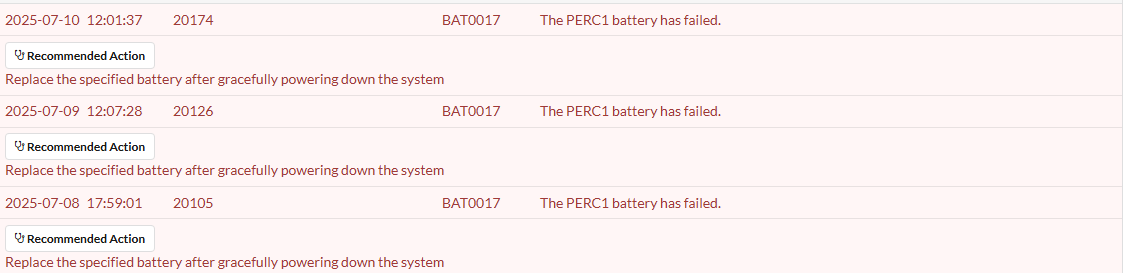
07/09/25 18:39:15:
C1:Charger detected Battery removal or Charger Fault condition07/09/25 18:44:15: C1:Charger detected Battery removal or Charger Fault condition 07/09/25 18:49:15: C1:Charger detected Battery removal or Charger Fault condition T11: C0: disableAutoRebuild=0, disableBatteryWarning=0, eccBucketSize=ff T11: C0:Charger detected Battery removal or Charger Fault condition T11: C0:EVT#56196-T11:161=Battery removed07/10/25 11:59:03: C0:Charger detected Battery removal or Charger Fault condition 07/10/25 11:59:03: C0:Charger detected Battery removal or Charger Fault condition 07/10/25 12:02:42: C1:Charger detected Battery removal or Charger Fault condition 07/10/25 12:07:42: C1:Charger detected Battery removal or Charger Fault condition在此範例中,我們看到控制器偵測到電池卸下或充電器故障,導致無法正確偵測到電池。
因此,若未實際卸下電池,則可能是韌體問題、電池故障或控制器充電故障。建議:更新 PERC 韌體,並檢查電池狀態是否正常。如果錯誤仍然存在,請聯絡 Dell 技術支援部門。
BAT0021 - PERC 電池的使用壽命已結束或故障
此錯誤代碼可能是因為電池已達到其使用壽命或發生故障。若要進行故障診斷,請檢查控制器記錄是否有電池故障、充電或偵測問題。
-
範例:偵測到電池或充電問題

T8: C0:Unknown DPN,
please check batteryT8: C0:EVT#00606-T8:200=Battery/charger problems detected; SOH BadT8: C0:EVT#00607-T8: 195=BBU disabled; changing WB virtual disks to WT, Forced WB VDs are not affected T8: C0:Battery type is unsupported T8: C0:Unable to read Battery Pack-Side EEPROM 128 bytes from Offset =0x0.Err - 1 T8: C0:Unable to read Battery Pack-Side EEPROM bytes.Err - 1在這裡,我們看到在啟動初始化期間發現電池損壞,
SOH Bad此處的訊息直接指出電池故障,我們甚至會看到電池繼續表示電池不支援,表示已不再正確偵測為有效電池。建議:聯絡 Dell 技術支援部門。