測試文章:本文僅用於測試目的。
Summary: 本文概述在 VMware ESXi 8.0 Update 3 上搭載 AMD Turin CPU 的第 17 代 PowerEdge 上對 Peripheral Component Interconnect Express (PCIe) 多段的支援(不支援);在 BIOS 中停用。
This article applies to
This article does not apply to
This article is not tied to any specific product.
Not all product versions are identified in this article.
Instructions
PCIe 多區段是以 AMD Turin 處理器為基礎的 Dell 第 17 代伺服器中推出的一項功能。PCIe 多區段可支援更多 PCIe 裝置,方法是擁有多個區段,且每個區段都有多個 PCIe 匯流排區段,進而提供擴充能力。
建立此 KB 是為了提及 VMware ESXi 對 PCIe 多段支援的支持狀態。Dell 在搭載都靈處理器的第 17 代 AMD 伺服器上支援 ESXi 8.0 Update3。首先,Dell 可透過 ESXi 8.0 Update 3 支援 PE R7715 和 R6715 1S 伺服器。2S支援即將推出。
但是,本文初次發佈時,ESXi 8.0 Update 3 不支援 PCIe 多區段。可能會隨著新增支援而變更。因此,若要在這些伺服器型號上安裝和使用 ESXi 8.0 Update 3,必須停用伺服器 BIOS 中的 PCIe 多區段支援。若要執行相同操作,請移至伺服器 BIOS 設定,選取 處理器設定 ,並將 「一個區段 」設為 PCI 多區段支援 BIOS 權杖的值。接著儲存變更、重新開機系統,並安裝 VMware ESXi。
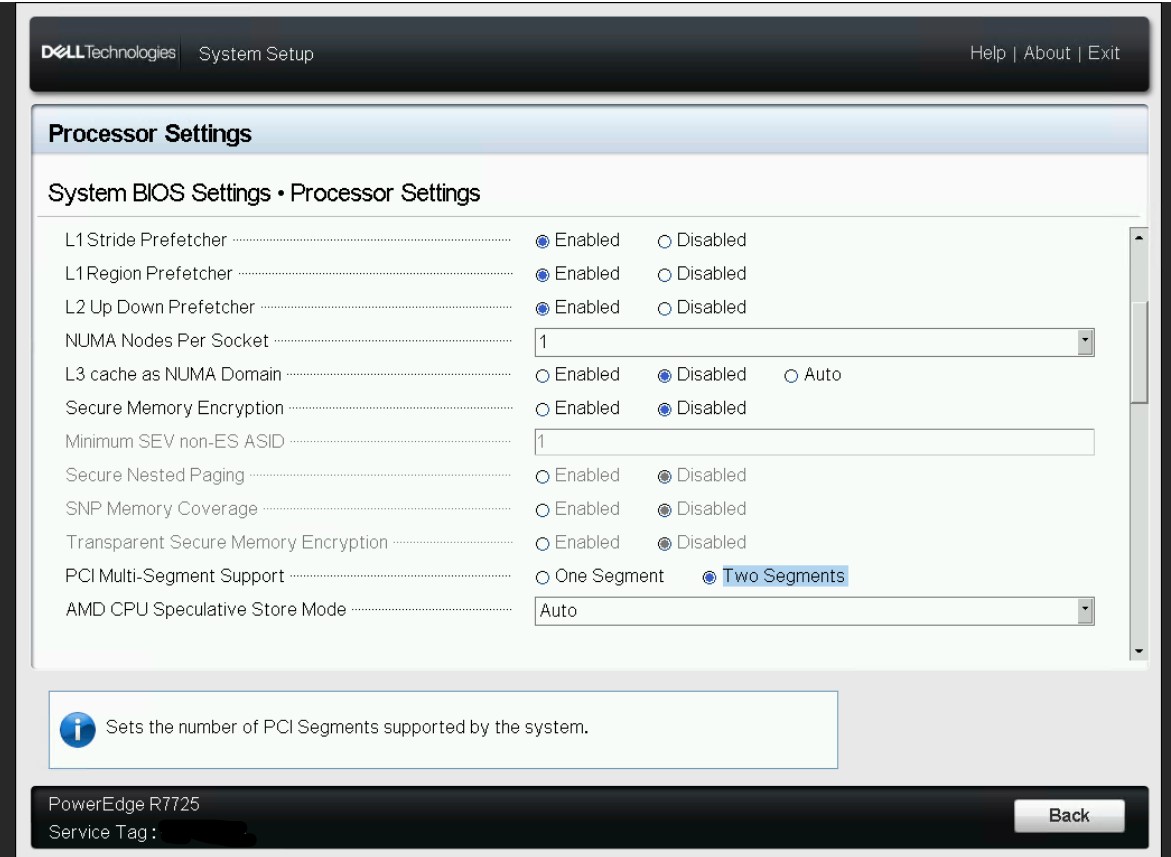
請注意 ,如果 PCIe 多區段支援 BIOS 權杖設定為 「兩個區段」,則使用 VMware ESXi 時可能會發生問題。
Additional Information
Affected Products
ObjectScaleArticle Properties
Article Number: 000364006
Article Type: How To
Last Modified: 19 Jan 2026
Version: 16
Find answers to your questions from other Dell users
Support Services
Check if your device is covered by Support Services.