测试文章
Summary: 测试摘要更新
This article applies to
This article does not apply to
This article is not tied to any specific product.
Not all product versions are identified in this article.
Instructions
PCIe 多段是戴尔在基于 AMD Turin 处理器的第 17 代服务器中引入的一项功能。PCIe 多段通过具有多个段且每个设备具有多个 PCIe 总线段来支持更多 PCIe 设备,从而提供可扩展性。
创建此知识库文章的目的是提及针对 PCIe 多段支持的 VMware ESXi 支持立场。戴尔在其基于 Turin 处理器的第 17 代 AMD 服务器上支持 ESXi 8.0 Update3。首先,戴尔支持使用 ESXi 8.0 更新 3 的 PE R7715 和 R6715 1S 服务器。2S 支持即将推出。
但是,在最初发布本文时,ESXi 8.0 Update 3 不支持 PCIe 多段。添加支持时,它可能会更改。因此,需要在服务器 BIOS 中禁用 PCIe 多段支持,才能在这些服务器型号上安装和使用 ESXi 8.0 Update 3。要执行相同的作,请浏览服务器 BIOS 设置,选择 Processor Settings 并将 One Segment 设置为 PCI Multi-SegmentSupport BIOS token的值。然后保存更改,重新启动系统并安装 VMware ESXi。
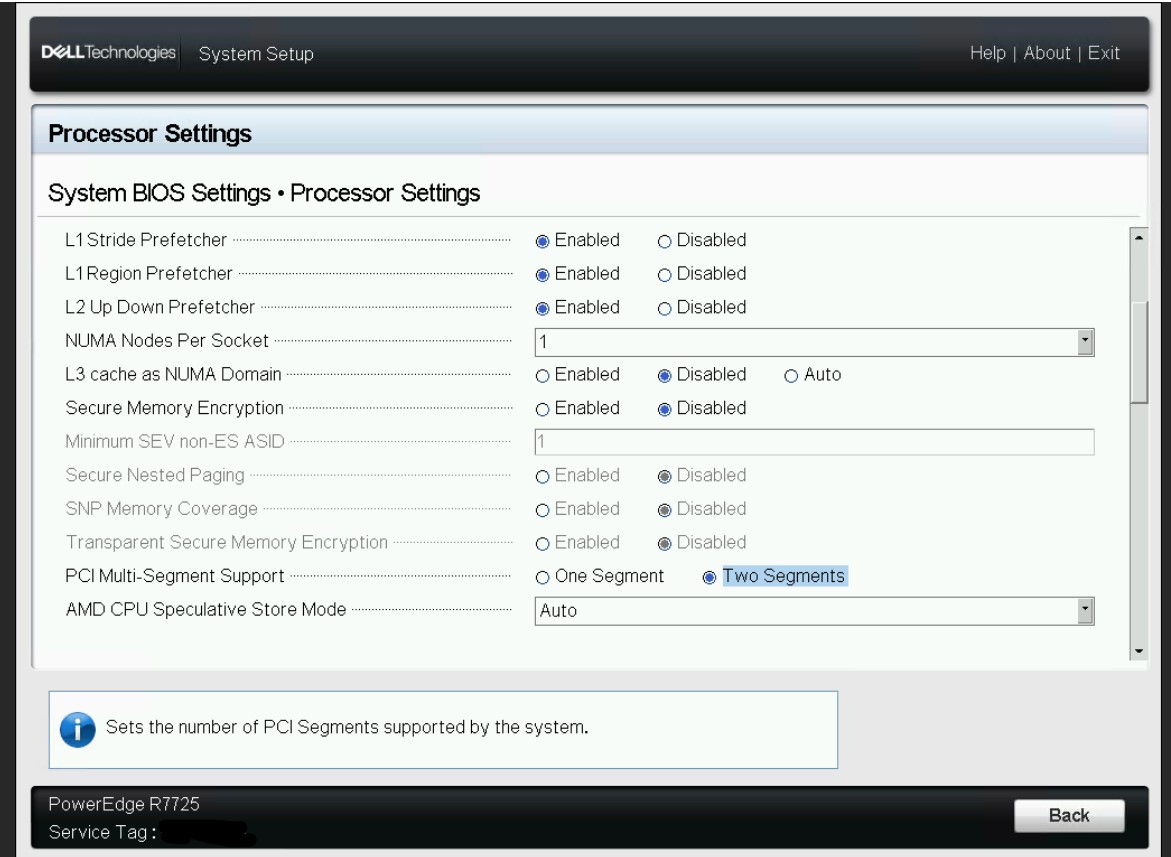
请注意 ,如果 PCIe 多段支持 BIOS 令牌设置为 “双段”,则在使用 VMware ESXi 时可能会遇到问题。
Additional Information
Affected Products
ObjectScaleArticle Properties
Article Number: 000364006
Article Type: How To
Last Modified: 20 Jan 2026
Version: 21
Find answers to your questions from other Dell users
Support Services
Check if your device is covered by Support Services.