Data Domain: Removing notification group from Data Domain
Summary: Removing notification group from Data Domain (Health > Alert > Notification > Group).
Instructions
When attempting to delete the certificate group from a user which does not have security officer's permission, it doesn't allow you to delete. It throws an error as below:
Error: "This operation requires a security officer's sign-off"
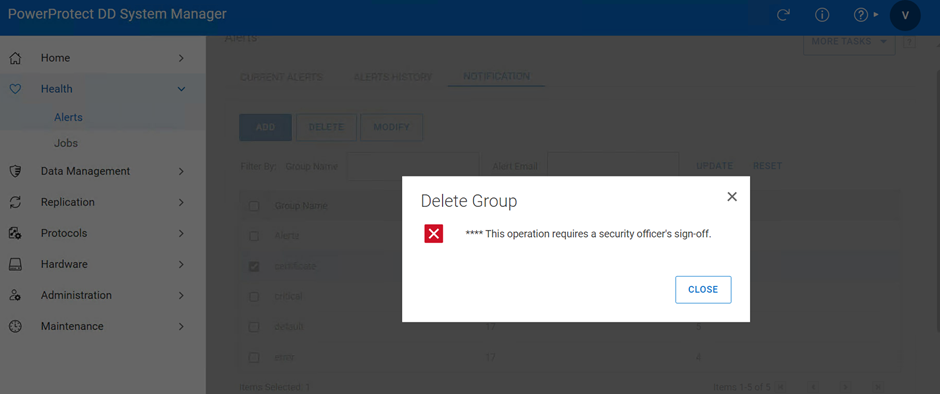
Even if you have got the security officer credentials and logged in to DD. Then it does not give option to select the group and delete. As shown below:

Even if logged into the CLI with the security officer's credentials then also it throws error as below:
Error: "This command is not available for this user."
secuser@datadomain001> alerts notify-list destroy certificate
****This command is not available for this user.
secuser@datadomain001>

Videos
Remediation steps:
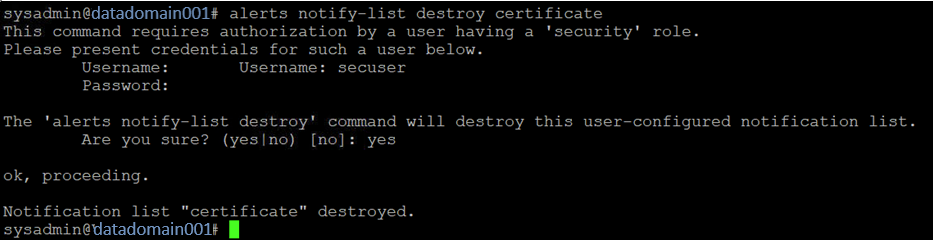
Step 1 - Log in to DD CLI with sysadmin or any other user which does not have the security officer's permission.
Step 2 - Run the command by updating the "Notification Group" name:
alerts notify-list destroy <group_name>Step 3 - Prompted for "security officer's" credentials.
Step 4 - Provide confirmation for deleting the "Notification Group" by choosing "yes" as shown below:
Notification group will be deleted.