"No Syslog box in the dropdown options".configuring VNX block only array to send logs to syslog server
Summary: No Syslog in dropdown options while configuring VNX block only array with syslog server.
Symptoms
Customer could not get past step 2c in the attached document.
Cause
It was determined that they did not have a host agent installed on the appliance or workstation that they wanted to use as the syslog server. (It was also confirmed that they could not install a Host agent on the server due to security considerations.)
Resolution
Install the appropriate host agent on the syslog server.
You can find the host agent with the following search:
Here's a link with additional instructions:
https://support.emc.com/search/
Type in Unisphere Host Agent in the (Scope by Product) search box, leave All support default in the Scope by resource box and most importantly, click on the Advanced Options tab over on the lower right. (otherwise a completely different and larger list will populate in findings as it doesn t do a full text search.)
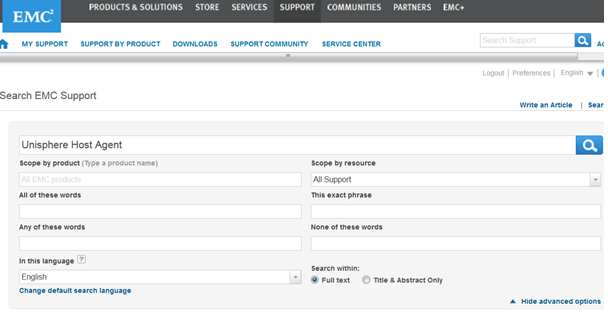
This search can be modified to find either Windows specific or Unix and other OS versions of the host agents as well. Here are some of the common ones:
ie;
Unisphere Host Agent for Windows 32 and 64-bit
Unisphere Host Agent (Linux x64)
Unisphere Host Agent for Linux x86
Unisphere Host Agent (Solaris x64)
Unisphere Host Agent (Solaris SPARC)
Unisphere Host Agent for AIX
Unisphere Host Agent for HP-UX
Note: Purposely I left out the version number in all of these, and tested search functionality and they all pull up the latest and older versions of each type.
Additional Information
On a block only array, a host agent must be installed on the syslog server.
>> Here's a questionnaire that you can provide to customer to determine their set up status:
1. Do you have a Host agent installed on the system (workstation) that you are going to be using as the Centralized Monitor station?
2. What is the Host agent type and version?
3. What is the OS and version on the Portal system or workstation (or VNX array) that you have designated?
4. Have you added the Portal IP address(es) to the Host Agent config file?
5. Could you verify that the other systems or workstations that you expect to see in the Available systems dropdown are not already functioning as portals? Can you also verify that they are running Unisphere for Windows?
6. *If* you are using VNX as the portal, do you have more than 20 hosts attached to the array? Note: the attached document states -> IMPORTANT: Do not use as a portal a VNX system that has more than 20 attached hosts.