Dell Unity:檔案系統使用率閾值
Summary: Unity 在達到 75% 時會顯示檔案系統填滿的警告 (使用者可修正)
This article applies to
This article does not apply to
This article is not tied to any specific product.
Not all product versions are identified in this article.
Symptoms
系統設計為在達到 75% 和 95% 時,顯示有關檔案系統使用率的警示。
錯誤如下:
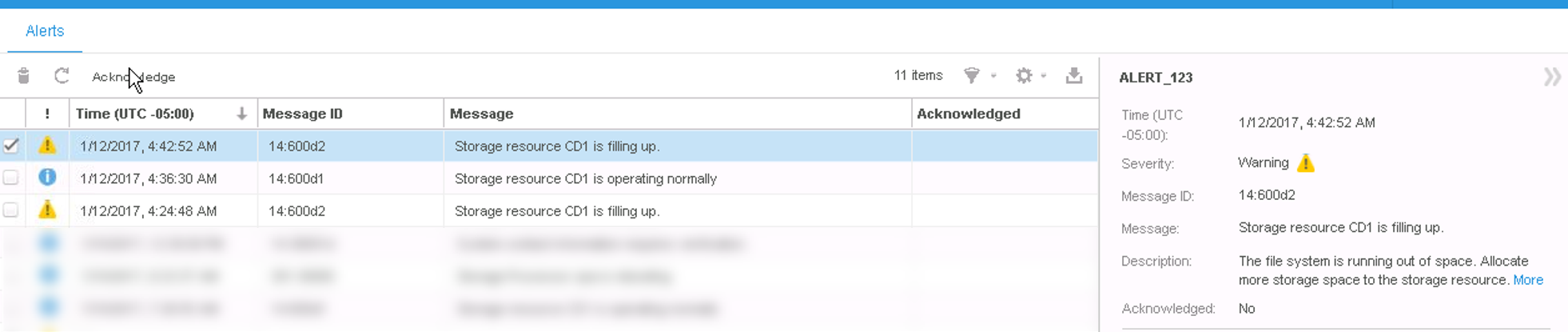
75%: "The file system is running out of space. Allocate more storage space to the storage resource."
95%: "The file system has run out of space. Allocate more storage space to the storage resource."
當檔案系統被清空或分配更多空間時,警示標籤會顯示通知:
The storage resource is operating normally. No action required.
客戶必須變更此閾值。
Cause
在警示標籤中:
Resolution
此 75% 閾值無法變更。可以管理和更改池的閾值,但此值不會影響文件系統。
Affected Products
Dell EMC Unity FamilyProducts
Dell EMC Unity FamilyArticle Properties
Article Number: 000052403
Article Type: Solution
Last Modified: 19 Sept 2025
Version: 4
Find answers to your questions from other Dell users
Support Services
Check if your device is covered by Support Services.