Avamar: Proxy Deployment Manager 오류 - 잘못된 도메인
Summary: Proxy Deployment Manager가 '프록시를 등록할 수 없음: 잘못된 도메인' 오류와 함께 등록에 실패함
Symptoms
Proxy Deployment Manager를 통해 프록시를 배포하려고 하면 항상 실패하고 프록시를 등록할 수 없음 오류가 발생했습니다. invalid domain
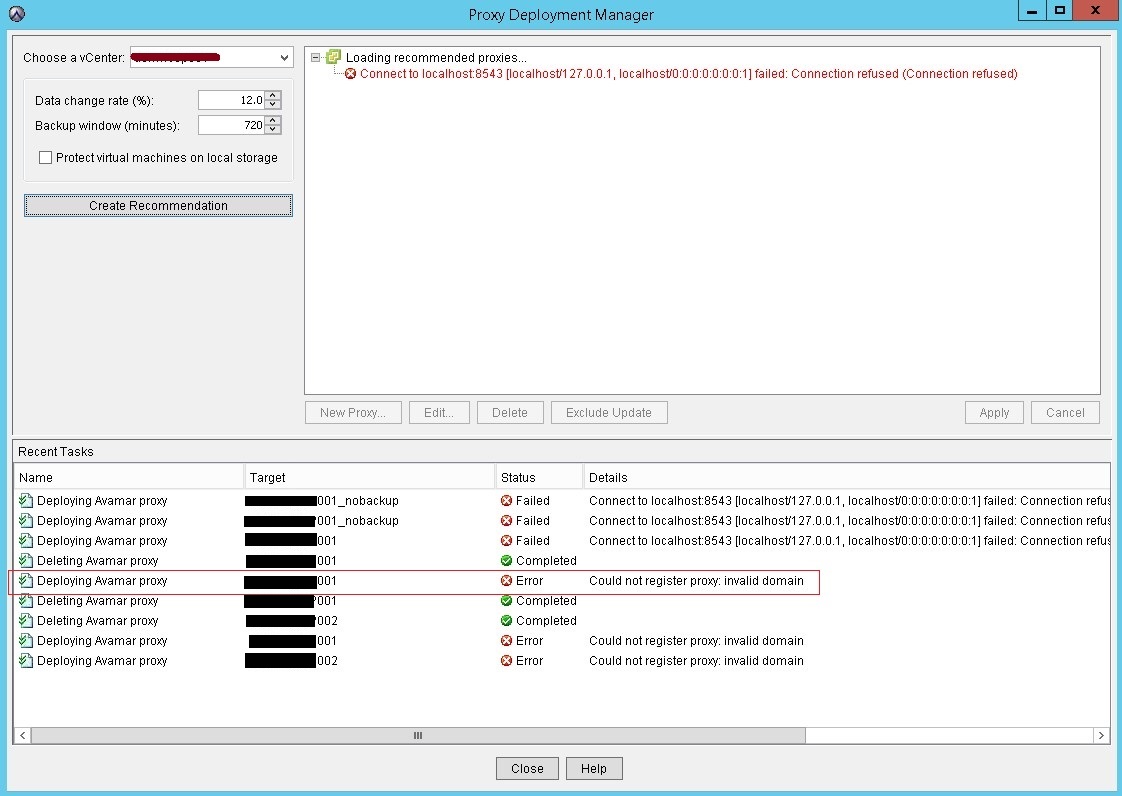
MCS 로그에 Avamar Server에 이미 이 클라이언트가 있는 것으로 표시됨
mcserver.log.43:FINE: Cl->MC 10.100.1.201:32876<client isclientos="0" type="init" ack="yes" fqhostname="usivnavmp001.sus.local" msgver="1" os_type="Linux" hostname="usivnavmp001.sus.lcal" client_type="VPROXY_GUEST" mcsaddr="10.100.1.200" uuid="4206c9d11fc2d8ef735d2c816c90712c" dpndomain="/" cid="0" version="7.4.101-58" secure-st-version="2"><DNSname>127.0.0.2</DNSame><DNSname>usivnavmp001.sus.local</DNSname><DNSname>usivnavmp001</DNSname><DNSname>10.100.1.201</DNSname></client>

mcserver.log.43:FINE: client connection called id indicates:10.100.1.201

mcserver.log.43:FINE: Paging will be disabled on client connecting from 10.100.1.201 because the client did not provide a paging address when connecting

mcserver.log.43:FINE: MC->Cl 10.100.1.201:32876 <message  errno="202" errdesc="Proxy client already exists as a client for image backup." msgver="5" ack="no" type="response" sync="fg"hfsaddr="10.100.1.200"  />
deploymanager.log in /usr/local/avamar/var/log/vcs shows the below error:
avagent.d Info: Stopping Avamar Client Agent (avagent)...

avagent.d Info: Client Agent stopped.

avagent Info <5008>: Logging to /usr/local/avamarclient/var/avagent.log

avagent Error <7531>: Unable to register /deab/proxy01.av.local with Administrator 192.167.191.29:28001


      'Proxy client already exists as a client for image backup.' (202)

avagent.d Info: Client activation error.

avagent Info <5008>: Logging to /usr/local/avamarclient/var/avagent.log

avagent Info <5417>: daemonized as process id 14474

avagent.d Info: Client Agent started.
Cause
이 문제는 2 가지 이유로 발생합니다.
이유 1 :
영향을 받는 Avamar Server에는 Avamar Server에 VM을 자동으로 추가하도록 구성된 규칙이 있습니다. 프록시 배포 중에 VM이 vCenter에서 생성되고 자체 활성화 전에 규칙에 따라 Avamar Server에 자동으로 추가됩니다. 따라서 오류 "Proxy client already exists as a client for image backup" 프록시가 나중에 자체 등록을 시도할 때 MCS에 의해 기록되었습니다.
이유 2 :
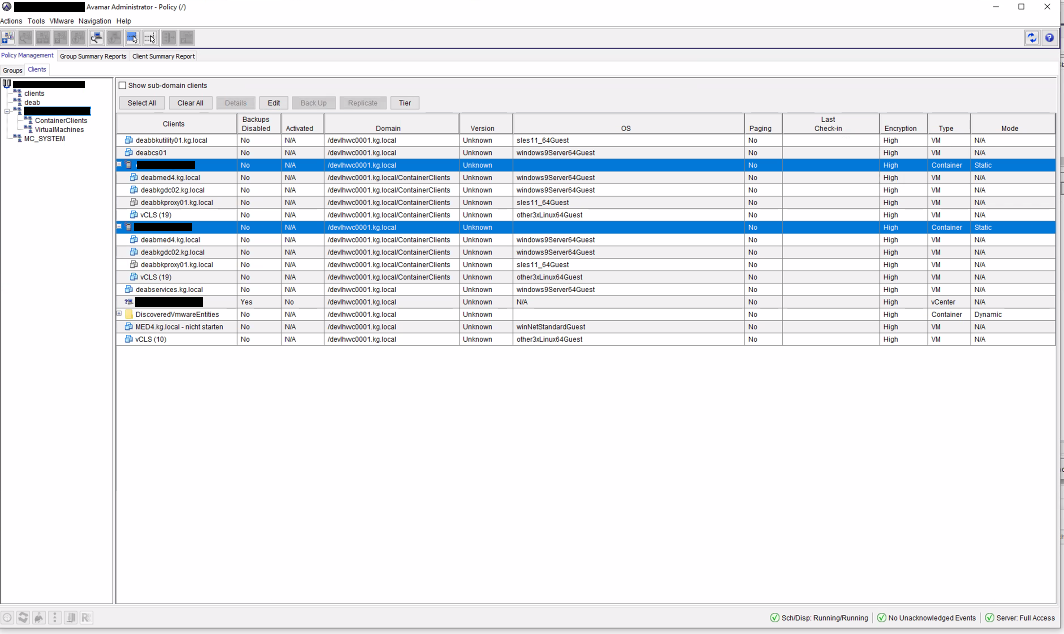
Avamar에 동적 컨테이너 집합이 있으므로 vCenter에서 생성된 모든 새 클라이언트가 그 아래에 추가되므로 오류가 발생하는 VM으로 추가됩니다 "Proxy client already exists as a client for image backup"
프록시가 VM 이미지 백업 클라이언트로 추가된 ESXi로 추가된 컨테이너의 예:
a { text-decoration: none; color: #464feb; } tr th, tr td { border: 1px solid #e6e6e6; } tr th { background-color: #f5f5f5; }
Resolution
이유 1:
1 때문입니다. Avamar GUI를 열고 Tools를> 클릭하고 Manage Rules
2를 선택합니다. 구성된 규칙을 확인하고 새로 배포된 프록시가 Avamar에 자동으로
추가되지 않는지 확인합니다. 이유 2:
1 Avamar GUI를 열고 Policy 탭을 클릭한 다음> 왼쪽 창에서
Clients(Groups 외)를 선택합니다. 2. 컨테이너(다음 예에서는 ESXi)를 클릭하고 Edit를 클릭한 다음 Dynamic Mode 플래그를 찾습니다.
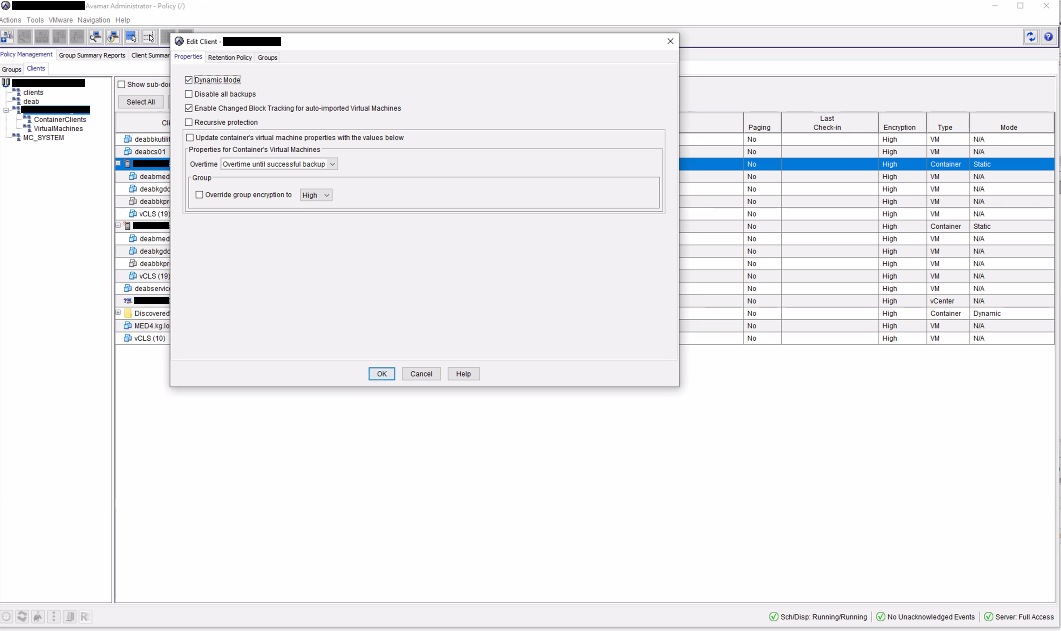
3. 동적 모드를 선택 취소하고 프록시 배포 관리자 작업을 다시 실행하십시오.
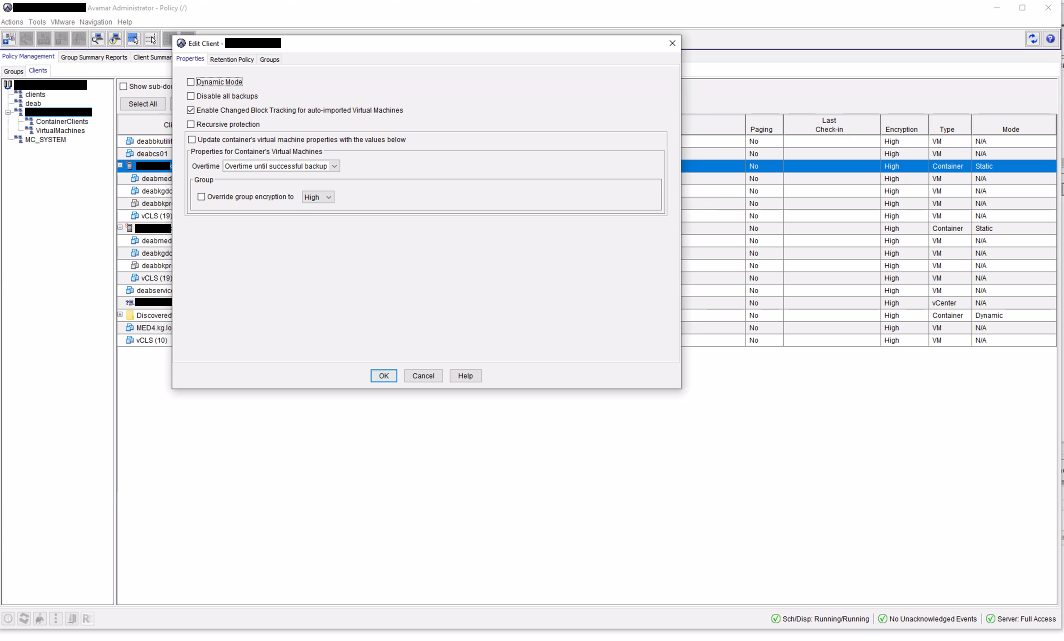
참고: 동적 모드가 필요한 경우 다시 활성화할 수 있으며 배포된 프록시는 컨테이너 클라이언트 아래로 이동하지만 정상적으로 작동하고 새 프록시를 배포할 때 비활성화됩니다.