Come avviare Microsoft Copilot in Windows
Summary: Ecco come avviare Microsoft Copilot in Windows, utilizzando la tastiera, i tasti di scelta rapida o i pulsanti in Windows e Microsoft Edge.
This article applies to
This article does not apply to
This article is not tied to any specific product.
Not all product versions are identified in this article.
Instructions
Sistemi operativi interessati:
- Windows 11
- Windows 10
- Microsoft Copilot in Windows non è disponibile nella Repubblica popolare Cinese (PRC)
- Recall è una funzione basata su NPU disponibile solo su PC Microsoft Copilot+
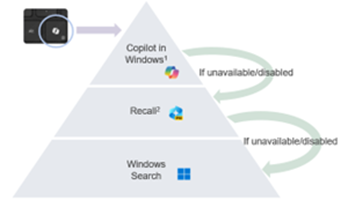
- Se disponibile, Microsoft Copilot in Windows e Recall possono anche essere disabilitati dagli utenti, determinando comportamenti diversi del tasto Microsoft Copilot
- La gerarchia si applica a tutti i computer con Windows 11
- Abilitazione del tasto Microsoft Copilot su PC non Copilot+ con Windows 10 con Windows Update - Da annunciare (TBA)
Microsoft Copilot in Windows può essere avviato in diversi modi.
| Per avviare Microsoft Copilot | Scelta rapida da tastiera, icona o tasto |
|---|---|
| Tasto Windows + C |  |
| Barra delle applicazioni di Windows |  |
| Microsoft Edge |  |
| Tasto Microsoft Copilot |  |
Nota: A partire dalla primavera del 2024, i nuovi dispositivi Windows 11 verranno forniti con un nuovo layout della tastiera e un tasto dedicato per avviare Microsoft Copilot in Windows. Il tasto sostituisce il tasto Menu accanto al tasto Alt destro. La posizione del tasto può variare in base ad alcuni layout regionali.
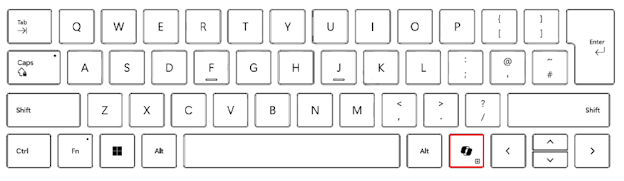
Comportamento noto
Sui PC Microsoft Copilot+, premendo il tasto Microsoft Copilot:
- Avviare Microsoft Copilot in Windows.
- Se Microsoft Copilot non è disponibile o è disabilitato, il tasto avvia Recall.
- Se l'opzione Recall non è disponibile o è disabilitata, il tasto avvia la ricerca di Windows
Tenere premuto il tasto Microsoft Copilot per avviare una dettatura vocale:
ciò consente all'utente di porre domande o ripetere i comandi vocali a Microsoft Copilot in Windows. Questa funzione verrà attivata in futuro.
Additional Information
Articolo correlato:

Article Properties
Article Number: 000221081
Article Type: How To
Last Modified: 19 May 2026
Version: 9
Find answers to your questions from other Dell users
Support Services
Check if your device is covered by Support Services.