PowerFlex:SVM NIC 可能會在 SVM 轉換期間被錯誤地指派
Summary: 在 SVM 轉換過程中,SVM 網路介面卡的分配可能不正確。
This article applies to
This article does not apply to
This article is not tied to any specific product.
Not all product versions are identified in this article.
Symptoms
使用者無法在 SVM 轉換期間升級或轉換主要 MDM(最後一個 MDM),因為子網無法通信。
案例
NIC 在 SVM 轉換後出現錯誤排序: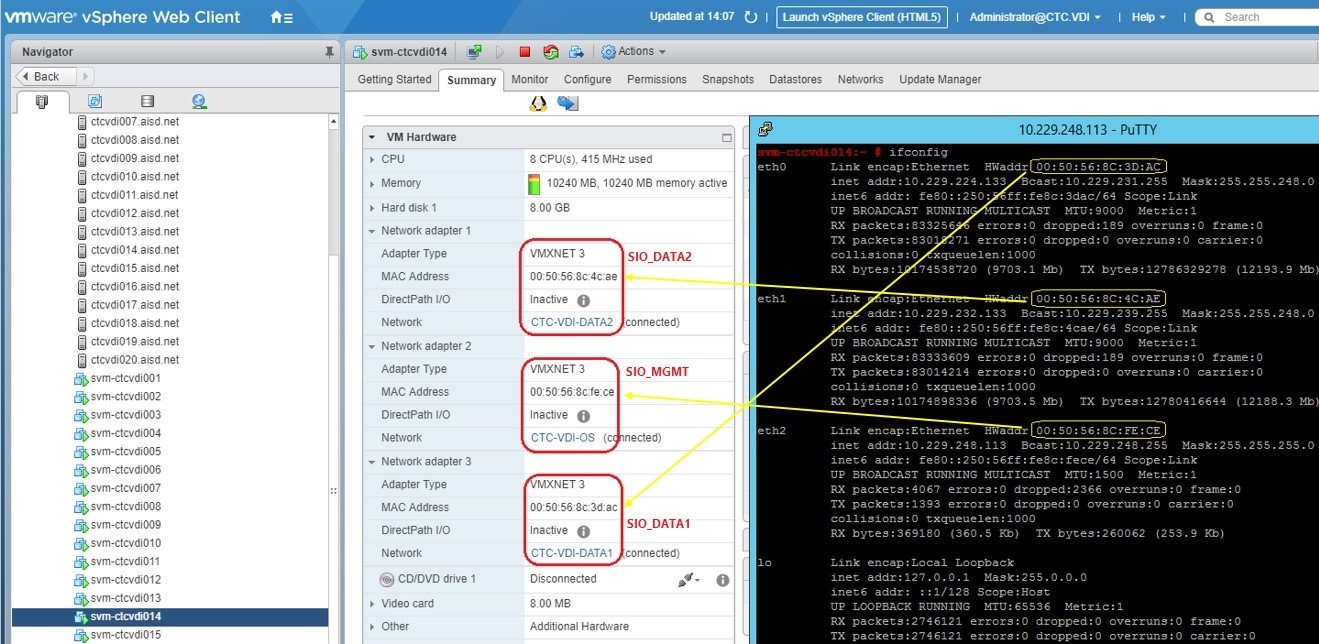
有兩種可能的情況:
案例 #1 - 主要資料 NIC 在不同子網路上交換 NIC (不可路由):
在檢視 query_cluster 我們可以看到主要 MDM 的 IP 位址順序與次要 MDM 的順序相反:
Primary MDM:
    Name: Secondary_MDM2, ID: 0x6a3e3168772f4322
        IP Addresses: 10.128.8.62, 10.128.0.62, Management IP Addresses: 10.63.193.162, Port: 9011, Virtual IP interfaces: eth1, eth2
Secondary MDMs:
    Name: Secondary_MDM1, ID: 0x3faea7c32806b951
        IP Addresses: 10.128.0.61, 10.128.8.61, Management IP Addresses: 10.63.193.161, Port: 9011, Virtual IP interfaces: eth1, eth2
    Name: Primary_MDM, ID: 0x02d885dd7c5fc180
        IP Addresses: 10.128.0.60, 10.128.8.60, Management IP Addresses: 10.63.193.160, Port: 9011, Virtual IP interfaces: eth1, eth2
主要 MDM 介面輸出 (可能因作業系統 (OS) 而異) 顯示 eth1 位於 10.128.0.x 子網路上,而 eth2 位於 10.128.8.x 子網路上,順序與次要節點的順序相同:
eth0: flags=4163<UP,BROADCAST,RUNNING,MULTICAST>  mtu 1500
        inet 10.63.193.162  netmask 255.255.255.128  broadcast 10.63.193.255
eth1: flags=4163<UP,BROADCAST,RUNNING,MULTICAST>  mtu 9000
        inet 10.128.0.62  netmask 255.255.248.0  broadcast 10.128.7.255
eth2: flags=4163<UP,BROADCAST,RUNNING,MULTICAST>  mtu 9000
        inet 10.128.8.62  netmask 255.255.248.0  broadcast 10.128.15.255
案例 #2 - 主要 MGMT 和 DATA IP 交換了 NIC:
主要 MDM 介面輸出 (可能因作業系統而異) 顯示 eth0 持有 MGMTIP,eth[1|2] 持有 DATA1 和 DATA2 IP:
eth0      Link encap:Ethernet  HWaddr 00:50:56:91:97:CD
          inet addr:10.202.5.13  Bcast:10.202.5.255  Mask:255.255.255.0
eth1      Link encap:Ethernet  HWaddr 00:50:56:91:3A:FB
          inet addr:192.168.152.28  Bcast:192.168.159.255  Mask:255.255.248.0
eth2      Link encap:Ethernet  HWaddr 00:50:56:91:4E:57
          inet addr:192.168.160.28  Bcast:192.168.167.255  Mask:255.255.248.0
次要 MDM 介面輸出 (可能因作業系統而異) 顯示 eth0 持有 DATA1 IP,eth[1|2] 持有 DATA2 和 MGMT IP:
eth0: flags=4163<UP,BROADCAST,RUNNING,MULTICAST>  mtu 9000
        inet 192.168.152.27  netmask 255.255.248.0  broadcast 192.168.159.255
eth1: flags=4163<UP,BROADCAST,RUNNING,MULTICAST>  mtu 9000
        inet 192.168.160.27  netmask 255.255.248.0  broadcast 192.168.167.255
eth2: flags=4163<UP,BROADCAST,RUNNING,MULTICAST>  mtu 1500
        inet 10.202.5.12  netmask 255.255.255.0  broadcast 10.202.5.255
在檢視 query_cluster 輸出結果中,每個節點都希望將 eth1 和 eth2 用於 VIP:
Master MDM:
    Name: agent-svm-de1801vmwesx002, ID: 0x52cd360827eb8e63
        IPs: 192.168.152.28, 192.168.160.28, Management IPs: 10.202.5.13, Port: 9011, Virtual IP interfaces: eth1, eth2
        Version: 2.6.11000
Slave MDMs:
    Name: agent-svm-de1801vmwesx001, ID: 0x361d56fd178799e0
        IPs: 192.168.160.27, 192.168.152.27, Management IPs: 10.202.5.12, Port: 9011, Virtual IP interfaces: eth1, eth2
        Status: Normal, Version: 2.6.11000
影響
由於子網路無法通訊,因此如果發生錯誤或容錯移轉,可能會導致 DU。
Cause
如果在運行升級/轉換過程之前修改了範本,則可能會出現此問題。
Resolution
確定正確的對齊方式,並更改 NIC 以使其匹配。PowerFlex 通常預設為:
ETH0=sio_mgmt
ETH1=sio_data1
ETH2=sio_datat2
eth[0|1|2] 變更的步驟:
- 將叢集置於單一模式 (我們必須移除,然後以正確的 IP 順序重新新增)
- 編輯次要 MDM 上的 /etc/sysconfig/network-scripts/ifcfg-eth* 指令檔,以符合目前的主要 MDM 順序 (eth0 上的 MGMT、eth1 上的 DATA1、eth2 上的 DATA2)
- 將目前次要 MDM 上的 SDS 進入維護模式 (MM),因為我們要透過重新開機變更 IP
- 將放置在 MM 中的 SVM 重新開機
- 重新連線至此節點時,請確認 IP 的順序與步驟 #2 中提到的目前主要 MDM 相同
- 請確定 SDS 已重新連線,然後結束 MM
- 移除我們剛從 MDM 叢集重新開機的次要 MDM
- 重新新增為待機 MDM,確保「new_mdm_ip」中的 IP 順序與目前主要 (DATA1、DATA2) 相符
- 變更回 3 節點/5 節點模式
- 確認叢集狀況良好且同步
- 切換 MDM 擁有權
- 切換 MDM 擁有權成功後,請繼續處理剩餘最後一個節點以進行 SVM 升級/轉換
受影響的版本
VxFlex 作業系統 3.0.x
已修正問題的版本
VxFlex 作業系統 3.0.1.5
PowerFlex 3.5.1.3
PowerFlex 3.6.0.327
PowerFlex 4.0.0.1003
Affected Products
PowerFlex rack, PowerFlex Appliance, PowerFlex custom node, PowerFlex SoftwareArticle Properties
Article Number: 000225313
Article Type: Solution
Last Modified: 30 Dec 2025
Version: 3
Find answers to your questions from other Dell users
Support Services
Check if your device is covered by Support Services.