NetWorker: NMC fails to launch "Selection of proxy failed. Please check your proxy configuration in the settings."
Summary: NetWorker Runtime Environment (NRE) 17.x is used to launch the NetWorker Management Console (NMC). The NMC fails to launch, reporting the following error "Selection of proxy failed. Please check your proxy configuration in the settings." ...
Symptoms
The NetWorker Management Console (NMC) fails to launch, reporting the following error:
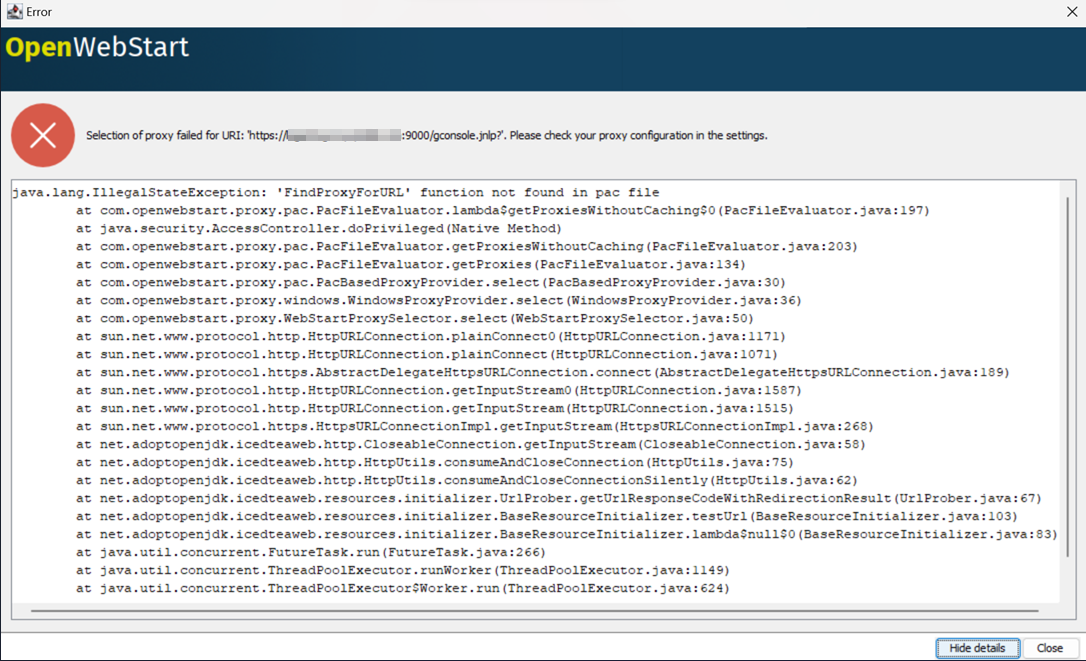
Enabling the NRE debug console shows that the NMC is attempting to use an external proxy during the connection: NRE 17.x: How to clear Java Cache, enable Java Console and Debugging.
[ITW-CORE][YYYY-MM-DD HH:mm:SS ][DEBUG][net.adoptopenjdk.icedteaweb.resources.ResourceTracker] Create resource for 'https://NMC-SERVER-ADDRESS:9000/gconsole.jnlp?'
[ITW-CORE][YYYY-MM-DD HH:mm:SS ][DEBUG][net.adoptopenjdk.icedteaweb.resources.ResourceHandler] Start processing resource: gconsole.jnlp
[ITW-CORE][YYYY-MM-DD HH:mm:SS ][DEBUG][net.adoptopenjdk.icedteaweb.lockingfile.LockableFile] Trying to create lock file C:\Users\USERNAME\.cache\icedtea-web\cache\recently_used.cache.lock
[ITW-CORE][YYYY-MM-DD HH:mm:SS ][DEBUG][net.adoptopenjdk.icedteaweb.lockingfile.LockableFile] Created lock file C:\Users\USERNAME\.cache\icedtea-web\cache\recently_used.cache.lock
[ITW-CORE][YYYY-MM-DD HH:mm:SS ][DEBUG][net.adoptopenjdk.icedteaweb.lockingfile.LockableFile] Deleted lock file C:\Users\USERNAME\.cache\icedtea-web\cache\recently_used.cache.lock
[ITW-CORE][YYYY-MM-DD HH:mm:SS ][INFO ][net.adoptopenjdk.icedteaweb.resources.cache.CacheImpl] isCached: CacheKey{location=https://NMC-SERVER-ADDRESS:9000/gconsole.jnlp?, version=null} = true
[ITW-CORE][YYYY-MM-DD HH:mm:SS ][DEBUG][net.adoptopenjdk.icedteaweb.lockingfile.LockableFile] Trying to create lock file C:\Users\USERNAME\.cache\icedtea-web\cache\recently_used.cache.lock
[ITW-CORE][YYYY-MM-DD HH:mm:SS ][DEBUG][net.adoptopenjdk.icedteaweb.lockingfile.LockableFile] Created lock file C:\Users\USERNAME\.cache\icedtea-web\cache\recently_used.cache.lock
[ITW-CORE][YYYY-MM-DD HH:mm:SS ][DEBUG][net.adoptopenjdk.icedteaweb.lockingfile.LockableFile] Deleted lock file C:\Users\USERNAME\.cache\icedtea-web\cache\recently_used.cache.lock
[ITW-CORE][YYYY-MM-DD HH:mm:SS ][DEBUG][net.adoptopenjdk.icedteaweb.resources.initializer.UnversionedResourceInitializer] needsUpdateCheck: https://NMC-SERVER-ADDRESS:9000/gconsole.jnlp? -> true
[ITW-CORE][YYYY-MM-DD HH:mm:SS ][DEBUG][net.adoptopenjdk.icedteaweb.resources.initializer.UnversionedResourceInitializer] Candidate URLs for [l=https://NMC-SERVER-ADDRESS:9000/gconsole.jnlp? v=null s=I]: [https://NMC-SERVER-ADDRESS:9000/gconsole.jnlp?]
[ITW-CORE][YYYY-MM-DD HH:mm:SS ][DEBUG][com.openwebstart.proxy.pac.PacFileEvaluator] Open PAC url 'http://PAC-SERVER-ADDRESS/common.pac'
[ITW-CORE][YYYY-MM-DD HH:mm:SS ][DEBUG][com.openwebstart.proxy.pac.PacBasedProxyProvider] PAC Proxies found for 'socket://PAC-SERVER-ADDRESS:80' : [DIRECT]
[ITW-CORE][YYYY-MM-DD HH:mm:SS ][DEBUG][net.sourceforge.jnlp.runtime.JNLPRuntime] JNLPRuntime,exit()
[ITW-CORE][YYYY-MM-DD HH:mm:SS ][INFO ][net.sourceforge.jnlp.util.logging.OutputController] Increase polling interval for shutdown phase
Cause
Brief Overview:
There is a proxy configuration interfering with the communication between the NMC client host and the NMC server.
Explanation:
This example shows that the NMC client host uses a Proxy Auto-Configuration (PAC) file. Browsers and apps use this JavaScript file to decide whether to route web requests through a proxy or connect directly. In this example, the connection attempts to use [DIRECT] which is equivalent to [NO PROXY]. This allows the gconsole connection to succeed; however one of the NMCs underlying JAR files is not passed properly.
Different error messaging may be observed depending on what proxies are used in the environment and their specific configurations.
NetWorker expects direct communication between its services and underlying components. In a working example, The NRE Java launcher directly connection from the NMC client to the NMC server:
[ITW-CORE][YYYY-MM-DD HH:mm:SS][DEBUG][net.adoptopenjdk.icedteaweb.resources.initializer.UnversionedResourceInitializer] Candidate URLs for [l=https://nve.networker.lan:9000/gconsole.jnlp? v=null s=I]: [https://nve.networker.lan:9000/gconsole.jnlp?]
[ITW-CORE][YYYY-MM-DD HH:mm:SS][DEBUG][com.openwebstart.proxy.direct.DirectProxyProvider] Using NO_PROXY for https://nve.networker.lan:9000/gconsole.jnlp?
[ITW-CORE][YYYY-MM-DD HH:mm:SS][DEBUG][com.openwebstart.proxy.direct.DirectProxyProvider] Using NO_PROXY for socket://nve.networker.lan:9000
[ITW-CORE][YYYY-MM-DD HH:mm:SS][DEBUG][net.adoptopenjdk.icedteaweb.resources.initializer.UrlProber] URL connection 'https://nve.networker.lan:9000/gconsole.jnlp?' header fields: {Keep-Alive=[timeout=5, max=100], null=[HTTP/1.1 200 OK], -X-Frame-Options=[SAMEORIGIN], Server=[Apache], Connection=[Keep-Alive], Last-Modified=[Wed, 11 Jun 2025 13:05:16 GMT], Pragma=[no-cache], Date=[Tue, 15 Jul 2025 16:40:30 GMT], Strict-Transport-Security=[max-age=31536000;includeSubDomains;preload], X-Content-type-Options=[nosniff], Cache-Control=[no-cache, must-revalidate], Content-Security-Policy=[frame-src 'self';], Expires=[-1], X-XSS-Protection=[1; mode=block], Content-Type=[application/x-java-jnlp-file; charset=iso-8859-1]}
...
[ITW-CORE][YYYY-MM-DD HH:mm:SS][DEBUG][net.sourceforge.jnlp.Launcher] Launching Application
Resolution
NetWorker has never been qualified for support using HTTP or HTTPS proxy configurations. These configurations are considered unsupported by NetWorker.
If the NMC launcher is reporting "Selection of proxy failed," perform the following:
- On the NMC client, open File Explorer and go to the OpenWebStart folder (NRE 17.x). The default location is C:\Program Files\OpenWebStart.
- From the OpenWebStart folder, launch itw-settings.exe.
- From the OpenWebStart console, click Proxy Settings.
- Select No Proxy.
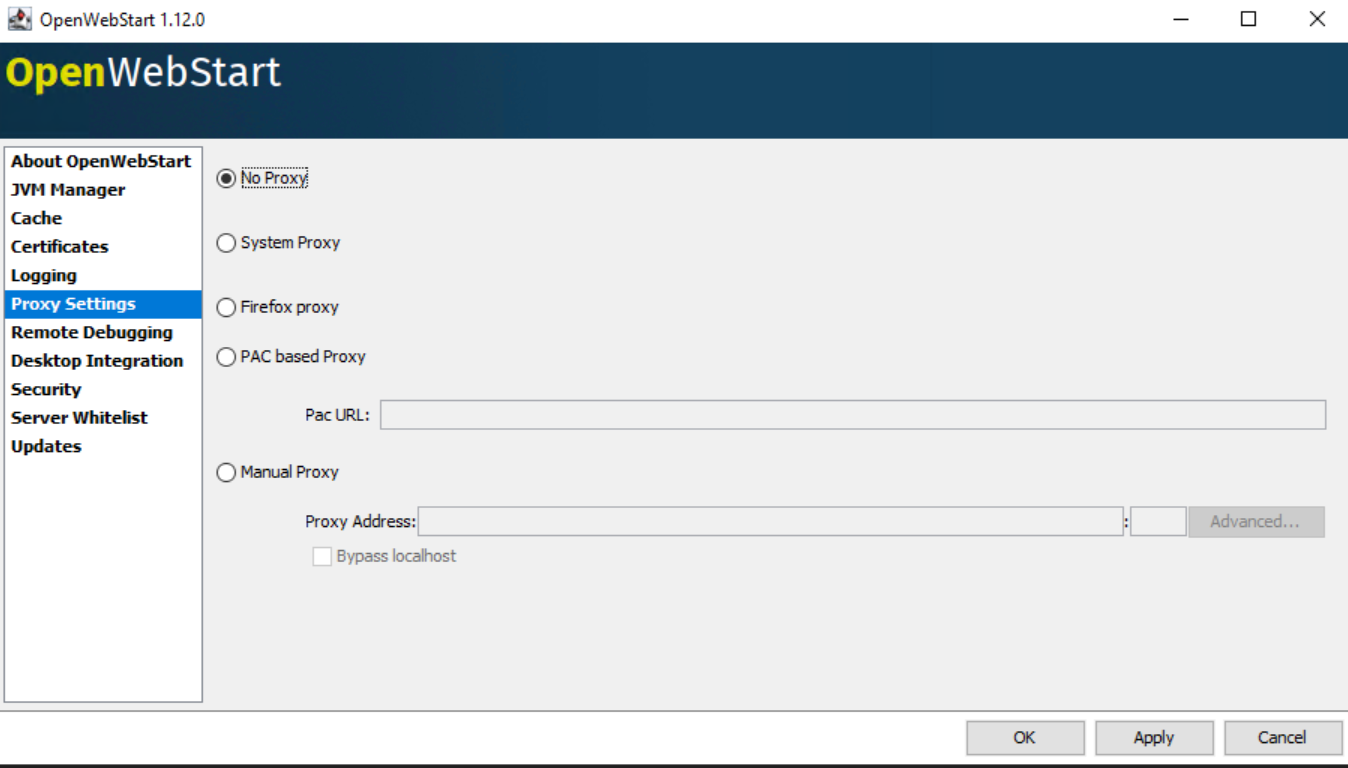
- Click Apply, then click OK.
- Launch the NMC by accessing the NMC URL from a web browser (https://NMC-SERVER-ADDRESS:9000) or using a previously downloaded gconsole.jnlp.
Additional Information
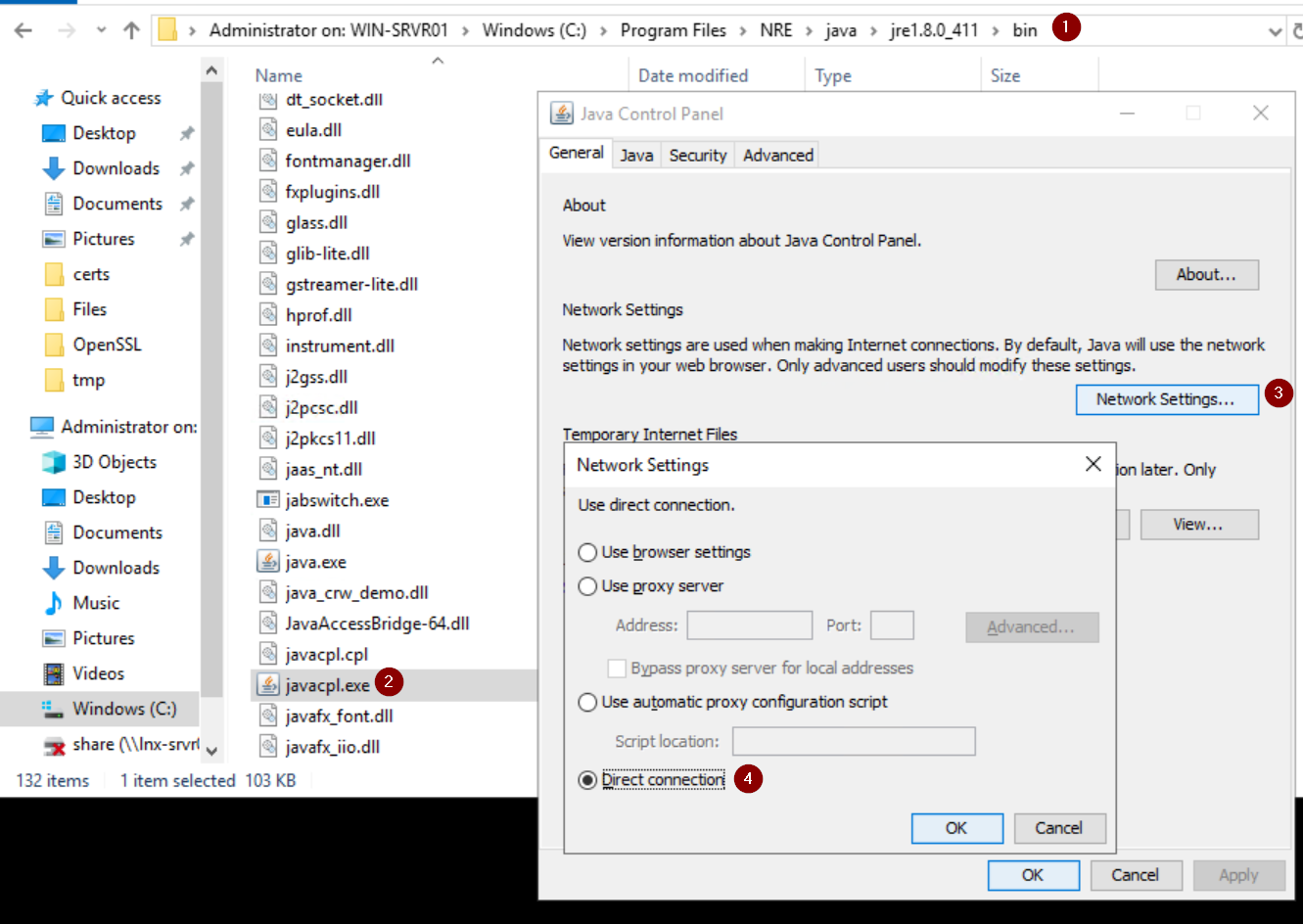
This error was observed on NRE 17.x; however, the same issue may appear on older NRE versions (8.0.x).
For NRE 8.0.x go to the NRE launchers Java Control Panel and set the Network settings to "Direct"