伺服器適用的 Dell Encryption Enterprise 啟動失敗
Summary: 嘗試啟動 Dell Data Protection 時 |Server Edition 在輸入網域系統管理員認證後立即失敗。
This article applies to
This article does not apply to
This article is not tied to any specific product.
Not all product versions are identified in this article.
Symptoms
受影響的產品:
- 適用于伺服器的 Dell Encryption Enterprise
- Dell Data Protection | Server Edition
受影響的版本:
- v8.9.0 及更新版本
在啟用期間,使用者會收到:[USERNAME] 的啟用失敗。使用者名稱或密碼不正確。
![[USERNAME] 的啟用失敗。使用者名稱或密碼不正確](https://supportkb.dell.com/img/ka06P000000PsZ3QAK/ka06P000000PsZ3QAK_zh_TW_2.jpeg)
圖 1:(僅限英文)[USERNAME] 的啟用失敗。使用者名稱或密碼不正確
在記錄中,輸出顯示:
[07.18.16 12:03:04:249 User: 1807 H] Event Engine ‐ Shield for Server OS Activations are enabled on the server [07.18.16 12:03:04:265 User: 1882 E] Event Engine ‐ Failed to login supplied user for manual authentication [win error = 1326] [07.18.16 12:03:04:265 WCFRequestProce: 817 H] Event Engine ‐ Manual Activation result = 1326, The user name or password is incorrect.
Cause
不適用
Resolution
此錯誤可能是由於:
- 權利不足
- Dell Encryption Enterprise for Server 需要網域系統管理員許可權才能啟用。
- 不正確的認證
- 用於驗證的網域帳戶可能已變更密碼,且可能需要在管理網域中提交的正確密碼。
- 關聯的網域不正確
- 網域系統管理員必須是設定期間所設定的相同父系網域和子網域的一部分。
- 安裝後,網域可在以下網域進行修改或驗證:
警告:下一個步驟是 Windows 登錄編輯:
- 請先備份登錄檔再繼續,並參考 如何在 Windows
中備份及還原登錄檔。
- 編輯登錄可能會導致電腦在下次重新開機時沒有回應。
- 如果您對執行此步驟有任何疑慮,請聯絡 Dell Data Security 國際支援電話號碼以取得協助。
HKEY_LOCAL_MACHINE\SOFTWARE\Microsoft\Windows NT\CurrentVersion\Winlogon\CMGShield
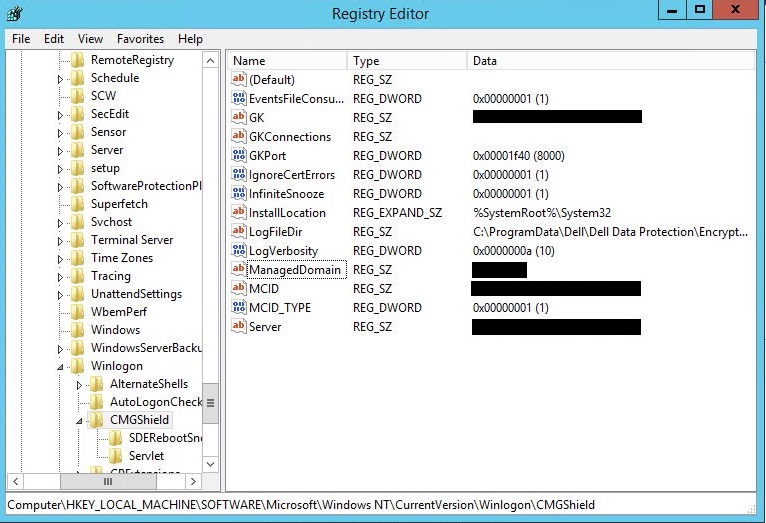
圖 2:(僅限英文)登錄編輯器
注意:登錄修改後,必須重新開機。
如要聯絡支援部門,請參閱 Dell Data Security 國際支援電話號碼。
請前往 TechDirect,以線上產生技術支援要求。
如需更多深入見解與資源,請加入 Dell 安全性社群論壇。
Affected Products
Dell EncryptionArticle Properties
Article Number: 000125054
Article Type: Solution
Last Modified: 03 Aug 2023
Version: 8
Find answers to your questions from other Dell users
Support Services
Check if your device is covered by Support Services.