VIPR SRM| EMC M&R -- Cannot add or delete devices because of error "Can't find the package of the installed modules"
This article applies to
This article does not apply to
This article is not tied to any specific product.
Not all product versions are identified in this article.
Symptoms
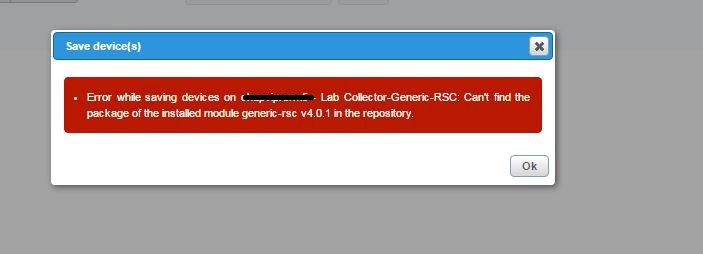
Whenever you try to do following you get the following "Can't Find the package of the installed module x.x.x.x in the repository"
- Add a device from Device Discovery
- Remove a device from Device Discovery
- Install Solutionpack
- Remove Solutionpack Component
- Modify component
example
Cause
This is caused by multiple issue
1. The Packages are missing from Module-Repository
2. The Modules are not installed
1. The Packages are missing from Module-Repository
2. The Modules are not installed
Resolution
You will need to add the packages back into module repository this can completed one of two ways
- Copy over the contents from another host where the module repository is still intact
- Download and upload the Vipr SRM Binary installer (for same level) , and execute it. The binary installer, will notice that code level is current and will only redeploy of the packages in the module repository
Once the Module repository is filled with package, we will need to reinstall all the meta packages via CLI with manage-module tool
- Copy over the contents from another host where the module repository is still intact
- Download and upload the Vipr SRM Binary installer (for same level) , and execute it. The binary installer, will notice that code level is current and will only redeploy of the packages in the module repository
Once the Module repository is filled with package, we will need to reinstall all the meta packages via CLI with manage-module tool
Affected Products
SRMProducts
Storage Monitoring and Reporting, SRMArticle Properties
Article Number: 000061510
Article Type: Solution
Last Modified: 25 Sept 2024
Version: 3
Find answers to your questions from other Dell users
Support Services
Check if your device is covered by Support Services.